Zentrix Gateway Admin Console Guide
Configure organization, models, and tools, verify permissions and traffic rules, and find where to handle runtime problems.
2026.10 · Applies to the Web Admin Console. Visible menus are decided by management scope, role, and licensed modules. Full steps for each action are in the Zentrix Gateway User Manual.
1. Enter the console and which menus you see
From the account menu at the top right of Capability Center, choose Admin Console. The top of the sidebar shows Admin Console and the current tenant name. Back to Workspace returns to Capability Center Home. The top of the content area shows the current location as Group › menu.
Menus are decided by three conditions together. When you cannot see a menu, check in this order:
-
Management scope: Tenant admins use this tenant's Admin Console. Platform administrators (the root created at install, or a platform account granted Platform administrator in Platform accounts) use the platform-scope Admin Console, which opens Tenants by default. The two consoles show different menus. See section 2.
-
Role: The tenant owner has every permission by default. Other duties are assigned through the six built-in roles in Role Management.
Role Duty Sidebar menus Tenant admin All configuration for this tenant Every tenant menu, including Session diagnosis and Role Management, which only tenant admins see Config Admin Configuration and assembly, not credentials or audit Overview, the Setup group, Members & Departments, Functional Groups, Gateway extensions, Report export, and the System Settings group (Global settings shows the General, Branding & appearance, and License tabs) Security Admin Credentials and security policy SSO configuration, Guardrails, Traffic rules; Global settings shows only the Account & session security tab Auditor Audit logs and data retention Operation Audit; Global settings shows only the Data retention tab Operator On-call operations and alert handling Alert Rules Finance, Read-only auditor Read-only cost, or read-only request and conversation detail No sidebar menu. An administrator provides the Overview page URL to open it directly Config Admin, Security Admin, and Auditor are pairwise exclusive. One account can hold only one of them. Operator, Finance, and Read-only auditor can stack with any role. A role can be granted only to a single user.
-
Licensed modules: When the license does not include an add-on module, the matching menu is hidden and the related APIs deny access.
Licensed module Matching UI Base features Every menu other than the add-on modules below Model guardrails Guardrails: sensitive data, lexicon, Q&A, internal systems allowlist, threat intelligence Dynamic routing Traffic rules: rule list, Global limits, Intent set, cache, and Validate rule Full-chain audit Operation Audit FinOps Usage, cost, and latency panels on Overview; shown as Usage and cost on Global settings → License
Knowledge Bases also requires the license to include knowledge-base capability and the deployment to have installed it. Roles and menus, and which roles see each Overview tab, are in section 3.4 and Appendix A of the Zentrix Gateway User Manual.
2. Current navigation cheat sheet
Tenant Admin Console
| Group | Menu | Tabs or main use | Manual chapter |
|---|---|---|---|
| Overview | Overview | Overview, Requests, Sessions, Rule hits, Alerts | Chapters 17–20, chapter 22 |
| Overview | Session diagnosis | Automatically identifies problems in a session and gives cause, evidence, and handling advice | Chapter 20 |
| Setup | Plugins, Skills, External agent, External Registries | Import and distribute skills and plugin packages; connect external agents (Agent directory, Task center); sync from Nacos | Chapter 12 |
| Setup | MCP Services, API services | MCP List, Token management, Categories; API service list, Token management, Categories | Chapter 11 |
| Setup | Knowledge Bases | Maintain knowledge sources and retrieval assets | — |
| Models | Model Providers | Model Providers, Models & pricing | Chapters 4 and 5 |
| Models | Models | Models, Categories: callable models and their upstreams, Try run; model categories | Chapters 5 and 6 |
| Organization & Access | SSO configuration, Members & Departments, Role Management, Functional Groups | Identity source, departments and members, roles, cross-department member sets | Chapter 3 |
| Organization & Access | Model Groups | Model Groups, API key management: who can use which models, and how much quota | Chapters 6 and 7 |
| Guardrails | Guardrails | Sensitive data, Lexicon, Q&A, Internal systems allowlist, Threat intelligence | Chapters 13 and 14 |
| Traffic | Traffic rules | Rule list, Global limits, Intent set, plus the Validate rule page | Chapter 15 |
| Traffic | Gateway extensions | Browse, upload, install, and bind WASM gateway extensions | Chapter 16 |
| Operations & Troubleshooting | Alert Rules, SMTP configuration | Alert Rules, Silences, Templates, Notification channels; system mail | Chapter 22 |
| Audit & compliance | Operation Audit, Report export | Configuration-change and access records, audit evidence; export of call and usage data | Chapters 21 and 22 |
| System Settings | Notification Banner, Global settings | This tenant's announcements; Global settings by tab: General (default models for each function and USD exchange rate), Branding & appearance (product display name, logo, site icon, theme color), Account & session security (login sessions and Security policy), Data retention (content retention and retention period), License | Sections 5.10, 5.7, 24.8, 3.7, 19.5, 24.7 |
Platform-scope Admin Console
| Group | Menu | Main use |
|---|---|---|
| — | Platform home | Items to handle, tenant count, runtime summary, and version |
| Tenants | Tenants, Platform announcements | Tenant lifecycle; announcements that apply to every tenant |
| — | Runtime monitoring | Overview, Profiling, Alerts, Probes, Egress connectivity, Diagnostics tabs; the Alerts tab splits into Active alerts, Rules, Silences |
| — | Gateway | Ingress & certificate, Nodes, Runtime parameters, Egress & proxies, Performance tests tabs: public access URL and ingress certificate, gateway nodes, overload protection, egress proxies |
| — | Extensions | Install or uninstall extensions for this platform. Each tenant uses them per authorization |
| Platform Accounts & Sign-in | Platform accounts, Sign-in methods, Sign-in sessions | Personal accounts of platform operators; platform single sign-on (OpenID Connect) and admin-plane access CIDRs; login sessions and Security policy |
| — | Notification channels, Integrations and exports | Platform channels and their receive level (all alerts, general alerts only, critical alerts only, emergency notices); send platform errors, metrics, traces, and logs to external systems |
| — | Maintenance | System Updates, Backup & Restore, Deployment configuration (including resource capacity and ingress listen) Version catalog tabs |
Entries for common tasks
| What you want to do | Entry |
|---|---|
| View tenant-wide usage and cost | Overview → Overview (needs FinOps) |
| Look up one call's result, routing, and upstream attempts | Overview → Requests, open the request details |
| View rule hits | Overview → Rule hits; limit and guardrail hits are in Match records on the request details |
| View alert records | Operations overview → Alerts |
| Simulate rule evaluation for one request | Validate rule at the top right of Traffic rules → Rule list |
| Set request count, concurrency, and circuit breaker | Traffic rules → Global limits |
| Search, rotate, or disable API keys | Model Groups → API key management |
| Set key-rotation grace period and token validity | System Settings → Global settings → Account & session security → Security policy |
| Choose default models for content safety, sensitive-data recognition, intent recognition, and similar functions | System Settings → Global settings → General |
3. Set up organization and permissions
- In Members & Departments, create departments and add members. Members with Admin permission turned on in Add member become tenant admins. Grant this only to people who truly need to manage the whole tenant.
- In Functional Groups, create cross-department member sets used to distribute model groups and other capabilities.
- In Role Management, assign different people to Config Admin, Security Admin, Auditor, and other roles. Sign in with each role account and check the sidebar.
- When enterprise-identity sign-in or directory sync is needed, Add identity source in SSO configuration: DingTalk, Feishu, WeCom, enterprise IAM (OAuth2), LDAP, or directory push. Enable only after test sign-in or connection self-check succeeds.
- On System Settings → Global settings → Account & session security, choose Security policy and set session timeout, online-user count, sign-in methods, required two-factor authentication, password policy, and token validity for external access.
Departments and functional groups decide which capabilities a member can use. Roles decide which admin menus a member can enter. When a member leaves, choose Delete. The account moves to Former members, and its API keys and login credentials fail immediately. See chapter 3 of the Zentrix Gateway User Manual.
4. Onboard models and open them through model groups
- In Model Providers, choose Add model provider, pick a provider type, check Request URL and Model request format, fill in the API key or subscription account, choose Verify and fetch available models, enable the models you need, then save. When checking available models, connectivity-test results stay on the page: in a multi-node gateway deployment, the test probes each node and shows that node's connectivity, latency, and failure layer. The model list marks whether items come from Live from the provider API or Preset catalog fallback. If some nodes are temporarily unreachable but you still need to save a draft, tick Save anyway. In Probe history on the provider details page, filter historical probe results by gateway node to investigate that node's network, proxy, or certificate.
- In Models & pricing, set a sell price for models that need billing. You can use a single price, a ladder, time-of-day pricing, or catalog price. Unpriced models can still be called, but they do not count toward amount and are rejected by amount budgets.
- In Models, confirm that models you will open already have an enabled upstream. On the Try run tab of model details, make a real call and confirm success. On failure, follow the failure location and reason on the page.
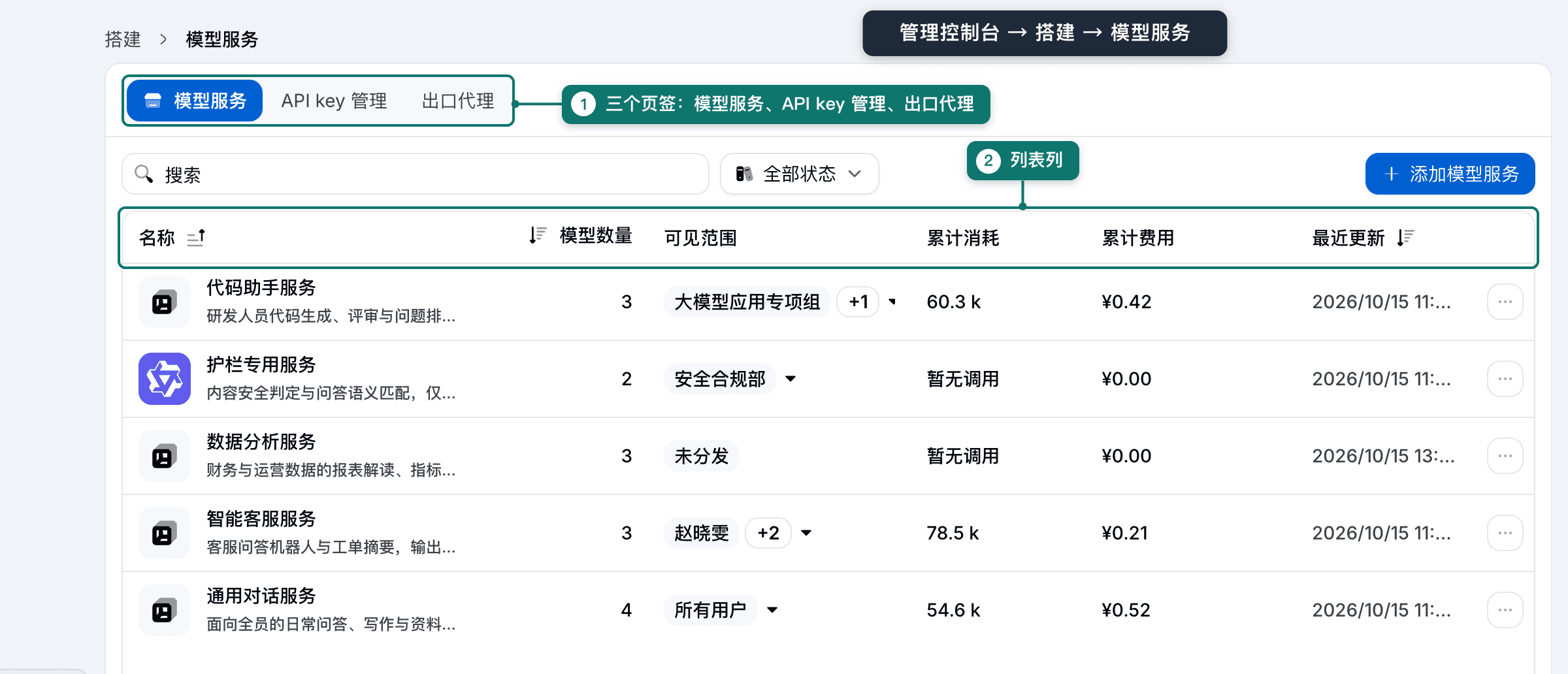
- In Organization & Access → Model Groups, create a model group and add the models to open. A new group's Visibility shows “Not distributed”.
- On Visibility & quotas in the group details, choose Edit available scope. Authorize a pilot department, functional group, or member first, and set a validity period. Then Edit quota per object for token budget and amount budget (hour, day, month, cumulative).
- In System Settings → Global settings, choose default models for content safety, sensitive-data recognition, intent recognition, and Q&A semantic match. The chosen models must have declared the matching capability purpose.
Quota limits only the current model group. Per-request token cap, concurrency, and requests per minute are controlled by traffic rules and Global limits. Model calls are distributed by default across every upstream of that model. To pin an upstream, change the allocation method, or configure failover, configure Traffic rules. See chapters 4–7 of the Zentrix Gateway User Manual.
5. API keys and call identity
Members create API keys in Capability Center. Each key is bound to one model group. Administrators do not create keys in the Admin Console. In Model Groups → API key management, administrators can:
- Search every key by name or prefix, status, model group, and caller;
- Rotate key: the new key is shown once. The old key stays usable during the grace period set in Security policy (default 24 hours);
- Disable or Delete: calls are rejected immediately. After disable, it cannot be re-enabled here. Use these two when a leak is found, not rotate;
- Edit quota: set an independent quota pool for a single key.
Business systems can also call models with an enterprise-identity token directly: in an enterprise IAM (OAuth2) identity source under SSO configuration, turn on Allow business systems to call models and MCP services with identity-provider tokens. Call identity comes only from platform authentication. An identity declared in an ordinary request header is not authorization. See section 6.7 and chapter 9 of the Zentrix Gateway User Manual.
6. Onboard MCP, API services, and external capabilities
| Object | Key steps | Manual chapter |
|---|---|---|
| MCP Services | Add app → choose a connection method (remote MCP URL, MCP JSON, OpenAPI, Postman Collection, cURL, or manual) → parse and check tools → configure MCP authentication → turn on Publish → Edit available scope. Tool-level access control, parameter-match rules, and request-body size limits are configured in Traffic → Traffic rules. View applicable traffic rules in Basic information on the MCP details page opens the rule list pre-filtered to this service | Sections 11.1–11.7 |
| API services | Add service, fill the upstream endpoint → configure authentication → publish and set available scope. Members generate an access token in Capability Center | Section 11.10 |
| External agent | Connect A2A agent → connectivity test → after registration, Approve in Agent directory → configure upstream credentials → publish and set available scope. Publish as MCP tool when needed | Sections 12.1–12.4 |
| Skills | Add Skill → fill the source and Resolve source → tick skills and Analyze selected → check risk level and admission result → Import → publish and set available scope. On update, Reimport from source on the skill details | Section 12.7 |
| Plugins | Import a plugin package or Export as plugin. Plugin packages do not contain credentials | Section 12.6 |
| External Registries | Add source to connect Nacos → Test connection → Sync now. Synced entries still need to be distributed separately | Section 12.7 |
Publish only makes the service appear in the Capability Center catalog. It does not grant use permission. Whether a member can use it is decided by available scope and its validity period. After a service is connected, tool discovery and connection tests run on every online gateway node, and per-node test results and failure reasons are shown on the current page.
7. Guardrails and content checks
Guardrails are configured in two places:
- In Guardrails, maintain detection sources: Sensitive data (built-in rules and custom regex), Lexicon (built-in denylist, custom denylist, allowlist), Q&A (required-answer bank), and Internal systems allowlist. The Threat intelligence tab connects this tenant's malware feeds (public sources or custom HTTP batch sources, at most 8 per tenant) and maintains the exception list. Needs the Model guardrails license.
- In Traffic rules, create or edit a rule, choose + Add an action → Content check, pick a detection method (PII sensitive data, lexicon, required answers, risk category, tool-call guard), set the on-hit handling and Guardrail check failed handling for When a component is unavailable. Image-and-text joint detection and multi-turn stitching-induction protection are configured in YAML edit of the same action (
action.guard.image,action.guard.multiTurn). Tool-call guard is one detection method of Content check (the standalone guardrail tab on MCP service details has been merged into traffic rules). To check whether an outbound address hits a malware feed, choose + Add an action → Malicious sources, tick Check whether outbound addresses hit a malware feed, and set the action to Block or Record only. If it is not turned on, nothing is checked. Needs the Dynamic routing license.
The Guardrails page only defines what can be recognized. Without a traffic rule that references it, it does not apply to calls. Malware feeds are likewise pushed to the gateway only after a traffic rule turns on malicious-source checking. A domain or IP that was blocked by mistake is allowed in the exception list on the Threat intelligence tab, or choose Add as exception on the rule-hit details. Platform administrators have no threat-intelligence entry. After an upgrade from an earlier version, reconnect malware feeds and turn on checking in traffic rules. Person names, addresses, and organization names need a Sensitive-data recognition model. Risk category and prompt-injection detection need a Content safety model. Required answers need a Q&A semantic match model. All of them are chosen in Global settings. Before go-live, check with Sensitive data test run and Validate rule on traffic rules, then check conclusions on request details with a test call. Notifications when a block happens are configured in Alert Rules. See chapters 13 and 14 of the Zentrix Gateway User Manual.
8. Traffic rules, gateway extensions, and domains
Traffic rules needs the Dynamic routing license. Tenant admins or Security Admins can enter. The Global limits tab also needs tenant-admin permission and is maintained by a tenant admin.
- Prepare request samples that should match and that should not match.
- On Rule list, New rule or Import rule template, and add match conditions and actions on the canvas. A rule that has a forward target or Allow / Deny stops matching. The rest are enrichment rules and continue evaluating later rules.
- Choose Save rule. In Review changes, check field diffs, related objects, and match order, then Confirm and apply.
- Use Validate rule to check the hit chain and final target. Tick Simulate primary failure when you need to see fallback order. Simulation does not call upstream. You must still verify with a real call.
- In Global limits, first choose a call type, then Add limit. Limit type can be Requests, Concurrency limit, Circuit breaker, invalid-attempt protection, or Upstream call timeout. Requests and concurrency also need Count by.
- On the rule details, choose View matched requests, or check actual hits in Overview → Rule hits.
A circuit breaker temporarily rejects requests when failures or slow calls reach a threshold. Failover configures backup tiers on the forward target. The two do not replace each other. WASM plugins installed in Gateway extensions are installed disabled. Configure them, then enable, and check runtime results in Execution stats. For fields, defaults, and value ranges, see the Zentrix Gateway Traffic Rules User Manual and chapters 15 and 16 of the Zentrix Gateway User Manual.
9. Usage, observability, and troubleshooting
| Entry | Problem it answers |
|---|---|
| Overview → Overview | Cost, tokens, success rate, latency, and traffic flow in the selected time and data range. Click a ranking or attribution to drill into gateway requests |
| Overview → Requests | One call's result, failure stage, responsible party, routing conclusion, match records, upstream attempts, and payloads |
| Overview → Sessions | Multi-turn calls, latency, cost, and diagnosis by session |
| Overview → Rule hits | Hit counts, allows, and blocks per routing rule |
| Session diagnosis | Automatically identified problems, causes, evidence, and repair advice, with an automatic recheck on day 7 after handling |
| Operation Audit | Who changed which configuration when. Needs Full-chain audit |
| Runtime monitoring | Platform administrators view status of platform parts on Overview, and public-egress connectivity on Egress connectivity |
Troubleshooting order: fix time and time zone, find the target call in Requests by result, responsible party, or request ID, open details to decide whether the cause is guardrail, rate limit and quota, routing, call identity, or upstream, then go to the matching configuration. After the fix, send the request again from the same caller and check. Call records are for trends and attribution. Settlement follows the provider or enterprise billing system's invoice. See chapters 17–21 of the Zentrix Gateway User Manual.
10. Alerts, export, and audit
- In Alert Rules → Notification channels, New channel (DingTalk, Feishu, Webhook, WeCom, or email), choose Send test message, and after the receiver gets it choose Confirm receipt. Channels that are enabled, verified, and subscribed to the Alert event receive this tenant's alerts, and only those channels can be named by an alert rule. When a rule names channels, it sends only to those channels. Email channels need SMTP configuration first. Test results and failure classification stay on the current configuration card or dialog; they do not flash away. Connectivity tests for LDAP, OIDC, IM channels, image sources, threat-intelligence malware feeds, and gateway egress proxies likewise stay on the page (egress-proxy tests show per-node latency and status through that proxy).
- On the Alert Rules tab, choose a channel and enable built-in alerts (for example A guardrail blocked content). Click New rule, choose a metric (for example Policy block share, Policy execution error, Model-service attempt failure rate), grouping dimension, value method, statistic window, Minimum samples (some ratio metrics), comparison, threshold, and duration. Thresholds for ratio metrics are decimals from 0 to 1. Ratios swing widely on few samples, so fill in Minimum samples; when the window has too few samples, the rule does not judge.
- Alert records are viewed in Operations overview → Alerts. Details can take a Handling note. Known load-test or change windows pause outbound delivery on the Silences tab. Alerts are still recorded. When the condition clears, the alert ends automatically.
- In Report export, New export, choose usage summary or full call records, frequency, and destination (inbox, object storage, or Webhook).
- In Operation Audit, search by operator, action, or resource, export audit evidence as CSV or PDF, and view integrity-check results in Archive and verification.
Call content and call records are kept forever by default. Changes are configured with technical support. Capacity of analytics storage and object storage needs to be planned from call volume. Operation Audit records are kept online for two years. See chapter 22 of the Zentrix Gateway User Manual.
11. Platform maintenance (platform administrator)
| Work | Entry | Points |
|---|---|---|
| Upgrade | Maintenance → System Updates | Upload a .zpkg upgrade package brought on site (the platform does not fetch it online). Start after pre-upgrade checks pass. The check states whether this run is a fast switch or a downtime migration. Complete a backup before starting. After the upgrade, run Run acceptance by hand in Deployment configuration |
| Backup and restore | Maintenance → Backup & Restore | Back up now by hand and Download a copy off-host. Restore applies only to the same version and deployment form. The secret-service key directory /etc/zenova/secret-service/keys is included in host-level backup |
| Runtime status | Runtime monitoring → Overview, Runtime monitoring → Egress connectivity | Status of gateway nodes, control-plane processes, and dependencies; public-egress connectivity |
| Runtime parameters | Gateway → Runtime parameters; Resource Capacity under Maintenance → Deployment configuration | High and low watermarks for processor and memory in overload protection, per-node in-flight call cap, quota-floor validity; control-plane database max connections (the control plane restarts after save) |
| Deployment configuration | Maintenance → Deployment configuration | Access URLs, object storage, operations notification channels, trace export, ingress ports and bind NICs, data dependencies, last acceptance |
| Gateway and ingress | Gateway | Ingress & certificate, Nodes, Runtime parameters, Egress & proxies, Performance tests; public access URL and ingress certificate. On Nodes, open node details and choose View node logs for platform runtime logs |
| Tenants | Tenants → Tenants | Create a tenant. Settlement currency cannot change after creation. Set monthly token cap and storage cap |
Delete tenant, reset a user password, replace or delete a gateway certificate and domain, change runtime parameters that restart after save (overload protection, resource capacity), enable legacy MCP identity, and retire a gateway node all go through the same two-step confirmation dialog (the dialog names the action and the target resource; delete tenant and retire gateway node also require typing the resource name).
When the console is unavailable, run sudo zenova status on the install host to view each service. Before a change, record version and configuration, and define the maintenance window and rollback. After a change, verify sign-in, model calls, permission denials, alerts, and backup status. See chapter 23 and section 24.7 of the Zentrix Gateway User Manual. For deployment forms, see the Zentrix Gateway Deployment and Service Selection Guide.
12. First go-live acceptance
| Object | Happy path | Deny or failure path |
|---|---|---|
| Organization and roles | Each role account sees only the menus in its duty | An unauthorized account does not see the menu, and opening the URL directly is denied |
| Models and model groups | A pilot member gets an API key and calls successfully | Calls outside available scope, with a revoked key, or with exhausted quota are denied |
| MCP and external capabilities | An authorized member gets connection settings and completes a read-only call | An undistributed member cannot issue a token. Restricted tools are blocked |
| Traffic rules | Routing conclusions from Validate rule and from a real call match | Limits, circuit breaker, and counterexamples behave as expected. The rule list has no data-plane rejection hint |
| Guardrails | Normal content passes | Synthetic sensitive content is redacted, recorded, or blocked as configured |
| Observability and audit | Matching records can be found in Requests, Rule hits, and Operation Audit | A failed call can be traced to responsible party and cause |
| Operations | Notification-channel test succeeds, backup is copied off-host | Restore has been rehearsed in an isolated environment |
The acceptance record includes version, environment, request ID, expected and actual results, and unfinished items. Phased go-live steps and checklists are in chapters 25 and 26 of the Zentrix Gateway User Manual.
Appendix D. Capability notes
Full-length chapter. Content is checked against the 2026.10 mainline code and the live console; menus and features depend on the current license, account permissions, and delivered environment.
Zentrix Gateway Traffic Rules User Manual
Configure and verify traffic rules, Global limits, Intent set, semantic cache, circuit breaker, and failover.