Zentrix Gateway Traffic Rules User Manual
Configure and verify traffic rules, Global limits, Intent set, semantic cache, circuit breaker, and failover.
2026.10 · Scope follows the current license, account permissions, and actual deployment.
This handbook is the traffic-rules special edition of chapter 15 of the Zentrix Gateway User Manual. It adds concrete fields, defaults, and value ranges from the current Traffic rules page and APIs. Detection items, templates, and judgment-model configuration for the Content check action in a rule are in chapter 14 of the Zentrix Gateway User Manual.
1. Entry and evaluation order
1.1 Entry, license, and permission
Open Admin Console › Traffic › Traffic rules. The top of the page has three tabs: Rule list, Global limits, and Intent set. At the top right of Rule list are Export, Import rule template, Import from file, and New rule. Validate rule to the right of the search bar below opens a separate validation page. After rules are ticked, that position becomes Enable selected, Disable selected, and Delete selected.
- License: when the license includes either Dynamic routing or Model guardrails, the sidebar shows Traffic rules, and Intent set, judgment-model status, and built-in intent trial become available on the page. When neither module is included, it is hidden.
- Permission: the page requires credential-management permission. Among built-in roles, tenant admin and Security Admin have it. When you cannot see the entry, first check modules on System Settings → Global settings → License, then the account role. APIs of the Global limits tab are additionally checked for tenant-admin permission. An account that holds only Security Admin can enter the page, but load and save of that tab are denied. A tenant admin must maintain it.
- Gateway extensions in the same group maintains plugin bindings referenced by the Attach plugin action. See section 16.3 of the Zentrix Gateway User Manual.
| Tab or page | Object | Main tasks |
|---|---|---|
| Rule list | Routing rules in decision order | Create, import, duplicate, reorder, enable/disable, delete rules |
| Global limits | Traffic-protection configuration maintained independently per call type | Requests, concurrency limit, circuit breaker, invalid-attempt protection, upstream call timeout, caller temporary exemption |
| Intent set | Built-in intent catalog and custom intent sets | View built-in intents, trial-judge a sentence, maintain custom intent sets. See section 9 |
| Rule details | One rule | View canvas and live traffic, edit, enable/disable, view matched requests, change history, delete |
| Validate rule | Simulated evaluation of the whole set | Enter request facts, view hit chain, final target, candidate targets, and evaluation reasons |
Global limits is maintained independently of a single routing rule, but still takes effect by its own match conditions and count-by. It does not mean every request shares one quota. Model-group quota, API-key quota, and these limits count separately.
1.2 How a rule participates in a call
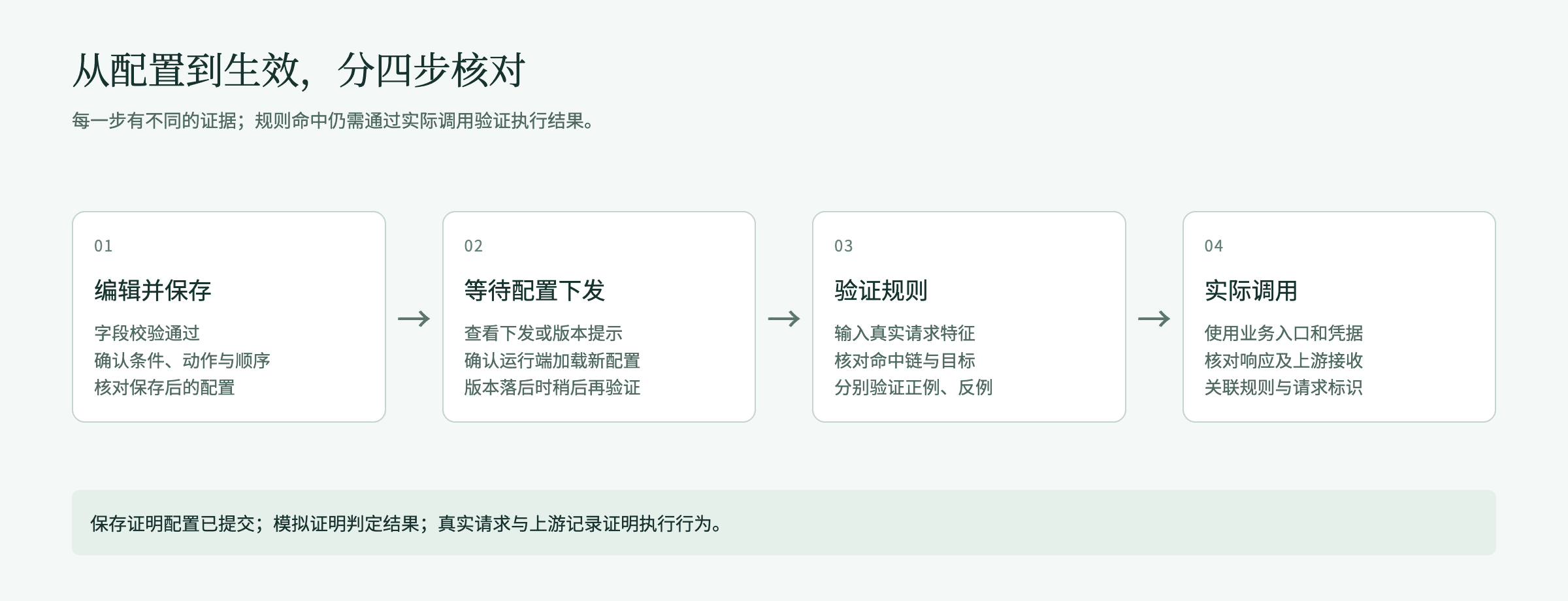
Figure 1: Configuration verification. Save, publish, simulate, and a real call each answer a different question.
After the request is authenticated, the gateway checks enabled rules from smallest Priority number to largest. A rule matches only when every condition is satisfied. If not, this rule is skipped and the next is checked. The On match column of the rule list names the rule kind. Hover for the evaluation reason:
| Rule kind | On match column | After a match |
|---|---|---|
| Enrichment rule: only detection, limits, rewrite, cache, and similar actions, no forward target | Continue matching | Stack this rule's configuration and keep evaluating later rules |
| Terminal rule: has a forward target, or the action is Allow / Deny | Stop matching | Later rules are not evaluated |
- Allow ends rule evaluation. The request follows the gateway's existing routing, still constrained by identity permission, quota, and target availability.
- Deny is not dispatched upstream. The gateway returns 403, and the error response carries the configured deny reason code.
- When the list is empty or no rule matches, the request follows the gateway's existing routing. That does not guarantee a usable target. The platform no longer ships built-in routing rules. Rules on the list are all maintained by this tenant.
- When several rules match at once, content checks are merged across the whole rule chain. When the same detection item conflicts, the stricter configuration is taken. The request is sent for detection only once. Per-request token cap and Request-body size cap take the strictest value.
- The Actual upstream condition is rechecked after a target is chosen. If a rule that matches at recheck requires a target that is not the chosen one, the gateway returns 503.
1.3 How to read the canvas
The rule editor shows one rule as a Rule orchestration canvas. Nodes from top to bottom:
- Request enters: names the traffic entry. Request path, call identity, and model information are inputs to condition evaluation.
- Match conditions: this rule's match conditions. All must be satisfied (AND). On the right, Condition not met / skip this rule means the next rule is checked by priority.
- Action · before forwarding the request, Action · after the upstream response: one action per node. The node is labeled Execution order n / m. After expanding a node, Move up / Move down change order inside this stage. Request-body size cap is fixed first in the request stage.
- Outcome: shows Configured expectation after a match. It does not mean a request has already succeeded.
- Exception handling: configurable handling grouped as Fixed platform behavior, On match, and When a component is unavailable, changing as actions are added or removed.
Canvas tools and panels:
- YAML edit at the top edits the current draft as YAML. Choose Apply to canvas then return to the canvas to check. Content is at most 256 KiB. Resource references use resource IDs.
- Undo / Redo apply to unsaved edits in this session, at most 50 steps.
- Collapse nodes / Expand nodes change display only and do not disable actions. Canvas zoom and Workflow overview at the bottom locate a long flow.
- Debug and preview on the right has Validate rule and Configuration checks. Validate rule sends the current unsaved draft together with the whole existing set to the gateway for evaluation. How you fill it is the same as the standalone validation page (see section 3.2). The page head says Uses the current draft. Judgment models are called for real. Real conversations follow this only after save and it takes effect. In-stream truncation at the model-reply stage cannot be validated here. When the draft still has unfinished items, it switches to Configuration checks. Configuration checks lists problems in the draft. Click a problem to jump to the matching configuration.
- The bottom shows save status (Unsaved changes, Not saved, or Saved), configuration-check conclusion (Configuration checks passed, or Configuration issues and the problem count), Validate rule, Cancel, and Save rule. Save rule is unavailable while configuration is unfinished. Hover for the reason.
2. Create a rule and configure conditions
2.1 Ways to create a rule
| Method | Entry | Notes |
|---|---|---|
| Blank | New rule at the top right of Rule list | Opens a blank canvas |
| Apply a template | Import rule template | In Rule templates, pick one, fill highlighted required fields, then Import this one. There are 74 templates, grouped as All, Model routing, and Content check. Model routing covers combinations of path, request header, query parameter, model name, model group, actual upstream, data source, sensitive data, call type, capability, client CIDR, time window, canary cookie, task type, task difficulty, business scenario, and forward / allow / deny, plus weighted round-robin, latency-first, and failover examples. Content check has six: Block keywords and return a canned reply, Block sensitive data, Block a custom topic, Block risky content, Required Q&A, Tool-call guard. If a required judgment model is not yet set, import opens the judgment-model settings drawer |
| Import from a file | Import from file | Reads a .yaml or .yml file, which may contain several rules. A same-named placeholder object is chosen only once. Rules are created at the end of the list in file order. Resource IDs in the file are kept as-is |
| Duplicate an existing rule | Rule row More actions → Duplicate | Prefills the editor as “Copy of original name” |
| Build from a built-in intent | Build a rule with it on an intent in Intent set → Built-in intents | Prefills that intent condition and rule name. See section 9 |
Each tenant may have at most 500 rules. The top right of the list shows existing / cap. After the cap, create, import, and duplicate are unavailable. When imported count exceeds remaining slots, the page states how many can still be created.
2.2 Create a model-routing rule
- Finish target onboarding and call verification in Model Providers and Models, and prepare a valid credential and model-use permission for the test caller in Model Groups.
- Choose New rule. At the top of the canvas, fill a name that states the purpose, for example “Customer-support Q&A primary route”. The name is 1–120 characters.
- In Match conditions, choose Add condition. From Choose a condition, add Client-declared model name, comparison Equals, and fill the model name the caller actually submits, for example
customer-support. This is the name in the request, not a model ID. - Choose Add an action. In Other, choose Forward to a specified target. The canvas shows a Forward to node. If the conditions do not yet have a call type, the editor automatically adds Call type = Model call.
- In the forward node, choose Target mode: All upstreams of the requested model, or Specified upstreams then pick upstreams one by one. To split, keep adding targets in this tier and set weights. To fail over, add a backup tier and turn on Enable failover. See section 7.
- Check Outcome, fix problems in Configuration checks, choose Save rule, and in Review changes check then Confirm and apply. See section 3.1.
- Use Validate rule to check should-match and should-not-match requests, then send a controlled request through the actual business entry. See section 3.
Names and thresholds in this chapter's examples are only to illustrate the operation. They are not recommended capacity. Do not treat example model names as already onboarded models.
2.3 Create an enrichment rule
To add a rate limit to a customer-support model without changing destination, add the same model-name condition, then add Limit (shown as Apply limit) and set request rate, count-by, and threshold. Do not add a forward target. This rule shows Continue matching on the list.
Place enrichment rules before the terminal rules they must constrain. If an earlier rule has already forwarded, allowed, or denied, a later enrichment rule does not participate. To implement “allowlist + deny the rest”, Allow the names on the list, then place a catch-all Deny after it. An ordinary rule without a forward target is an enrichment rule and does not end evaluation.
2.4 How conditions relate, and count limits
- Conditions in the same rule are AND. Multiple values in the same condition match if any one is satisfied. Negative comparisons (such as Not equals, Does not start with, Does not match regex) are satisfied only when none of the values match.
- A new rule needs at least one condition and one action, or save says Add at least one condition / Add at least one action. A rule may have at most 16 conditions. Most conditions take 1–32 values. Caller may select 1–42 objects. Departments plus functional groups in Organization member total at most 64.
- Value length: each value of request path, request header, URL parameter, and client-declared model name is at most 256 bytes. Other values such as data source and concrete capability are 1–160 bytes each. Model group and Actual upstream accept only objects picked from the selector. An all-zero ID cannot be used as a placeholder.
- Contradictory conditions on the same field cannot hold at once and are rejected at save. “A or B” should be two values of one condition.
- A condition must be information the chosen Call type actually produces. For example Tool name is not produced by a model call. When MCP method is List tools, Resources, or Prompts, no tool name is produced. Such a rule never matches. Save says Condition "X" produces no fact in "Y", so the rule will never match and lists call types that condition applies to.
- Regular expressions are executed by the data-plane engine. Lookahead/lookbehind and backreferences are not supported. To say “does not start with”, use an option in the Exclude group of the comparison.
- An existing unconditional rule shows Matches every request on the list. Before editing, confirm it is an intentional catch-all and check its position.
2.5 Condition types
Choose a condition lists only conditions available for the current call type. Each item has a group label from the table below. Use the search box to find by name:
| Group | Condition | How to fill and compare | Notes |
|---|---|---|---|
| Identity and source | Caller | First choose Caller type, then search by name and select objects. Comparison Is one of / Is not one of | Lists only identity kinds the current call type can provide. A hand-typed ID cannot replace the selector. After an object is selected, the condition row hints in place: Some entries will not match can still be saved; This rule will not match on any entry cannot be saved, pick another object; This caller was not seen in the last 7 days is only a reminder |
| Identity and source | Tags | Choose tag key and value. Comparison equals, is one of, not equals | The tag key must be a defined call tag. When no tag is defined, this condition has no options |
| Identity and source | Organization member | Choose in Department (including descendants) and Functional group. The two kinds are unioned. Comparison Is one of / Is not one of | When the caller's department cannot be resolved, a Deny this call rule that contains this condition is treated as satisfied; rules with other actions are treated as not satisfied |
| Model and capability | Call type | Model call, MCP call, A2A call, connector call, API service | Forward, limits, and most rewrite actions require pinning call type to one kind |
| Model and capability | Concrete capability | First choose call type, then a concrete capability | Do not fill a model ID as an MCP tool |
| Model and capability | Tool name | Comparison Is one of / Is not one of. When an MCP service is already selected, you can pick a registered tool, or type a glob with *, for example delete_* | Used for MCP call, connector call, and API service (takes the API name) |
| Model and capability | MCP method | Call tool, List tools, Resources, Prompts, multi-select. Default at create is Call tool | Only for MCP call, not connector call. When List tools, Resources, or Prompts is selected, you cannot also configure Tool name |
| Model and capability | Client-declared model name | Equals, starts with, matches regex, and the matching exclude forms. Pick from the model catalog or type | Does not accept an upstream ID. To pin an upstream exactly, use Actual upstream |
| Model and capability | Model group | Choose a model group | Judged by the set of groups the caller can use that contain the requested model. Any matching group hits |
| Model and capability | Actual upstream | Choose an upstream | Rechecked only after a target is chosen. Cannot be used to decide which upstream to pick |
| Request content | Data source | Data returned by an MCP tool | Recognized through a trusted channel. In limits, available only for model call, MCP call, and connector call |
| Request content | Request contains sensitive data | Choose one or more types from this tenant's sensitive-data type catalog that can be used as conditions | Produced only in pre-evaluation recognition on the platform model-call entry. Native gateway entry and MCP, A2A, API-service calls do not produce this fact. Types recognized only by a recognition model, such as person name, address, and organization name, cannot be conditions. See below |
| Intent and scenario | Intent | First choose Intent dimension (task type, task difficulty, business scenario, custom intent set (advanced)), then tick intents | Produced only in model calls. An intent-recognition model must be set. See section 9 |
| Request basics | Request path | Starts with /. Equals, starts with, matches regex, and exclude forms. On managed HTTP passthrough, a path with ., .. segments (including percent-encoded forms) or a backslash returns 400, does not enter evaluation, and is not forwarded | Reverse-proxy prefixes and different entries may change the visible path |
| Request basics | URL parameters | Parameter name (case-sensitive, at most 64 bytes) and value | Takes effect only on calls that hit the gateway directly |
| Request basics | Request header | Header name (lowercase letters, digits, and hyphens, at most 64 characters), comparison, and value | Credential, forwarded-source, transport, and gateway-internal headers are stripped by the data plane and cannot be conditions |
| Time and source | Time window | Choose a timezone (IANA name), add one or more HH:MM-HH:MM windows. Crossing midnight is allowed | Judged in the chosen timezone, independent of the administrator computer's display time |
| Time and source | Client CIDR | Choose Is one of / Is not one of, fill IPv4/IPv6 CIDRs, or tick the system preset Chinese mainland | Depends on a trusted client address the entry provides. Chinese mainland excludes Hong Kong, Macao, and Taiwan. Intranet and unknown regions do not participate in region match |
| Time and source | Canary cookie | Choose a cookie name (zenova_canary, zenova_rollout, zenova_variant) and fill a value | Values are write-only and are not echoed. They cannot contain spaces, semicolons, or Chinese. When editing an existing rule, if the cookie name is unchanged and the value is left empty, the saved value is kept. Changing the name requires filling the value again |
Besides string comparison, set, time-window, and canary-cookie conditions may also choose Is one of / Is not one of. Multi-value exclude means none of the values hit. Missing, inapplicable, or unfinished judgments do not automatically match because of exclude. Special cases of organization member and tags follow their own notes.
To strictly allow only mainland sources, first Allow with Client CIDR is one of Chinese mainland, then place a catch-all Deny this call after it in the same service scope. Using only Is not one of Chinese mainland to block does not block unknown regions or intranet IPs. Preset data supports IPv4 and IPv6 and is updated with product releases. The judgment basis is the egress IP.
Request-header names that cannot be used as conditions (the data plane strips or rewrites these headers before evaluation, so a rule that uses them never matches):
| Category | Headers |
|---|---|
| Credentials | authorization, proxy-authorization, cookie, x-api-key |
| Forwarded source | x-forwarded-for, x-real-ip |
| Transport and content | host, content-type, content-length, content-encoding, accept, accept-encoding, connection, transfer-encoding, sec-websocket-protocol |
| Correlation IDs | x-request-id, x-correlation-id, traceparent, tracestate |
| Gateway internal | Headers starting with x-lp- or x-waner-, plus x-zenova-tags, x-zenova-end-user |
2.6 Call identity and missing facts
Real call identity comes from credential authentication, the signed-in account, and trusted request context. A caller filled in Validate rule is only an evaluation input. It does not grant permission to a real call. Copying an object ID into an ordinary request header also does not replace authentication.
Different entries provide different match information. When a condition in a simulation result shows The request did not provide this information, fill information a real request can provide. When it shows This call type does not provide this match information, adjust the condition or the call type. Before configuring an intent condition, confirm the intent-recognition model is available. Sensitive-data types in the simulator are assumed facts filled by an administrator. They do not confirm that a real request has completed recognition.
The Request contains sensitive data condition is used to pick a rule from the request body. The platform model-call entry recognizes types the rule references before rule evaluation. When nothing is detected, the condition does not match. When recognition is unavailable, the request returns 503. Failure is not treated as “not detected”. Native gateway entry and non-model calls do not produce this fact. Do not infer that those entries will match from a simulated hit. This condition can only choose types that can be recognized before evaluation. Types that depend on a sensitive-data recognition model, such as person name, address, and organization name, belong in Detection scope of a Sensitive-data detection action. The condition and that detection action cannot sit in the same rule: use the condition when you need to pick a target or deny by sensitive data; use the detection action when you need to redact or block; when you need both, split into two rules and check order.
3. Validate rule and real calls
3.1 Save and review changes
Create and edit both open Review changes first: choose Save rule in the editor, or Save after editing on the rule details. Check Field diffs, Related objects (referenced before the change, referenced after), and Match order. When failover is configured, Failover chain is also shown. When this change modifies a sensitive request header, you must tick confirmation before save. When the check is correct, choose Confirm and apply. When the scope is wrong, choose Cancel to return to editing.
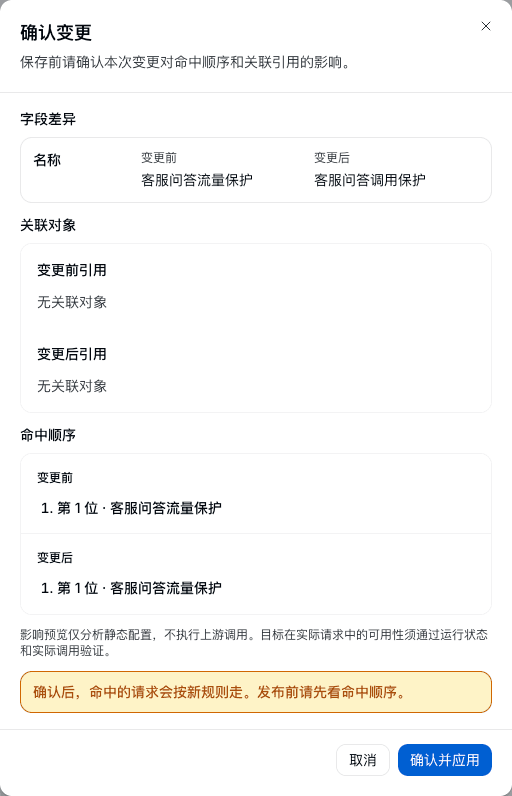
Figure 2: Review changes. Before confirming, check the actual change, related objects, and match order.
- After apply succeeds, the prompt is
Rule "<name>" saved.View match records in it opens the Live traffic view of that rule's details. Configuration is submitted. Gateway nodes may take a short time to load the new configuration. - Enable/disable switches and delete on the rule list take effect after their own confirmation dialogs. Drag reorder and Move up / Move down take effect immediately. None of these open Review changes. Move to top / Move to last may change match order for the whole tenant and open Review changes first. The enable/disable switch on rule details also opens Review changes.
- When configuration publish fails, the top of the list shows The latest configuration publish failed. This tenant's traffic rules still take effect at the previous version. When a lexicon or Q&A set a rule references has not published successfully, it says Detection data referenced by some rules has not published successfully. Those rules currently do not take effect. and lists the missing objects. Remove those references in the related rules and save again, or save later to retry publish. For about a dozen seconds after save, the page rereads publish results. A failure hint may appear a moment later.
- Rule list, rule details, and Validate rule do not show whether each gateway node has loaded the new version. After save, verify take-effect with a real call.
3.2 Use Validate rule
How to enter: Validate rule to the right of the search bar on Rule list. The page head says Uses rules already in effect, in the whole set's order. Results match production. The validation page has no call-record picker. Request facts must be filled by hand. To validate unsaved edits, use the Validate rule tab on the right of the rule editor. See section 1.3.
- Choose Call type, fill Requested model (the same value as Client-declared model name in the rule). For a non-model call, choose Capability instead.
- Choose Caller, or choose Credential identity (API key). One of the two.
- Fill Request path and Validation time (for time-window conditions) as needed. A model call may also fill Default routing target (optional), used to see where it lands when no rule matches. For a content-check trial, choose Detection direction (Input or Output), and in Messages choose Role (User, Assistant) for each message and fill Message content. You can choose Attach image to add a picture, and Add message for several turns. When Detection direction is Output, also fill This-turn answer. When a matched rule configures tool-call guard, you can fill Tool name and Arguments or command. To check a tool return, fill Return result, and choose Tool-call guard.
- When needed, expand More request facts and fill Specified model groups, Intent prompt, Client IP, Query parameters, Canary cookie, Call tags, Data source, Sensitive-data types, Request headers. Values filled here are assumed. In real traffic they are judged by the platform.
- To see fallback order, tick Simulate primary failure. To exercise a caller with an amount budget, tick Exercise as a caller with an amount budget. Tiers on the chain that are priced but whose currency differs from the caller's amount pool are marked skipped. Unpriced tiers still participate.
- After required facts are complete, the page computes automatically. Run validation recomputes. After you change input, wait for the new result before reading.
Validate rule page fields:
| Field | Where | Notes |
|---|---|---|
| Call type | Basics | Required. Decides the entry and available match information |
| Requested model | Basics | Fill for a model call. Type or pick from the list |
| Capability | Basics | Choose for a non-model call |
| Caller / Credential identity | Basics | One of the two. Credential identity is an API key |
| Request path | Basics | Simulated match uses this path value. A real request's path is provided by the call entry |
| Validation time | Basics | Used to evaluate time-window conditions. You do not wait for the real window |
| Default routing target (optional) | Basics | May be filled for a model call. If omitted, the result area says it cannot show where it lands when no rule matches |
| Detection direction, messages, this-turn answer | Basics | Runs a content-check trial per the matched rule's guardrail configuration. Results are in Content check result. Messages may choose a role and attach an image. When Detection direction is Output, fill This-turn answer. The result gives basis and staged latency (image transcription, content judgment) |
| Tool name, arguments or command, return result | Basics | Used when a matched rule configures tool-call guard. Arguments that parse as a JSON object are sent as-is, otherwise as command text. After Return result is filled, matching rules also detect at Tool return. Tool-call guard is called only after you choose Tool-call guard. Results are in Tool-call guard |
| Specified model groups | More request facts | When no caller is filled, specify model groups the request can use, multi-select. When a caller is filled, the system derives them from the caller. Without them, a rule that contains Model group cannot be simulated |
| Intent prompt | More request facts | Used for intent classification. When empty, no intent information is produced. Judgment is in Judgment result |
| Client IP | More request facts | IPv4 or IPv6 address |
| Query parameters, canary cookie, call tags | More request facts | Add by name and value |
| Data source, sensitive-data types | More request facts | Platform-judged facts. Values filled here are assumed |
| Request headers | More request facts | One name: value per line |
| Simulate primary failure | Bottom option | See candidate order after the primary target fails |
| Exercise as a caller with an amount budget | Bottom option | Priced tiers whose currency does not match are marked skipped. Unpriced tiers still participate. Same judgment as runtime |
| Result | Correct reading | Next |
|---|---|---|
| Matched | A terminal rule matched. Later rules are not evaluated | Confirm its order and action match expectation |
| Enrichment matched; continue evaluation | This rule stacked configuration. Later rules are still evaluated | Check the full hit chain and final target |
| No match | Evaluated, but conditions did not hold or required information was missing | Expand conditions and check reasons such as Value does not match, The request did not provide this information |
| Not evaluated | An earlier rule already ended evaluation | Check the earlier rule's order and action |
| No rule matched; routed by the currently published default configuration | Destination is decided by the gateway's existing routing | Confirm the default target and permission are usable |
Results list each rule's conclusion in two rounds, Pre-routing evaluation and Recheck after a target is chosen, and list Rule chain this validation hit, Validated routing target, metering group, and each target's expected share. A rank-based target strategy also shows candidate rank, quality score, price, expected time to first token, and whether it was excluded. When Simulate primary failure is ticked, it shows the backup target's tier and transfer chain. When no higher tier is configured, it says there is no backup after primary failure. When every candidate is excluded by a hard condition, the result says the request was not blocked and one is chosen by weight instead. Gateway nodes may take a short time to load a new version. After a just-saved change, still check with a real call.
Simulation does not call an upstream model, and cannot prove that a limit has counted, a rewrite has run, or a target is reachable. When you fill Intent prompt, Messages, or run Tool-call guard, the page calls the matching judgment model or detection service. Use test text that is allowed to be sent for checking. Weighted round-robin simulation uses polling progress independent of production. Consecutive simulations do not consume the real-traffic polling order.
3.3 Finish verification with a real call
Use the entry, credential, and request format the business actually uses. Test requests should use redacted data and a clear test object, so other business is not affected.
| What to verify | What to do | Result to keep |
|---|---|---|
| Routing | Send should-match and should-not-match requests | Actual target, status code, request identifier, matched rule |
| Rate limit | Increase requests in a controlled way inside the chosen count-by, then change the dimension value | Handling after the threshold, and whether different count objects count separately |
| Concurrency | Keep several requests in flight, then add one more | In-flight count, deny result, and release after they finish |
| Rewrite | Send a request with an observable test field | Value the upstream actually received and the response the caller actually received |
| Content check | Send normal text and a prepared hit sample | Actual result of allow, record, block, or redact |
| Circuit breaker | Inject a controlled failure or delay, wait for half-open recovery | Upstream receive count, deny result, and recovery. See section 6 |
| Failover | Make the primary target meet a configured trigger | Whether the backup received the request, total attempts, and latency |
View matched requests on the rule details opens the Requests view of Operations overview, filtered to this rule. You can also check match records in Rule hits and jump to the rule details. The Routing & changes tab of request details lists Routing process, Skipped candidates, Attempts, and What changed, used to check the actual destination. See section 7.6. When a request is denied, keep the full status code, error code, and request identifier the caller received. For the full mapping of status codes to error codes, see the error reference.
Some failed requests may lack a complete call record. Missing logs alone do not prove the request did not run. Investigate with the original response, upstream receive records, and the time range. When a record is missing, submit it to a runtime administrator.
The platform generates an independent call ID for every call. Policy hits, guardrail evidence, and call details are related by that ID. An X-Request-Id the caller sends is kept separately as Caller request ID. You can search requests by it first, then open details for every hit. Routing policy and prompt templates have two request ID variables. {{request_id}} is the platform call ID, which plugin context also uses. {{client_request_id}} is the X-Request-Id the caller sent; use it to reconcile with the caller's own system. When the caller sends none or an invalid value it renders empty, and a request header that references it is still set with an empty value. Different requests that reuse a caller ID are still recorded separately.
4. Configure Global limits
4.1 List and sources
Open Traffic rules → Global limits. First choose a call type on the right of the tab (model call, MCP call, A2A call, API service). The list shows only limits of that call type. You can filter by Limit type.
| Source column | Meaning | How to maintain |
|---|---|---|
| Global limits | An independent limit created on this tab | Edit, enable/disable, delete, create a temporary exemption in the row More actions |
| From a routing rule | A limit derived from an Apply limit action in a routing rule, showing the rule name | Read-only. Click the rule name to edit in the source rule. When the source rule is already deleted, Delete leftover limit |
| Platform-enforced limit | A hard floor preset by the platform | Read-only |
When call type is MCP call, the top of the list states the upstream-timeout definition: a call not covered by an enabled timeout limit uses the system default (connect 5000 ms, request 30000 ms). When a limit's count-by or match condition is not information the chosen call type actually produces, the row shows Count-by unavailable and the reason. That limit does not take effect. Switch to fields that call type provides. After a limit is saved, if it says Limit saved, not yet synced to the model gateway, the system retries automatically. Until sync completes, the gateway may still use the previous configuration.
4.2 Create a limit
- Choose Add limit to open the Create Global limits canvas (Limit orchestration).
- In Request-count entry, choose Limit type: Requests, Concurrency limit, Circuit breaker, invalid-attempt protection, Upstream call timeout. Switching type resets thresholds to that type's defaults and keeps name and match conditions. Name may be empty; when empty, the limit summary is used as the name. The limit ID is assigned by the system.
- In Count object, set match conditions. Requests and concurrency also need Count by. See section 4.3.
- In Limit configuration, fill thresholds. In On over-limit, choose handling.
- In Debug and preview on the right, Test run can simulate Limit not triggered and Limit triggered (no request is sent, no live counter is read). Configuration checks lists unfinished items. While the condition catalog or count-by catalog has not finished loading, publish is paused and the page says Catalog cannot be loaded for now, publish is paused. or a matching load hint.
- Choose Enable Global limits to publish. When editing an existing limit, choose Save Global limits.
When editing an existing limit you cannot change limit type. To change type, create a new one. A deleted limit cannot be recovered. Recreate it when needed.
Prefill values by type when creating a limit (all can be changed):
| Limit type | Prefill |
|---|---|
| Requests | Count-by prefills a credential dimension: By API key when the chosen call type provides it, By API key (A2A token) for an A2A call, otherwise the first available caller dimension of that type. 100 per minute, immediate burst 20. On over-limit Reject the request, When quota is used up is Reject immediately. When queue is chosen, prefill max queue depth 64, max wait 3000 ms, per-organization queue cap 16, per-organization queue capacity 1048576 bytes. When a fixed reply is chosen, reason code prefills quota_exceeded |
| Concurrency limit | Concurrency cap 8, busy-time priority 0, no reserved slots |
| Circuit breaker | Statistic window 30 seconds, minimum samples 10, failure rate 50%, slow-call threshold 2000 ms, slow-call rate 50%, open duration 30 seconds, half-open probes 5 |
| invalid-attempt protection | Statistic window 60 seconds, count threshold 5, pause 300 seconds |
| Upstream call timeout | No prefill. Connect timeout and request timeout must be filled |
| Caller temporary exemption | Exemption type Requests, expiry 24 hours later |
4.3 Match conditions and count-by
Match conditions decide which requests this limit constrains. Count-by decides how those requests accumulate separately. For example matching only a customer-support model and counting by API key means each API key's requests to that model count separately. Changing match conditions does not automatically change count-by. Check them separately when editing.
Match conditions have two layers:
- Unified conditions: the same condition types as the rule list. See section 2.5, but only conditions the chosen call type actually produces are listed. URL parameters is only for model call and API service. Client-declared model name, request contains sensitive data, and intent conditions are only for model call. Tool name is only for MCP call, connector call, and API service. MCP method is only for MCP call. Data source is not used for A2A call and API service. Rate-limiting by CIDR uses Client CIDR among them.
- Kept match clauses: match by caller identity, client IP, route, model, model group, actual upstream, capability, capability type, app, belonging department, functional group, dependency, endpoint, MCP service or tool, service name and service namespace, deploy environment and deploy region, and similar fields. Comparison is Equals (only one value), Is one of, Not equals. By client IP in a clause compares the full address exactly. It does not include a CIDR.
When a unified condition has been added, kept match clauses do not participate for now. After every unified condition is deleted, clauses take effect again. When both layers are empty, the limit applies to every request of the chosen call type. Each layer has at most 16 conditions. All conditions across them must be satisfied to match. Two affirmative conditions on the same field must have intersecting values, or the page blocks save.
Count-by may be multi-select. When several dimensions are selected, counts are by value combination. Options follow the chosen call type, including by API key, by API key (direct call), by user, by caller group, by internal service, by client IP, by session, by route, by model, by actual upstream, by model group, by app, by belonging department (count per department), by functional group (count per group), by MCP service, by MCP tool, and by tag. Session can only be a count-by, not a match clause. By session is provided only for model call, MCP call, and connector call. A2A call and API service have no session identifier. When counting by session, only requests with an explicit session identity count separately per session. Sessions attributed by conversation-history continuation, and requests whose session cannot be identified, are not counted in this dimension. Responses continuation requests reuse the previous turn's identification. Identification order and value requirements are in section 15.5 of the Zentrix Gateway User Manual. Before choosing a count-by, confirm the real entry will provide that information.
4.4 Request count, on over-limit, and temporary thresholds
In Limit configuration, fill Requests in the period and Immediate burst for each time window. A time window may be second, minute, or hour, at most 3, and the same period cannot repeat. Values must be positive integers. Requests in the period cannot exceed the number of microseconds in that window (second 1,000,000, minute 60,000,000, hour 3,600,000,000). This is a rolling rate limit that refills over time, not a quota that resets on the hour. Several time windows take effect at once. A request must satisfy every window. Immediate burst absorbs a short peak and does not consume quota in ordinary times.
On over-limit options:
| Option | Behavior | Parameters |
|---|---|---|
| Reject the request | Return a rate-limit error and retry hint. A model call returns 429 | — |
| Queue and wait | Wait for available quota. Still return a rate-limit error on timeout or a full queue | Max queue depth 1–512, Max wait (ms) 1–30000, Per-organization queued-request cap 1–128, Per-organization queue capacity (bytes) 1–33554432 |
| Return a fixed reply | Do not call a model. Return preset content | Reason code told to the caller: lowercase letters, digits, underscores, 1–64 bytes. Assistant reply content: required, at most 64 KiB |
When quota is used up has two more options: Reject immediately, or Use public quota first, reject only when public quota is also insufficient. Public quota means a request-count limit under the same call type that counts only by tenant. When no such limit exists, it is still treated as reject.
When Enable temporary threshold is on:
- Fill temporary request count and temporary burst for each time window. Every temporary value must be at least the base quota, and at least one must be higher than the base quota.
- Fill start and end time. End must be later than start and later than now. The window is at most 30 days.
- After expiry, the data plane automatically restores the base quota. No republish is needed. A temporary threshold only relaxes a traffic threshold. It does not extend credential validity and does not grant model access.
4.5 Concurrency limit
A concurrency limit counts calls executing at the same time, not the total in a period.
- Concurrency cap: a positive integer. After it is reached, a new request is rejected immediately and does not enter a queue. A model call returns 429.
- Recovery threshold (optional) and Hard concurrency cap (optional): must be filled together, and must satisfy recovery threshold < hard concurrency cap ≤ concurrency cap. After the hard cap, new requests are rejected. Receiving resumes after concurrency falls below the recovery threshold.
- Slots reserved for priority requests (optional): 0 to concurrency cap minus 1. When busy, ordinary requests may use at most “cap minus reserved slots”. Remaining slots admit only priority requests.
- Busy-time priority: integer 0–3, 0 ordinary, 3 highest. When a request hits several concurrency limits with a priority, the highest tier is taken. Tiers only decide who can use reserved slots when busy. Priority has no effect in a limit with no reserved slots.
4.6 Invalid-attempt protection and upstream call timeout
invalid-attempt protection needs Statistic window (seconds), Invalid-attempt count threshold, and Pause duration (seconds), all positive integers. After invalid attempts in the window reach the threshold, requests of that match object are paused and return 429 during the pause. Currently, capability calls such as MCP, A2A, and API service count when downstream credential verification fails. Ordinary HTTP failures are not counted. When verifying, confirm the request really went through the matching entry and the event was recognized.
When a condition pins MCP method to List tools, circuit breaker, upstream call timeout, and Return a fixed reply are not supported, and count-by such as by MCP tool, by app, by actual upstream, and by session are not provided. When pinned to Resources or Prompts, by MCP tool is not provided. Matching options are greyed and say The current MCP method does not support this configuration. Choose another.
Upstream call timeout includes Connect timeout (ms) and Request timeout (ms), both 50–600000. Connect timeout must not be greater than request timeout. Connect timeout limits wait to establish an upstream connection. Request timeout limits the whole upstream request (including the response body). When the timeout is reached, this upstream call is stopped. When failover is configured, later handling is decided by the failover rule. Slow-call threshold in a circuit breaker is only for circuit-breaker statistics and does not interrupt a slow request.
4.7 Create a caller temporary exemption
In More actions of an independent-limit row, choose Create a caller temporary exemption. The system creates an independent exemption configuration and does not modify the original limit. Match fields reuse the original limit's first match field. Values must be reconfirmed.
- Check caller, match scope, and Exemption type. Optional types are Requests, Concurrency limit, Circuit breaker, and invalid-attempt protection. Upstream call timeout is not included.
- Fill Reason and Expiry. An ordinary exemption is at most 7 days. Expiry must be later than now.
- When Exempt platform-enforced limits is on, validity is at most 2 hours. Use it only in an authorized emergency.
- After save, verify with calls inside and outside the exemption scope. After expiry, check that the original protection has recovered.
An exemption takes effect by type: it applies to every matching limit of the specified type, not only the limit that started the exemption. An exemption is not an exemption from identity authentication, model authorization, or other quotas.
5. Actions and exception handling
5.1 Action list
On the canvas, choose Add an action, or choose the insert button after an existing action node, then pick an action from the list. The list is grouped as Before forwarding the request, After the upstream response, and Other. The first two are actions placed on the canvas by execution stage. Other holds actions that decide destination and settings that apply to the whole rule. The latter do not take a canvas execution-order slot. An action whose dependency is not met is shown as unavailable. Hover for the reason. Action type inside an action node can be replaced with another action.
| Action (canvas name) | Panel group | Applicable call types | Points |
|---|---|---|---|
| Forward to | Other | Pinned to one kind | A model call chooses an upstream or All upstreams of the requested model. Other calls choose a capability endpoint. See section 7 |
| Allow | Other | Unlimited | Ends evaluation and hands the request to the gateway's existing routing. Cannot coexist with detection, limit, rewrite, or plugin actions |
| Deny this call | Other | Unlimited | Stops the request, returns 403 and Deny reason code. Cannot coexist with detection, limit, rewrite, plugin, or mirror |
| Content check · Conversation | Before forwarding the request (when Check stage includes the model reply, the reply is checked after the response is received) | By detection method | Checks the user question and model reply. Methods are Sensitive data, Keywords, Required Q&A, Model judgment. See section 5.2 and chapter 14 of the Zentrix Gateway User Manual |
| Content check · Tool calls | Before forwarding the request | Model call, MCP call, API service | Checks arguments when an agent calls a tool, and the tool return. Does not check conversation content. See section 5.2 |
| Malicious sources | Other | Unlimited | Checks whether an outbound address hits a malware feed this tenant connected. See section 5.2 and section 14.16 of the Zentrix Gateway User Manual |
| Apply limit | Before forwarding the request | Pinned to one kind | In-rule request rate, concurrency, circuit breaker, and upstream call timeout. See section 5.5 |
| Per-request token cap | Before forwarding the request | Model call | See section 5.4 |
| Request-body size cap | Before forwarding the request | Model call | See section 5.4 |
| Semantic cache | Other | Model call | See section 10 |
| Reasoning instruction | Other | Model call | See section 5.4 |
| Session-switch protection | Other | Model call | See section 7.4 |
| Shadow dispatch | Other | Model call | Needs a forward target first. See section 7.5 |
| Prompt | Before forwarding the request | Model call | See section 5.2 |
| Rewrite request headers, rewrite request fields, rewrite request body | Before forwarding the request | Header rewrite is model call only | See section 5.3 |
| Rewrite response headers, rewrite response fields, status-code mapping | After the upstream response | Response headers and status code are model call only | Response-field rewrite takes effect only on non-streaming responses |
| Attach plugin | Other (when it runs is decided by the plugin binding) | Model call | Choose an enabled plugin binding, at most 8 per rule. See section 16.3 of the Zentrix Gateway User Manual |
| Mirror copy | After the upstream response | One of MCP, connector, A2A, or API service | Node title is Traffic-copy test. See section 5.6 |
Allow and Deny this call cannot coexist with other actions. Actions in one rule must require the same call type. Split actions that need different call types into two rules. The canvas places actions in the gateway's fixed execution stages. Arbitrary wiring is not supported.
5.2 Content check and prompts
A content check in a rule decides which requests are sent for detection, which items are detected, and the action after a hit. Full notes on detection items, templates, judgment models, and handling are in chapter 14 of the Zentrix Gateway User Manual.
Content check is two cards by object, which can be added and deleted separately:
- Content check · Conversation: checks the user question and model reply. Check stage is User question, Model reply, or User question and model reply. A rule has only one check stage. Combinations such as “keywords on the question, model judgment on the reply” need two rules. Detection methods may tick Sensitive data, Keywords, Required Q&A, Model judgment (risk classification, prompt injection, and custom categories).
- Content check · Tool calls: checks arguments when an agent calls a tool, and the tool return. Does not check conversation content. Used for model call, MCP call, and API service. When call type is not pinned at add, Model call is added automatically.
- Malicious sources: tick Check whether outbound addresses hit a malware feed. On match is Block or Record only. It checks the target address on outbound requests of proxy, tool execution, and shadow traffic. It does not check conversation content or tool arguments, and can be turned on without a content check. A Deny this call rule does not provide it. When the tenant has not connected a malware feed, it says No malware feed connected yet. Ticking this does not take effect for now. and provides Go connect a malware feed. When several rules turn it on at once, the stricter action is taken.
Model judgment needs a Content-judgment model. Person names, addresses, and organization names in Sensitive data need a Sensitive-data recognition model. Required Q&A needs a Q&A semantic match model. These three judgment models are set in System Settings → Global settings → General → Default models. When you tick the matching item in the rule editor and the model is not yet set, a drawer such as Set content-judgment model opens on the right for in-place setup. Choose Save and use. One judgment model is shared by the whole tenant. After a change, every rule takes effect at once. Save is rejected when it is not set.
When the Conversation card ticks Sensitive data, Model judgment, or Required Q&A, When the judgment model is unavailable appears in the card, Allow or Deny. Default at create is Deny. The Tool calls card has the same item when it configures model judgment. The two cards are set separately and do not affect each other. Keep Deny for high-risk business.
In Reply copy of the Conversation card, Block reply may be System default copy or Custom copy. After Custom copy, fill Default reply copy, and you may fill Reply copy for this category (optional) per risk category. Copy is used only when content is blocked. Category copy takes precedence. It is not used for redact, record-only, or allow. A required-Q&A hit returns the standard answer. Unticking Model judgment or Required Q&A, or deleting the whole card, first confirms whether to clear that detection's settings.
Check stage, block return, and referenced objects must be ready
What check stage covers. User question is checked before the request is sent to the target model. Model reply is checked before the model answer is returned to the caller. User question and model reply checks both. In a trial run and in the API they correspond to input, output, and both directions. Both connection methods — the OpenAI-compatible entry (calling /api/v1/agent-gateway/openai/v1/* with a model key) and the native gateway entry (/v1/*) — run both input and output, with the same judgment. An enrichment rule that only attaches a content check and does not specify a forward target also checks the model reply. The two entries differ only in when a streaming allow is released. See “Guardrail behavior on streaming output” below.
What the caller receives.
| Case | HTTP status | What the caller sees |
|---|---|---|
| User question hits Required Q&A | 200 | Reply content is the standard answer from the bank, returned in the requested API format. A streaming request is an SSE stream. Response header x-zenova-response-source is guard_canned_answer. safetyIntervention on the answer root carries kind: "canned_answer" and the matched rule identifier. The model is not called. The call record is success, upstream not requested, 0 tokens, not billed. A hit on a non-chat API such as vectors or images is treated as a block and returns 403 |
| User question hits another detection; or a non-streaming answer hits in the model-reply check | 403 | error.code is content_policy_violation, error.reason is CONTENT_POLICY_BLOCKED. error.message is the configured refuse copy (the default refuse copy when none is configured). An entry in error.details whose reason is safety_intervention carries hit category, detection direction, and the matched traffic-rule identifier |
| A streaming answer hits in the model-reply check | 200 (the stream has started) | Content already emitted is kept. The stream ends with the chosen protocol's terminal frame. The refuse copy is in safetyIntervention on the terminal-frame root |
| The judgment model is unavailable, and When the judgment model is unavailable on the matching detection card is Deny | 403 | error.message is “The content-check service is unavailable. This request was denied per policy.” There is no safety_intervention entry. The reason code differs from a hit |
The same hit returns the same message, code, and details shape on both entries. Callers should distinguish “content was blocked” (change the request content) from “detection is unavailable” (contact an administrator to restore the detection service) by reason code. Do not retry the latter as a network failure. Field examples are in the “Content-policy hit and detection unavailable” section of the error reference. When When the judgment model is unavailable is Allow, the request is processed as usual.
Referenced objects must be ready first. Tenant lexicons and Q&A sets referenced by a content-check segment must have published successfully. Referencing an object that has not published successfully fails save or configuration publish, and the Traffic rules page names the missing object. A saved rule that is unusable because a referenced object failed is marked Currently unavailable on the rule list with the reason. There is no “saved successfully but does not take effect at runtime”, and a normal request that contains no sensitive content is not denied for that reason.
Guardrail behavior on streaming output
- Distinguish the three check stages. Checking only the model reply does not replace protection of the user question.
- Results of Record only, allow, Block, Redact and continue, and similar actions differ. Verify each with a sample.
- When several rules match, detection types are merged. The same type takes the strictest action. The request is sent for detection only once. Check the full rule chain.
- When a category or prompt injection chosen in Model judgment is not recognized by the current content-judgment model, the editor says The current content-judgment model does not recognize: … Choosing these categories will not match. When the content-judgment model can recognize only fixed categories, custom categories are unavailable.
- When Check stage includes the model reply, a streaming response is also checked: the rule layer detects chunk by chunk, model judgment runs sentence by sentence. On a block hit, the gateway stops at the hit and sends a terminal frame per the call protocol. After stop, billing follows actual upstream usage. See section 14.10 of the Zentrix Gateway User Manual. Terminal-frame shapes per protocol are in the Streaming-guardrail-stop terminal frames section of the error reference.
The Prompt action references a prompt in the prompt library. Fields are Choose prompt, Version tag (production or latest), and Inject position (Prepend or Append). The node shows the referenced version. When it says The current tag is another version, not published, confirm the publish relationship. Do not look only at the prompt name. View prompt opens the matching prompt details.
Content check · Tool calls, MCP tool permission, and API-service match rules
- Tool-call match rules and custom categories: A match rule takes effect only by the tool pattern it fills (exact name or
*prefix/suffix glob). It is not filtered by a “which tools to detect” scope. Values are taken by the path filled in Field (dot-separated, for exampleargs.content). When empty, every string leaf is walked and one layer of JSON escape is unwrapped before match. When call arguments are not valid JSON, the raw string is full-text matched andargsMalformedis marked in evidence. An exception only exempts the overlapping hit. Other hits are handled as usual. Semantic injection is handled by content safety. - Model-judgment scope and prompt-cache impact: Model judgment (built-in categories and tenant custom categories) applies only to model calls (categories and classifiers cannot be configured when policy conditions contain only MCP / connector / API service). An inbound tool-result rule that hits and rewrites to “this content was blocked” changes historical message content, which invalidates upstream prompt cache after that position. At save, if a tool name in the rule has not appeared in the catalog or in call records of the last 30 days, the editor gives a tool-name check hint.
- MCP tool permission and in-place migration: The standalone guardrail on MCP service details has been merged into traffic rules. Implement it with Tool name, Organization member, and MCP method conditions plus a deny action or tool-call guard. At upgrade, existing configuration is automatically converted to traffic rules that sit before the tenant's existing policies, named
MCP guardrail migration · {service name} · {item}(item is Tool permission, Argument content rules, Default action, Request-body cap, or Needs hand rewrite). Lookaround/backreference regex, exact tool names that contain wildcards, and allow items withargumentContainsbecomeMCP guardrail migration · {service name} · Needs hand rewritedeny rules. After/v1/executeis widened, a deny rule that contains an organization-member condition and has no triggering user (for example a service account) is denied fail-closed. - API-service match rules: Under the API-service call type, the Call arguments position checks the request body, and Return result checks the response body. A JSON body is matched by field pointer or every string leaf. A plain-text body is full-text matched. A binary body is not checked.
Tool-call network control
Network control is a group inside tool-call guard. It limits the model from reaching external URLs through fetch tools, a command line, or web search. After save, the backend compiles this setting into tool rules. The three match methods URL allowlist, URL denylist, and Block the call are generated only by network control. They cannot be typed by hand in Match rules.
- Mode: one of four. No limit generates no rule and hides the rest of the settings. Allow only specified URLs allows only URLs on the allowlist. Deny specified URLs blocks only URLs on the denylist and allows the rest. Deny network blocks every call of a controlled fetch tool and does not need URLs filled. When switching to the last three modes, the controlled tool defaults to
WebFetch, the URL parameter defaults tourl, and the two tick boxes default to on. Switching between the two list modes keeps only the list that belongs to the new mode. - How to write URL entries (both lists):
- A domain entry is
domain[:port][/path-prefix], for examplewww.example.com/chinese/data. The domain is an exact match.*.example.commatches only subdomains, notexample.comitself. A path prefix is compared by path segment:/amatches/a/b, not/ab. - An IP entry is
10.1.2.3,10.1.2.3:8080, or CIDR10.0.0.0/8. IPv6 is in brackets, for example[fd00::1],[fd00::]/8. An IP entry cannot have a path. Host bits of a CIDR must be 0. - An IP entry matches only a URL that writes the IP directly. The gateway does not resolve names. Domain entries and IP entries are not converted into each other: when the list writes
1.2.3.4, even ifevil.comresolves to that address,https://evil.com/does not hit this entry. - A written port matches only that port. When no port is written, an allowlist matches only the protocol default port, and a denylist matches every port.
- Query parameters do not participate. An entry cannot write a protocol or a query.
- At save, domains are lowercased, a trailing dot is stripped, and internationalized domains are converted by the standard. After save, the page shows the normalized result.
- A domain entry is
- Allow only specified URLs: a URL outside the allowlist is always blocked. A URL that cannot be parsed, whose protocol is not http or https, that carries a userinfo, whose path has an ambiguous writing, or that is a direct IP while the list has no matching IP or CIDR, is treated as outside the list. When the host is on the list and only the port is not, the block reason shows Port is not in the allowed URLs: an entry with no port allows only that protocol's default port.
- Deny specified URLs: URLs on the denylist are blocked, the rest are allowed. To stop rewritten forms from bypassing the list, a call with no URL parameter, a URL that cannot be parsed, a protocol that is not http or https, a userinfo, or an ambiguous path is also blocked. Therefore a wrong URL parameter name on a controlled tool blocks every call of that tool, and the hit record's block reason shows The call has no URL. A mirror site, a new domain, or a direct IP can bypass a denylist. When outbound access must be strictly controlled, use Allow only specified URLs.
- Controlled fetch tools: each row fills a tool name and the parameter name that holds the URL. The default row is
WebFetchandurl. A customer-defined fetch tool or an MCP fetch tool needs another row here. Beside the tool name it shows whether a call of that tool was seen recently. When not seen, it reminds you to check the tool name. - Two tick boxes (on by default):
- Also block networking commands on the command line: recognizes only networking commands that appear at the start of a command, such as
curl,wget,ssh,scp,ftp,nc,telnet, including the start of the next command joined by a semicolon,&&, a pipe, and similar. Commands that only mention those words, such asgrep curl notes.txtorcat ~/.ssh/config, are not blocked. Networking started through a script, a renamed binary, or another program is not recognized. Commands rewritten by encoding or concatenating variables may also bypass. - Also deny web search: blocks
WebSearchcalls.
- Also block networking commands on the command line: recognizes only networking commands that appear at the start of a command, such as
- Try it: enter a URL, judge by the form's current settings, and show Allow or Block and the reason, for example Block · domain is not in the allowed URLs, Block · in a denied URL. Try it does not save settings.
- On match: Record only records and does not block. That setting applies to every tool rule of this policy. When the same request hits several policies, the strictest action among them is taken. Each policy has only one network-control segment. Network control of several policies is judged separately. Any one that judges block, blocks: an allowlist's effect is intersection, so a URL that must be allowed should be written into every related policy's allowlist; a denylist's effect is union.
- What the model sees after a block: on an allowlist block, the model receives an explanation listing allowed URLs (capped; when over the cap the total is noted) and is told not to retry another way. When several policies' network control is in effect at once, the explanation lists only URLs every policy allows, so the model does not follow the explanation to a URL another policy does not allow. On a denylist block, the explanation only says that URL is denied and does not list the denylist. After intercepts in the same request reach the cap, the gateway stops continuation and returns the hit ID.
- Hit records: hit details show Source (network control or a custom rule), Access target (domain and path, no query), and Block reason. An allowlist hit can click Add to allowed URLs: the page enters that policy's edit state, expands the network-control group, and adds the target to allowed URLs: a domain target adds domain and path prefix, a direct-IP target adds that IP (with port when it is not the default). This only changes the form. It takes effect after an administrator confirms save. If the whole site is being added (no path prefix), the page shows The whole site will be allowed. If another enabled policy's network control also does not allow that URL, hit details list those policies, each of which can jump to add. A hit record does not contain every fact those policies' match conditions need. They block only when the same request also satisfies their match conditions. Check match conditions before adding. A denylist hit does not provide an add entry. To allow, delete the matching entry in the policy. A network-control hit does not provide Add an exception in the policy.
- Check scope: WebFetch and WebSearch are no longer treated as read-only tools. When Which tools to detect is all, model judgment also checks those two tools' calls.
- Boundaries:
- The gateway can see only tool calls the model returns through the gateway.
- Redirects after allow, and secondary requests from page scripts, happen in the customer program and are not visible to the gateway.
- Final outbound control at the network layer is on the customer firewall or gate. This feature's job is to block early and leave a trace when the model accesses an unauthorized URL. It does not guarantee blocking every external access.
- Customer-side recommendations:
- Agents call models through the gateway.
- Fetch tools do not follow cross-host redirects. If they must, every hop is checked with the same list.
- Do not give an agent a networked command line. If you must, run the command line in a sandbox with no network.
- Do not use a
*.glob on a shared hosting domain (for example a public object-storage domain), or other tenants' sites under the same domain are also allowed.
Image-and-text joint detection
- Detection flow and remote-image inlining: In image detection of the Content check · Conversation card, turn on Detect image content and choose an Image-understanding model (rule YAML
action.guard.content.image). After choosing an image-understanding model that supports visual input (model.modelId), the gateway transcribes input images (and/v1/images/generationsgenerated images) into a structured description, in-image text, and instruction marks, inserts⟦图片 k⟧描述:…;图中文字:…⟦/图片 k⟧into the safety-layer input, and sends it to lexicon, sensitive data, and content safety together (a sensitive-data hit on image transcription whose action is mask is automatically raised to block). A remote image (http(s)://) is fetched and checked by the gateway, then replaced with an inlinedata:URI before forwarding to the target model, so the upstream model receives the bytes that were checked. - Data flow, cache, and allowlist: Image data is sent to the image-understanding model and the target model. A gateway node keeps a 24-hour local transcription cache (indexed by tenant, image-content SHA-256, model, and prompt version). Remote fetch allows only public-network addresses by default (private, loopback, link-local, and cloud-metadata addresses are denied). Public images need no entry; an intranet image source must be filled explicitly in Allowed internal image hosts (YAML
allowedFetchHosts, at most 32). Hosts listed there are treated as internal: when the selected image-understanding model is an external service, images from those hosts are never sent to it, and the request is handled by the rule's When the judgment model is unavailable setting. - Limits, budget, and billing: One image is at most 20 MiB, one request at most 8 uncached new images (40 MiB together), fetch connect timeout 3 seconds, read timeout 10 seconds. Worst extra latency is about one vision-model call. If an instruction aimed at recognition or review is detected in an image, that transcription is forced into jailbreak detection. Image-understanding calls are billed to the tenant as
guard_image_understanding, shown in model-group usage detail as Platform internal call: image understanding. - Image-detection boundary: The conclusion comes from a vision model's transcription, not deterministic OCR. It may miss, and it may be affected by prompt injection mixed into the image (transcriptions that contain instructions are forced into jailbreak detection, as above). Images and files referenced by file ID rather than carrying bytes directly (Anthropic
source.type=file, Responsesinput_image.file_id/input_file.file_id/item_reference, Chatfile.file_id, and similar) are not checked, are allowed as usual, and are marked Not checked in the policy-hit list. That reference form can be used to bypass detection. It is a known boundary, not an implementation defect. - Attachment-detection boundary: PDF, Word (.docx), PowerPoint (.pptx), Excel (.xlsx), CSV, plain text, Markdown, and RTF attachments whose content is carried directly with the request are checked for sensitive data and content safety. Attachments emitted in a tool result after a tool reads a file are also checked. Attachment detection has no separate switch. When sensitive data is configured as mask, a hitting attachment is sent as redacted text (starting with
[Attachment Nth attachment, redacted by the gateway, original file not sent]). The original file is not sent. Session details show that redacted text and the Redacted by the gateway, original file not sent mark. A hit in an image inside an attachment cannot be masked and is treated as a block. Scanned PDF pages and embedded images in a document are checked only when image detection is on. Types judged by recognition rules, such as national ID and phone number, cover the full attachment text. Types that need model recognition, such as person name, address, and organization name, and content-safety judgment, cover only about the first 10,000 characters (32 KiB) of attachment text per request. The rest is allowed and recorded as Not checked · attachment exceeded model-recognition range in the policy-hit list. One attachment is at most 20 MiB, 300 pages (slides, sheets), 4 MiB extracted text, 3 seconds to parse. Over the cap, an encrypted attachment, parse failure, or too many attachments parsed by the gateway at once is handled per the rule's When the judgment model is unavailable. Legacy Office (.doc/.xls/.ppt), other formats, and attachments referenced by file ID are not checked, are allowed as usual, and are recorded as Not checked · legacy Office format, Not checked · document format not supported, Not checked · file submitted by ID.
Multi-turn stitching-induction protection
Three items can be turned on separately in multi-turn conversation settings of the Content check · Conversation card (rule YAML reassembleShortMessages, cumulativeOutput, sessionEscalation under action.guard.content.multiTurn). All default off:
- Split-input detection: sliding-check in the order of user-written messages (skip assistant answers and messages that contain only tool results). When at least 3 of at most 6 messages have visible length at most 8 characters (compatible-character normalization first, then strip punctuation, emoji, zero-width characters, and whitespace), concatenate this stretch of visible text and send it to lexicon, sensitive data, and content safety. The hit basis shows “Cross-message stitch · user messages i–j”. Stitched content cannot be written back. When sensitive data is configured as mask, it is treated as a block.
- Multi-turn answer merge detection: content-safety judgment in the output direction includes conversation history before this turn's question (truncated from the end, at most 4096 characters). This turn's answer is judged together with historical answers. A hit stops this turn. Streaming output is still held back sentence by sentence and judged sentence by sentence. Extra input per sentence is capped at 4096 characters. Lexicon and sensitive data are not stitched across turns.
- Session multi-hit limit: when new-content hits (clear hit, suspected hit, jailbreak hit) of the same session in a time window (10 minutes, 30 minutes, 1 hour, 6 hours, 24 hours) reach the set count (2–20), for the duration either Deny later requests of this session (return the refuse copy directly, do not call upstream or a judgment model) or Treat a suspected hit as a clear hit. The same content is counted only once in the window: old hits in history that are sent for detection again with a new message are not accumulated again, and user messages already counted as the split-input window slides are not accumulated again.
Whether or not the three items above are on, inbound detection also sends historical assistant answers.
What is sent for detection in a very long conversation: system text, all user-written text, and new content of this turn (messages after the last assistant answer, including this turn's tool results) are always sent. When they do not fit, handling follows When the guardrail errors. Historical tool results and historical assistant answers are sent as far as remaining capacity allows (tool results first, recent first). Parts that do not fit are not treated as over-limit. Byte count is recorded in hit evidence historyUncheckedBytes. Therefore hiding a payload in a forged early user message and then squeezing capacity with padding cannot bypass detection.
Session accumulation:
- Session accumulation follows the session identifier the caller provides. Changing the identifier is a new session. An application server should generate an unguessable session identifier.
- Each gateway node accumulates locally and does not share across nodes. Only model calls participate in session accumulation. MCP calls do not.
- A dedup digest of hit content is computed by each node with that node's own key. After a node-key rotation, hits already accumulated in the window are counted again as new content (at most one window).
Handling false positives: in Policy hits, you can filter by Session state: limited. Mark as false positive on the hit that triggered the session limit, when the operator has traffic-rule management permission, also lifts that session's limit. Gateway nodes recover after the next configuration publish. When the mark is not the triggering hit, or the operator does not have traffic-rule management permission, only the false-positive annotation is recorded and the limit stays. View session opens session details and locates and expands the turn of the hit.
Upgrade notes and trial-run API
- Rolling upgrade: during a roll, this tenant's
tenant_configandmcp_protectionconfiguration segments on old-version nodes are frozen at the last usable version. Old nodes keep executing old rules and recover automatically after the node finishes upgrading. Gateway nodes must roll while the control plane is reachable. - How to write rule YAML: a guardrail is written in three segments under
action.guard:content(conversation),toolCall(tool calls),threatIntel(malicious sources). Write at least one. Omitguardwhen no guardrail is attached. The old writing that putsstage,onGuardError, and similar at theguardtop level is rejected as a whole. Rewrite old files into three segments before import. - Trial-run API: a traffic-rule trial run can be called through the admin API. The JSON shape uses
POST /api/v1/admin/route-policies/simulate:directionisinputoroutput,messagesis[{role, text, attachments}]. Test attachments (images or documents such as PDF, Word, Excel) go inattachmentsasdata:<type>;base64,. The output direction fills this-turn answer inanswer. A page trial run with images usessimulate/with-attachments(form upload). The trial run and the gateway take the same judgment path. A switch turned off in the rule is also off in the trial run. The result gives basis and staged latency (image transcription, content judgment).
5.3 Rewrite request and response
- Rewrite request headers / Rewrite response headers: operation Set, Append, Delete. A header name is at most 128 characters and cannot repeat in the same rule. Request headers such as
Host,Content-Length,Content-Type, and connection-control headers cannot be rewritten. Gateway-managed response headers cannot be rewritten. Changing a sensitive request header needs a second confirmation before save.- Request headers that cannot be rewritten:
host,set-cookie,content-type,content-encoding,content-length,connection,keep-alive,te,trailer,transfer-encoding,upgrade. - Response headers that cannot be rewritten:
content-type,content-encoding,content-length,authorization,proxy-authorization,proxy-authenticate,www-authenticate,set-cookie,location, and connection-control response headers. - Gateway-internal headers starting with
x-lp-orx-zr-, plusx-zenova-route-ruleandx-zenova-route-sample, cannot be rewritten on request or response. A header value is at most 4096 bytes and cannot contain a newline or a NUL. Deleting a header cannot fill a value.
- Request headers that cannot be rewritten:
- Rewrite request fields: locate a field with a JSON Pointer, for example
/metadata/channel. Operations are Add, Overwrite, Delete, Copy, Move. Copy and move must fill Source location. Values are filled in JSON form. Text needs double quotes. - Rewrite request body: copy or move fields in the body, or Convert to text, Convert to number, Convert to boolean.
- Rewrite response fields: adjust the final non-streaming response. Keep only listed fields may keep 1–16 paths.
- Status-code mapping: replace a specified upstream status code with another status code returned to the caller. It can only be configured on a rule that changes the target or denies the request. Do not wrap an upstream failure as success without distinction.
Each rewrite kind is at most 16 items per rule. A path starts with / and is at most 160 bytes. / and ~ in a field name are escaped per JSON Pointer. A request rewrite cannot change the routing-target model or a gateway-reserved field, and cannot bypass model selection and authorization by rewriting /model or a protected request header. A real secret is configured only at a protected credential entry. Do not write it into a rule name, an ordinary value, or a screenshot.
After save, test a normal field, a missing field, an empty value, a type mismatch, an upstream failure, and a streaming call separately. A simulated hit only proves rule evaluation. Rewrite results must be checked from the upstream request or the caller response.
5.4 Tokens, request body, and reasoning instruction
- Per-request token cap: fill at least one of Max input tokens and Max output tokens, range 1–10,000,000. Over-limit input is rejected before it is sent to the provider, and the caller is told this is a platform limit. The output cap rewrites
max_tokensof the request. - Request-body size cap: unit KB, range 1–32768 (the 32 MiB global hard cap). Judged on the inbound raw body before authentication, model parse, and body rewrite. Over the cap returns 413.
- Reasoning instruction: Reasoning may be On or Off. When on, Reasoning strength may be Default, Low, Medium, High. Default fills medium. When the caller already specified a reasoning parameter, the caller wins. Off only means the platform does not fill one. It does not delete a parameter the caller already sent. When the target model does not support the chosen tier, it folds to the nearest tier. When several rules match, the highest-priority one is taken.
When several rules set a token cap or body cap at once, the strictest value is taken.
5.5 In-rule limits
Apply limit takes effect only on requests that hit this rule, and appears in the Global limits list as a From a routing rule derived limit. Inside the node, first is the Request rate switch (count-by, When quota is used up, time windows, and Temporary threshold (optional)). Under it, Concurrency, circuit breaker, and timeout (optional) has Concurrency, Circuit breaker, and Upstream call timeout switches. Field meanings and ranges are the same as sections 4 and 6.
- When an in-rule limit is exceeded, the only option is Deny this call, returning the configured reason code. Queue, fixed reply, invalid-attempt protection, and a temporary exemption need an independent limit in Global limits.
- The rule must pin Call type to one kind, and conditions in the rule must be information that call type actually produces (same range as unified conditions in section 4.3). For example an API-service rule cannot use a Data source condition. After call type is pinned, count-by is checked automatically for that type: already chosen dimensions that are still available are kept; when none are available, it falls back to the prefill dimension in section 4.2.
- The same request may be constrained by both an in-rule limit and Global limits.
- Prefill of an in-rule limit: request-rate count-by is the same as section 4.2, 100 per minute, burst 20; concurrency cap 8; circuit-breaker parameters are the defaults in the table in section 6.2; upstream call timeout is connect 3000 ms, request 30000 ms. Busy-time priority in Concurrency is chosen as Highest, Higher, Ordinary. When using a recovery threshold and a hard concurrency cap, also turn on Enable soft/hard concurrency thresholds and recovery.
5.6 Mirror copy
Mirror copy (node title Traffic-copy test) is used only for one explicit MCP, connector, A2A, or API-service call. It copies the request to another capability endpoint at Copy percentage (1–100%). The primary request does not wait for the copy. The copy result is not returned to the caller. A copy request does not go through rate limiting or plugins, is actually sent to the copy target, and occupies that target service's own quota. It is recorded separately as a Mirror request on the request details and does not count toward the caller's usage and cost.
After Enable traffic-copy test is on, choose a capability and capability endpoint as Copy target. At create, Copy percentage defaults to 100%. In Traffic-destination confirmation, I confirm the copy target may sit on the same host as the primary and I confirm copy traffic may be sent to a different domain default to ticked. Check them against the actual topology. A mirror request that does not match the confirmed topology is skipped. Requests that may have side effects are not copied by default. Before turning on Allow copying requests that may have side effects, confirm the copy environment can safely receive creates, deletes, and similar calls.
5.7 Exception handling
The Exception handling node lists only items the current actions can configure:
- Fixed platform behavior: when a condition is not met, do nothing and hand evaluation to the next rule.
- On match: handling of a content-check hit, over-limit, input over the token cap, body over the cap, and similar, set in the matching action or fixed as deny.
- When a component is unavailable: when request-field or request-body rewrite fails on the model entry, in When model-entry rewrite fails choose Reject the request (default) or Allow as-is. On MCP, A2A, and API-service entries, in When capability-entry rewrite fails choose Keep as-is and continue or Deny this call. These two items appear only when the rule contains a request-field or body rewrite and the call type matches. When allow is chosen, What changed on the request details shows that rewrite did not actually take effect and the request was allowed as-is. Request-header, response-header, and status-code rewrite failures always deny this call.
- Content-check failure handling is not set on this node. Set When the judgment model is unavailable separately on the Content check · Conversation and Content check · Tool calls cards. See section 5.2.
- When every forward target is unavailable, an error is returned. After failover is enabled, backup targets are tried per trigger conditions. Transfer stops after backups are exhausted or the attempt cap is reached.
Exception handling is not a unified catch-all for every failure. Insufficient permission, exhausted quota, a guardrail block, an unavailable target, and a client cancel may end the request at different stages. Test failure paths that actually happen. Do not only confirm that the exception node exists.
6. Configure and verify a circuit breaker
6.1 What a circuit breaker solves
A circuit breaker judges from completed call samples whether an upstream keeps failing or slowing. After sample count reaches the floor and either failure rate or slow-call rate reaches a threshold, later calls are rejected for the open duration and the upstream is not called. After expiry it enters half-open and allows a limited number of probe calls. Any probe failure re-enters open. After every probe succeeds, ordinary handling resumes.
A circuit breaker, concurrency, and timeout are different controls: concurrency limits in-flight count, timeout limits wait, a circuit breaker pauses later calls from recent results. A circuit breaker itself does not switch upstream. Only a rule that configured failover skips a candidate whose circuit is open and tries the next target on the transfer chain.
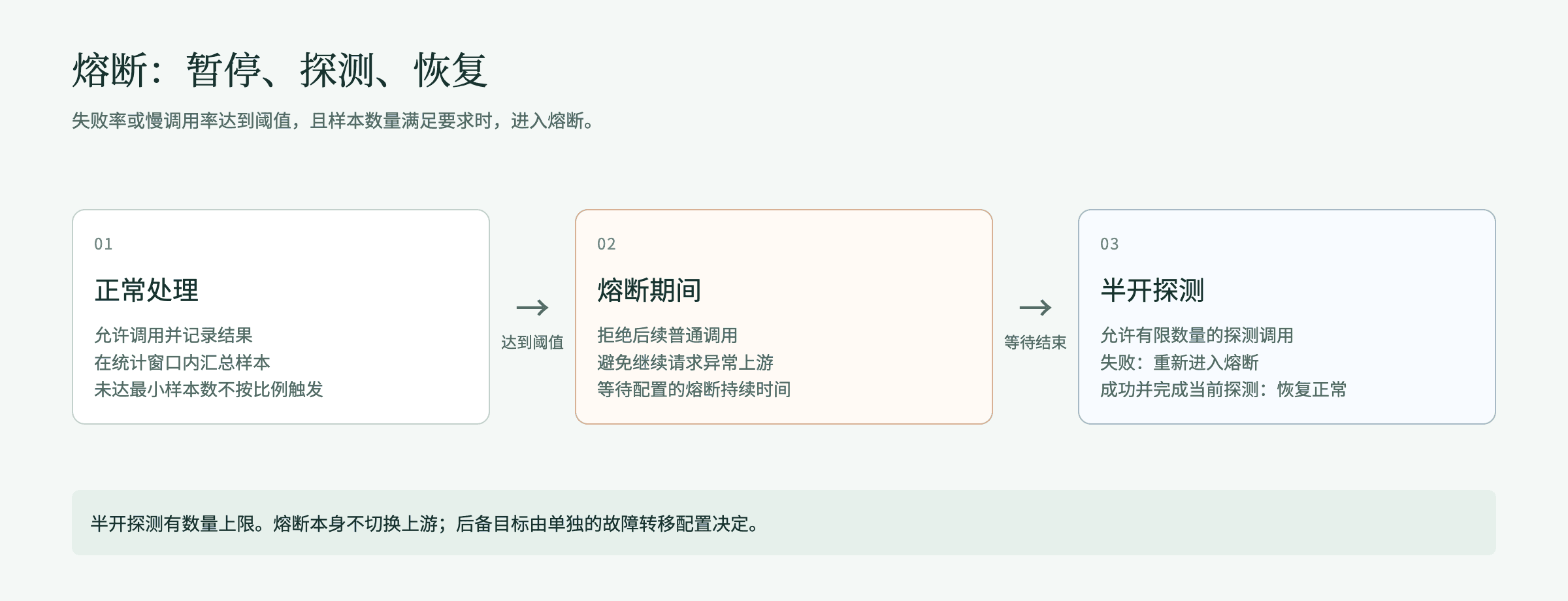
Figure 3: Circuit-breaker states. During half-open only a limited number of probe calls are allowed. Other requests may still be rejected.
6.2 Where to configure it
You can expand Concurrency, circuit breaker, and timeout (optional) in a rule's Apply limit and turn on Circuit breaker, or create a limit whose type is Circuit breaker in Global limits. Parameter meanings are the same. Match scope and owning configuration differ. Before using both places on the same business, state what each protects and verify them separately.
In Global limits, the first five parameters sit in Limit configuration, and Open duration (seconds) and Half-open probe count sit in On over-limit. For in-rule configuration, first pin Call type to one kind.
| Parameter | Meaning | Fillable range | In-rule default |
|---|---|---|---|
| Statistic window (seconds) | Time range that summarizes recent call results | 1–3600 | 30 |
| Minimum samples | How many calls must accumulate before a ratio is judged | 1–1000000 | 10 |
| Failure-rate threshold (%) | Open when the failed-sample ratio reaches this value | 1–100 | 50 |
| Slow-call threshold (ms) | A call whose latency reaches this value is a slow call | 1–1800000 | 2000 |
| Slow-call-rate threshold (%) | Open when the slow-call ratio reaches this value | 1–100 | 50 |
| Open duration (seconds) | How long calls are paused after open | 1–3600 | 30 |
| Half-open probe count | Cap of probe calls allowed to run at once in half-open | 1–1000 | 5 |
All are integers. Slow-call threshold is milliseconds. Other time parameters are seconds. Failure categories are classified from the entry's actual call result. Do not treat every business 4xx as an upstream failure. While open, an OpenAI-compatible model call returns 503 (error code TRAFFIC_CIRCUIT_OPEN). Anthropic returns 529. Investigate against the response of the entry you use.
6.3 Verify with a controlled failure
Prepare an independent test caller and a test upstream whose return you can control. Do not manufacture failures with ordinary business. The numbers below are only to verify behavior. Do not use them as production capacity.
- Set statistic window 60 seconds, minimum samples 4, failure rate 50%, slow-call threshold 30000 ms, slow-call rate 100%, open 8 seconds, half-open probes 2.
- Save and confirm apply, reopen details, and check the seven fields one by one.
- With the same protected object, send success, failure, success, failure in the window. The first 3 samples are fewer than 4 and should not fire early. After the 4th, failure rate is 50%.
- Keep requesting immediately after, and check open rejects and upstream receive count. During reject, the protected upstream should not receive these requests.
- Wait 8 seconds and send probes. Let a probe fail: it should re-enter open. Wait again and let probes succeed, then check that ordinary requests recover.
- Keep 2 half-open probes in flight, then send a 3rd request, and check the probe cap. After releasing the first two, check the recovery result.
6.4 Verify with a slow call
Set statistic window 30 seconds, minimum samples 2, failure rate 100%, slow-call threshold 200 ms, slow-call rate 50%, open 8 seconds. First send one fast successful request, then one successful request whose latency exceeds 200 ms.
Even if both are successful responses, after the slow-call ratio reaches 50% the next request may be opened. Check actual latency, the response, and upstream receive count. Do not judge from HTTP 200 alone that it will not fire.
After disabling the circuit-breaker configuration, wait for configuration sync and confirm recovery with a real call. Do not treat the disable switch as an instant reset button. Before go-live, add verification for the actual topology, call type, and streaming requests.
7. Traffic split and failover
7.1 Target mode, tiers, and weights
Target mode on the Forward to node has two kinds. Switching clears already chosen targets:
- All upstreams of the requested model: expands to every currently enabled upstream of the model the caller requested. After the model adds or disables an upstream, it takes effect automatically. The rule does not need to change. You can limit to some providers only.
- Specified upstreams: pick upstreams one by one, grouped by their model.
A non-model-call forward target is a capability endpoint: choose the capability, then the endpoint.
A rule may have at most 8 forward targets. The first tier is Primary targets, then Backup tier 1, Backup tier 2, and so on.
- Primary targets pick one by target-selection strategy and weight. A primary target that was not picked does not automatically become a backup.
- Weights in the same tier (integers 0–100) sum to 100%. When you adjust one target, the rest share remaining weight in proportion. Distribute weight evenly splits 100% as evenly as integers allow. A target whose weight is 0 does not participate. At least one target in the tier must have weight greater than 0.
- Forward targets in the same tier cannot repeat. A disabled or unavailable target does not recover because you raised its weight.
- Save is rejected when a backup tier is configured but failover is not enabled.
For example primary targets A and B at 80 and 20 describe expected allocation inside primary targets. A backup tier's weight is used only after that tier is entered. It is not summed with primary targets.
7.2 Target-selection strategy
| Target selection strategy | Behavior | Prerequisite and verification |
|---|---|---|
| Stable assignment by caller | Weighted hash of request features and weights. The same caller always lands on the same target. Weights describe allocation among many callers | Observe distribution with several actual callers. Do not only repeat the same request |
| Weighted round-robin | Pick in turn by weight inside the same tier. Each gateway replica has independent polling progress | Count enough actual dispatches, excluding early rejects and unavailable targets |
| Latency first | Draw two primary targets by weight, pick the one with faster expected time to first token. A new target is tried then scored | At least 2 primary targets, and only model targets are supported. Expected latency comes from each gateway replica's local statistics |
| Quality first | Compare quality score first. A gap inside tolerance is a tie, then blended price, then latency, then weighted hash | Quality score is from the built-in model catalog's benchmark index. Price is from a published price list. A target missing data is treated as tied with the best |
| Cost first | Compare blended price first (input plus output; missing either side is treated as no price). A gap inside tolerance is a tie, then quality score, then latency, then weighted hash | Same as above. An unpriced target shows Unpriced in the rule editor |
Quality first and Cost first may fill Tolerance (0.1%–50%, default 5% if omitted). When picking by rank, a candidate that does not satisfy the request's needed tool call, image, JSON output, reasoning, or context length is excluded. When every candidate is excluded, one is chosen by weight instead. When there is only one optional target, the strategy does not affect assignment.
7.3 Configure failover
- Pin call type to Model call and configure primary targets on the forward node.
- Choose Add a backup tier and add backup targets. Enable failover cannot be turned on without a backup target.
- Turn on Enable failover and choose trigger conditions (any one is enough to transfer, at most 16): Upstream connect failed or interrupted, Upstream timeout, Upstream returned a specified status code, Response content matches a specified condition. Defaults tick upstream connect failed or interrupted, upstream timeout, and status codes 429, 500, 502, 503, 504. Upstream connect failed or interrupted includes cannot connect, connection reset by upstream, and the path stopping to respond after connect: data sent that is not acknowledged within 15 seconds is judged interrupted. You do not wait until the first-content budget is exhausted. Upstream timeout only means the upstream returned no result inside the gateway's time budget.
- Specified status codes must each be 100–599. A response-content condition must fill Response-content location starting with
/(for example/error/type) and the expected value. Upstream status codes that trigger transfer lists common 4xx and 5xx by name, for example 401 Upstream authentication failed (key invalid or expired), 403 Upstream access denied (insufficient balance or no permission), 429 Too many requests, 503 Upstream temporarily unavailable, 504 Upstream gateway timeout, plus Cloudflare 520–526 and 529 Upstream overloaded (Anthropic). Before choosing a 4xx, confirm that kind of error might succeed on another target. Otherwise you only add duplicate calls. - Set Total attempts (1–10, including the first call, default 3) and Failover budget before first content (seconds) (1–600, default 120). After either cap is reached, backup targets are no longer tried.
- Save and check apply status. On Validate rule, tick Simulate primary failure to see the transfer chain, then manufacture a controlled failure and check the actual backup call.
Failover tries backup tiers in order. Inside the same backup tier, a higher-weight target is preferred. Only with failover enabled does a failure try a backup target. Sitting later, or having several targets in the same tier, does not mean automatic transfer.
Response content matches a specified condition takes effect only on non-streaming requests. Connect failure, timeout, and status-code conditions also apply to streaming requests. Transfer happens only before the first content is sent to the caller. A streaming response that has started outputting is not withdrawn and switched to another model. Usage and quota count toward the metering group. Cost is settled at the unit price of the tier that actually ran.
7.4 Session-switch protection
Session-switch protection keeps later requests of the same session on the previous turn's model. A switch happens only when a new candidate leads the current strategy's primary metric by more than the switch margin, and user turns have reached the floor. It does not switch while a tool call is still streaming, or when the prompt prefix matches the previous turn.
- Can only be configured on Quality first or Cost first, and primary targets must have at least two forward targets.
- Fields: Switch margin 0.1%–50% (default 5%), Minimum user turns 1–100 (default 1), Idle timeout 30–86400 seconds (default 300).
- Sessions are identified in the order of section 15.5 of the Zentrix Gateway User Manual. Sessions attributed by conversation-history continuation, and requests whose session cannot be identified, do not enable protection.
7.5 Shadow dispatch
Shadow dispatch copies a sampled request (the body after request transform and redaction) and sends it asynchronously to a shadow model, for evaluation only. Failure, timeout, or drop of the shadow request does not affect the primary response. Shadow skips rate limiting but is billed as usual. Usage is accounted separately under purpose Shadow and does not enter primary-traffic statistics. The response body is not stored. Only size, status, latency, and tokens are recorded.
- A forward target must be configured first. The shadow model cannot be the same as a forward target.
- Fields: Sample percentage 0.1%–100% (default 1%), Concurrency cap 1–64 (default 2), Queue cap 1–256 (default 8), Timeout 1–300 seconds (default 30), Response-read cap 1 KiB–8 MiB (default 1 MiB).
- Deleting the action node stops shadow dispatch. A rule that configures shadow dispatch provides Shadow compare on the details page, comparing primary and shadow by request count, success rate, latency p50, latency p95, tokens (input / output), and cost.
7.6 Check live traffic and transfer results
A rule that sets a forward target (including a capability-endpoint target), and a rule with a content check, provide Rule orchestration and Live traffic views in details view state. Edit state has only orchestration. Live traffic auto-refreshes every 15 seconds and can be paused. It summarizes by time window as N calls · call success rate · transferred to another target N times (transferred out after failure · skipped, finally succeeded) · cost per thousand tokens, and lists per target Configured weight / actual share, Send count, Send success rate, Latency (median / slow), Transferred out · transferred in, and Cost per thousand tokens. A capability-endpoint target does not show token cost. A backup target is marked Backup, and actual share shows —. When the rule changed inside the window, the page says actual share includes traffic from before the change. A rule with a content check also shows a breakdown of Content-check hits N: block · record only · judgment model unavailable and recent hits.
A number with › in a model-target row can drill down: Configured weight / actual share opens that target's First-choice outcomes, listing destinations after it was picked (sent, skipped) and reasons it was not picked (for example session kept on another target, tool calls not supported, over the context window). Transferred out / Transferred in open a reason table by reason, counterpart target, count, and share, for example Transferred out after failure · response rejected (429), Skipped · target paused. Click a row to open the request list under that condition. Calls from before routing records went live have no reason detail. The page notes the start time.
When checking transfer results, first look at transfer-out and transfer-in reason distribution in Live traffic, then drill to a concrete request, and on Routing process, Skipped candidates, and Attempts of Routing & changes on the request details check why it was picked, which candidates were skipped, and each attempt. Record receive of primary and backup, the final response, latency, and the request identifier. Client timeout should cover the gateway's attempt budget. A request with an external side effect needs the impact of a duplicate call assessed. Failover is still checked for permission, quota, and target belonging.
8. Maintenance, validation, and locating failures
8.1 Find, reorder, enable/disable, delete, and change history
- Search: search by rule name, rule ID, or target model, at least 2 characters. Filter by Status, and in Filter multi-select Call type, or choose a concrete service by Capability (View applicable traffic rules on MCP service details prefills these two for this service). Results include rules that explicitly pin that call type or capability, and rules that do not pin.
- Export: at the top right of the rule list, choose Export to export every rule as a YAML file. Auth request-header values and canary-cookie values are not written. File comments and the hint column name stripped rules. Fill those fields before import. Export is unavailable when the rule list has not loaded completely or there is no rule.
- Reorder: when listed by priority and not searched or filtered, you can drag the handle at the start of a row, or use Move to top, Move up, Move down, Move to last in More actions to change decision order. Drag and Move up / Move down take effect immediately. Move to top / Move to last first open Review changes. After a change, verify the full rule chain, especially enrichment rules and catch-all deny rules.
- Enable/disable: use the in-row status switch. After ticking several rows, Enable selected, Disable selected, Delete selected take effect after confirm. After disable, configuration is kept. Before re-enable, check that related objects are still usable.
- Delete: row More actions → Delete, then Delete in the confirmation box, deleted immediately. On rule details it is Delete rule. Delete cannot be undone. Before delete, confirm replacement routing and protection are ready.
- Change history: Change history on the rule details lists each change's operator and field changes by time. Load this version loads that version into the editor and says This version is loaded in the editor. It applies to requests only after publish. It applies to requests only after save and confirm apply. A version that contains no loadable configuration says This version does not contain loadable configuration.
- When you close the editor without saving, in Leave rule editing? choose Keep editing or Discard editing. Discard does not save the current draft.
8.2 Common checks and handling
| Hint or limit | What to do |
|---|---|
| Name empty or too long, value empty | Fill a 1–120 character name and complete values. Do not type only spaces |
| Too many conditions or values | Split into several explainable rules and recheck order. Do not merge conflicting conditions |
| Model name filled as an upstream ID | Fill the client-declared model name. For object match, use Model group or Actual upstream |
| Target upstream missing or disabled | Pick the upstream again. Confirm provider, model, and upstream are all enabled and callable |
| Every weight is 0, duplicate targets | Configure a valid weight per tier, remove duplicate targets in the same tier |
| Call type does not match the action | Per the hint, pin Call type to one kind, or split into two rules |
| Latency first needs two targets | Add another model target in primary targets, or use another strategy |
| A backup tier is configured but failover is not enabled | Enable failover, or delete the backup tier |
| Invalid regex, CIDR, timezone, or time window | Fix the field format, and verify positive/negative examples and timezone boundaries |
| Request header or JSON path is protected | Use platform-provided routing, credential, or target configuration. Do not rewrite a governed field |
| Temporary threshold below base quota, window already expired | Check temporary values and start/end together. Guarantee at least one item is relaxed |
| Invalid circuit-breaker, concurrency, or timeout parameters | Check integers, ranges, units, and relations among fields |
| Fill at least one canary-cookie value | A new condition, or a changed cookie name, must fill the original value. When editing a same-named cookie without changing the value, leave it empty. Do not paste a redacted echo from the page |
| Add at least one condition, add at least one action | A new rule needs at least one condition and one action |
| Condition "X" produces no fact in "Y", so the rule will never match | Per the hint, delete that condition, or change Call type to a type listed in the hint |
| This rule will not match on any entry | The chosen caller cannot be recognized on any entry. Pick another caller object |
| Request contains sensitive data cannot be used with Sensitive-data detection | Keep the condition when picking a rule by request content. When you need redact or block, choose types in Detection scope of the action. Split the two handlings into two rules |
| A sensitive-data type cannot be used as a condition, or the type is not in the tenant catalog | Pick again from the current tenant's type catalog. Recognition-model types such as person name, address, and organization name are only for a detection action |
| Catalog, template, or related object failed to load | Wait for the service to recover and retry. Save is paused while a catalog is unavailable |
8.3 Save conflicts and runtime anomalies
For the meaning of error codes on 403, 429, 502, 503, 504, and whether they are retryable, see the error reference. The table below gives investigation order by symptom:
| Symptom | Investigation order and handling |
|---|---|
| Save says version conflict or preview invalid | Keep the pending edit, refresh to read the latest configuration, check others' changes, then preview again. Do not reconfirm an old preview |
| Page save succeeded, actual behavior did not change | Reopen and confirm fields. Check enablement, order, the publish-failure hint at the top of the list, and call time. Verify later through the real entry |
| Simulation matches, real request does not | Check call type, entry, authenticated identity, model name, path, request facts, and timezone. URL parameters depend on the call entry. Client CIDR depends on a trusted source IP. When the region is unknown, neither positive nor negative region match hits |
| Request contains sensitive data did not match or returned 503 | Check whether it is a platform model-call entry that produces this fact, and whether the chosen type is in the catalog. On 503, check the pre-evaluation recognition service. Do not treat recognition failure as not detected |
| Returns 403 | Combine the error code to distinguish a rule deny, credential permission, model scope, or quota. Check deny rules and authorization. Do not only adjust the routing target |
| Returns 413 | Check Request-body size cap in the rule |
| Returns 429 | Distinguish request count, queue timeout, concurrency limit, and invalid-attempt protection. Check Global limits, in-rule limits, model-group and API-key quota, and count-by separately |
| Returns 503 or a circuit-breaker hint | Check failure ratio, slow-call ratio, sample count, and open duration. Check whether it is half-open and whether the upstream is still unhealthy. When using an Actual upstream condition, also check whether post-routing recheck failed |
| Returns 504 or upstream timeout | Check connect timeout, request timeout, failover total budget, and client timeout. Compare upstream latency and the network |
| Rewrite or response format does not match | Confirm action stage, call type, JSON path, field type, and whether it is streaming. Check whether handling on rewrite failure kept the original content |
| A backup target received no request | Check the backup tier, Enable failover, trigger conditions, attempt budget, target authorization and health. Confirm the request failed before the first content was output |
| Cannot find a failed call record | Widen the time range and check the rule and identity. Investigate with the original response and upstream records. Do not treat missing logs as proof the request did not run |
A problem report includes at least: rule or limit name and ID, operation time and timezone, call type and entry, redacted request information, response status and error code, request identifier, expected result and actual result. Error-code meaning can be looked up first in the error reference. Do not submit a raw API key, cookie, personal information, or an upstream credential.
9. Intent set
9.1 Intent-recognition model
An intent condition depends on an intent-recognition model. In System Settings → Global settings → General → Default models, choose a model for Intent recognition. The top of the Test intent recognition dialog at the top right of Intent set → Built-in intents shows current status, for example Intent-recognition model: name, or No intent-recognition model is set yet. Intent conditions will not match. The same hint appears when the model is unavailable or its service is disabled. Intent conditions will not match.
When a request hits a rule with an intent condition, the gateway calls the intent-recognition model once. Built-in dimensions and custom intent sets are judged in the same call. A single judgment times out at 8 seconds. When judgment is unavailable (model not set, service disabled, call failed, or the request has no text that can be judged), the intent condition does not match. Intent is produced only in model calls. MCP, A2A, and API-service requests do not carry intent information.
9.2 Built-in intents
Intent set → Built-in intents lists the platform built-in intent catalog in three dimensions:
| Dimension | Contents |
|---|---|
| Task type | Seven groups: writing, practical guidance, technical help, multimedia, find information, self-expression, other / unknown, more than twenty fine classes, for example translation, programming, data analysis |
| Task difficulty | Two tiers, Hard and Not hard. Hard when at least 6 of seven criteria are met: specificity, domain knowledge, complexity, problem solving, creativity, technical accuracy, practical application |
| Business scenario | More than ten customer-support categories such as order, shipping address, invoice, payment, refund, account, delivery, more than twenty intents, for example request a refund, track an order |
Each row shows Intent and Description. Build a rule with it opens a new rule with that intent as a condition, name prefilled as Dimension: intent.
Choose Test intent recognition, enter a question in the dialog, then Recognize. It shows four rows: Difficulty, Type, Scenario, and Content risk. When judged hard, Because: … lists the met criteria. On judgment failure it gives the reason. The content-risk row needs a content-judgment model already set. When it is not set, it says No content-safety model is set yet and provides Go to Global settings. Recognition calls a judgment model. Use text that is allowed to be sent for checking.
9.3 Custom intent sets
In Intent set → Custom intent sets, choose New intent set and fill:
- Name: 1–120 characters, cannot duplicate an existing intent set.
- Description: at most 2000 characters.
- Recognition sensitivity: Conservative (prefer miss), Balanced (default), Aggressive (prefer extra hits).
- Intents: at least one, at most 64. Each intent fills Display name (1–120 characters, cannot repeat) and One-sentence description (what kind of question belongs to this intent; the judgment model recognizes from this sentence).
In a rule condition, choose Intent, switch Intent dimension to Custom intent set (advanced), then choose the intent set and intent. An intent set referenced by a traffic rule cannot be deleted. A referenced intent cannot be removed. The page lists rules that reference it.
10. Semantic cache
10.1 How to turn it on, and boundaries
Semantic cache takes effect only on model requests that hit a rule that turned on semantic cache: adding a Semantic cache action on the rule turns it on. A request that hits such a rule checks cache first. When the question is similar enough, the cached answer is returned directly and the model is not called. On a miss, the model is called as usual and the answer is written to cache. When no rule turns on semantic cache, the request neither reads nor writes cache. Cache takes effect only on OpenAI Chat Completions format, messages with exactly one user message (an extra system or developer message is allowed), and a body of at most 256 KiB, on single-turn requests. Streaming and non-streaming both apply. A streaming answer is also written to cache.
-
Before turning it on, set Semantic cache embedding model and Semantic cache rerank model in Admin Console › System Settings › Global settings › General › Default models, choosing an embedding model and a rerank model. A rule can turn on semantic cache only when both are in effect. When a rerank model is saved, the system actually calls it with built-in synonymous and non-synonymous samples and sets that model's hit standard. A model that cannot tell the two kinds of sample cannot be saved. A model with no upstream, or with several upstreams, cannot be chosen for these two.
-
The Semantic cache node of the rule editor shows status of the two models. When they are not set or unavailable, you can open settings from the node. Save of a rule that turned on semantic cache is rejected while the two models are not ready. Set the models first, or delete the Semantic cache action. The two models cannot be cleared while they are still used by a rule that turned on semantic cache. The page lists those rules.
-
Every cache lookup calls the chosen embedding model once. When a nearby cached question is found, the chosen rerank model is called once more. Both kinds of call are billed at the chosen model, labeled Semantic cache embedding and Semantic cache rerank in usage and call records, and do not consume quota. The current question, and nearby cached questions in the same isolation scope, are sent to the chosen models. Confirm the data boundary before using an external provider's model.
-
When a chosen model is disabled, unavailable, or the call fails, the request still calls the model. Request details state the reason, for example Did not participate: semantic cache embedding model unavailable, Miss: semantic cache rerank model call failed. After a chosen model changes upstream, the default-models page says it needs to be rechecked. Cache does not participate until you choose Recheck and finish.
-
After the semantic-cache embedding model is changed, existing cache entries no longer hit. New entries accumulate with requests. No hand work is needed.
-
Deployments that use OceanBase as the platform database do not support semantic cache.
-
The OpenAI-compatible entry (calling
/api/v1/agent-gateway/openai/v1/*with a model key) checks cache at the gateway ingress layer, and judges whether it can participate from the whole rule chain this request hit. When any of the following appears in the rule chain, this request neither reads nor writes cache:- Destination is known only at dispatch: several forward targets, failover enabled, or target mode All upstreams of the requested model;
- Per-request token cap;
- Attach plugin;
- Rewrite request headers;
- Response rewrite, including rewrite response headers, rewrite response fields, and status-code mapping;
- A content check of the model reply;
- After Apply limit, there is still a content check, prompt, rewrite request fields, or rewrite request body.
The last item is judged by execution order of the whole rule chain: first by order on the list, then by execution order on each rule's canvas. It also counts when the limit and those actions belong to different rules. The reason on the request details is Did not participate: a guardrail or rewrite still sits after the limit, so it runs only at dispatch. When cache must participate, Move down Apply limit after those actions, or change the rule's order on the list.
A rule whose limit sits after content check, prompt, and rewrite does not affect cache. A rule that forwards to a single specified upstream and does not enable failover also does not. Cache is recorded and hit separately by the model actually forwarded to. When that model is unavailable on this entry, cache does not participate.
-
The native gateway entry (
/v1/*) checks cache after a forward target is chosen. Limits and forward rules do not affect cache participation. An answer from retry or failover is not written to cache. -
An Allow / Deny this call rule cannot turn on semantic cache.
-
When one rule itself contains the configurations above, the Semantic cache node of the rule editor says cache does not participate. Combinations across rules are not warned. When an OpenAI-compatible request turned on semantic cache but this time did not participate, the Semantic cache row under Request destination on Routing & changes of the request details states the reason, for example Did not participate: the rule chain has a token cap, Did not participate: multi-turn conversations do not use cache. Before go-live, call twice with the same sentence and confirm the second shows Hit semantic cache, upstream not called on the request details, or check response header
x-zenova-cacheishit.
10.2 Cache parameters
The following parameters are executed uniformly by the platform. There is no adjustable setting:
| Parameter | Value | Notes |
|---|---|---|
| Hit standard | Decided by the chosen rerank model | Produced when the semantic-cache rerank model is saved, from built-in samples the system checks. A hit only when the rerank score reaches this standard. Reset after the rerank model is changed |
| Validity | 3600 seconds | How long a cache entry is kept. Cleared automatically at expiry |
| Isolation scope | By caller | Isolated by key when calling with an API key. Different keys of the same owner do not share hits. Other calls are isolated by user. Agent calls are additionally distinguished by agent. A request whose caller cannot be determined neither reads nor writes cache |
Cache is always split by tenant, model, and the chosen semantic-cache embedding model. After a model, upstream, or provider configuration change, the system automatically clears this tenant's cache entries. After the rule chain (including rule version) changes, old cache is also no longer hit.
10.3 Caller control and checking results
- A caller can control cache per request in header
x-zenova-cache-control. Several directives are comma-separated and case-insensitive:no-cachedoes not read cache but still writes,no-storereads cache but does not write,bypassneither reads nor writes. When a directive cannot be recognized, the OpenAI-compatible entry neither reads nor writes this time, and the native gateway entry returns 400, error codecache_control_invalid. - Response header
x-zenova-cachereturnshit,miss, orbypass. When the embedding model, rerank model, or cache-store call times out or fails, the model is still called as not-participating or a miss. Cache does not cause the request to fail. - A cache-hit call is not billed. Semantic cache savings on Operations overview counts hits and tokens saved, and gives net saving: on a hit, the amount saved is computed at that model's then price, minus the cost of Semantic cache embedding and Semantic cache rerank calls. Net saving is only a total. It is not split by model.
- A cache-hit request does not count toward a rate limit and does not occupy the tenant monthly token cap. When a rate limit or the tenant monthly token cap is exhausted, a request that can hit cache still returns the cached answer. A miss is denied as usual. The two entries differ as follows:
- OpenAI-compatible entry: the model-group Visibility & quotas pool is judged before cache is checked. When the pool is full, even a request that can hit cache returns 429.
- Native gateway entry: when Apply limit in the rule chain sits before a content check, prompt, per-request token cap, or request rewrite, that rule's request rate is checked first in execution order. A cache-hit request also counts. Over the limit returns 429. Concurrency slots of in-rule limits and of global limits are both taken only after cache is checked and after any global queue wait. A cache-hit request and a queued request do not take a slot. When concurrency is full, a request that can hit cache still gets the cached answer.
Zentrix Gateway Admin Console Guide
Configure organization, models, and tools, verify permissions and traffic rules, and find where to handle runtime problems.
Zentrix Gateway Traffic Rules Configuration Tutorial
Step-by-step configuration and verification for common routing, rate limiting, content check, access control, and semantic-cache scenarios.