14. Configure content detection and safety fences
Full-length chapter. Content is checked against the 2026.10 mainline code and the live console; menus and features depend on the current license, account permissions, and delivered environment.
Back to overview · Full table of contents · Download full PDF
This chapter is for tenant administrators and Security Admins. It explains how to add a Content detection action in a traffic rule, and apply content-safety protection to model calls, MCP calls, and API-service calls. After this chapter you can start from a rule template, pick Content detection · Conversation content or Content detection · Tool calls by inspection target, set sensitive information, keywords, model judge, and canned Q&A, write reply copy and custom categories, validate the rule before save, confirm it has taken effect after save, and check the actual effect with a test call and the rule detail. You can also connect a malicious feed and intercept outbound requests to known malicious domains or IPs.
Content detection is configured in two places: Admin Console › Guardrails › Guardrail rules only maintains the detection basis (sensitive-data types, lexicons, Q&A, internal-system allowlist, threat intelligence) and does not decide which calls it applies to. Whether to detect, which calls to detect, and what to do on a hit are all configured in a rule under Admin Console › Traffic › Traffic rules. Sensitive-data recognition rules are in Chapter 13. Traffic-rule conditions, order, and publish are in Chapter 15. This chapter's capabilities require Model guardrails in the license. Adding a detection action also requires Dynamic routing.
14.1 Parts of content detection
When to use: first time you configure content detection; first understand inspection targets, inspection methods, and the judge models they depend on.
The Content detection action is split by inspection target into two items, listed separately in the rule canvas Add action menu:
| Action | What it inspects | Typical use |
|---|---|---|
| Content detection · Conversation content | User questions and model replies | Intercept questions that contain passwords or ID numbers; intercept prohibited topics; reply with a standard answer to a specified question |
| Content detection · Tool calls | Tool-call arguments a model or external agent sends, and results a tool returns; does not inspect conversation content | Intercept dangerous operations such as dropping a database, destructive commands, or sending sensitive data out |
How they differ and how to choose are in section 14.2. Content detection · Conversation content can tick the following inspection methods at the same time:
| Inspection method | Use | Judge model needed |
|---|---|---|
| Sensitive information | Passwords and secrets, ID numbers, bank-card numbers, phone numbers, and similar (Chapter 13) | Person names, addresses, and organization names need a Sensitive-info recognition model; the rest do not |
| Keywords | Literal match against referenced lexicons, including evasion spellings | Not needed |
| Model judge | Semantic judgment of risk categories, prompt injection, and custom categories | Content judge model |
| Canned Q&A | On a standard question, reply with the standard answer directly | Q&A semantic matching model |
Calls from business systems, developer tools, and external agents all go through the gateway. As long as they fall in the rule conditions, they are detected by the same rule.
Note: one rule has only one inspection stage (user question, model reply, or both). For a combination such as keywords at the user-question stage, model judge at the model-reply stage, split into two rules.
14.2 How conversation content differs from tool calls
When to use: you are unsure whether to pick Content detection · Conversation content or Content detection · Tool calls, or a rule is saved but did not stop the content you expected.
| Comparison | Content detection · Conversation content | Content detection · Tool calls |
|---|---|---|
| Text inspected | User questions in the request; replies the model generated | Tool-call arguments the model sent (for example a command to run, a URL to visit); results a tool returned to the model |
| Not inspected | Tool-call arguments and tool-return results | User questions and model-reply body |
| Inspection stage | User question, Model reply, or Both | Decided by the action itself; not affected by the conversation-content inspection stage |
| Inspection methods | Sensitive information, keywords, model judge, canned Q&A | Match rules (regex or keywords), model judge (dangerous-operation categories and custom categories) |
| What the caller sees on a hit | Reply copy (section 14.11) | The intercepted tool call is not executed; the model continues to reply after receiving the intercept note |
How to choose
- To stop what the user said or what the model answered, for example a user question contains a password, asks a competitor's price, or asks for prohibited content, pick Content detection · Conversation content.
- To stop what the model or external agent is about to do, for example run
rm -rf, call an API to delete data, or send a file to an external URL, pick Content detection · Tool calls. - When you need to govern both kinds of risk, add both actions on the same rule.
Note: Content detection · Tool calls does not inspect the user's question. When a user question contains a password, a rule that only configured tool-call detection will not intercept. That is expected.
14.3 Set judge models
When to use: first use of model judge, sensitive-info recognition (person names, addresses, organization names), or canned Q&A, or you need to change a judge model.
The platform has four judge models, one each for the whole tenant, belonging to platform infrastructure, not distributed by member:
| Function | Use | Models you can pick |
|---|---|---|
| Content judge | Risk categories, prompt injection, and custom categories of conversation content | Any chat model (for example DeepSeek, GPT, Claude series), or a dedicated content-safety guardrail model, or a custom content-safety detection service (14.15) |
| Intent recognition | The Intent condition of a traffic rule (Chapter 15) | Any chat model, or a model that provides a structured-decision API |
| Sensitive-info recognition | Person names, addresses, organization names (Section 13.6) | A chat model that supports JSON output |
| Q&A semantic matching | Semantic matching of canned Q&A | An embedding model |
Procedure
- Open settings in either place:
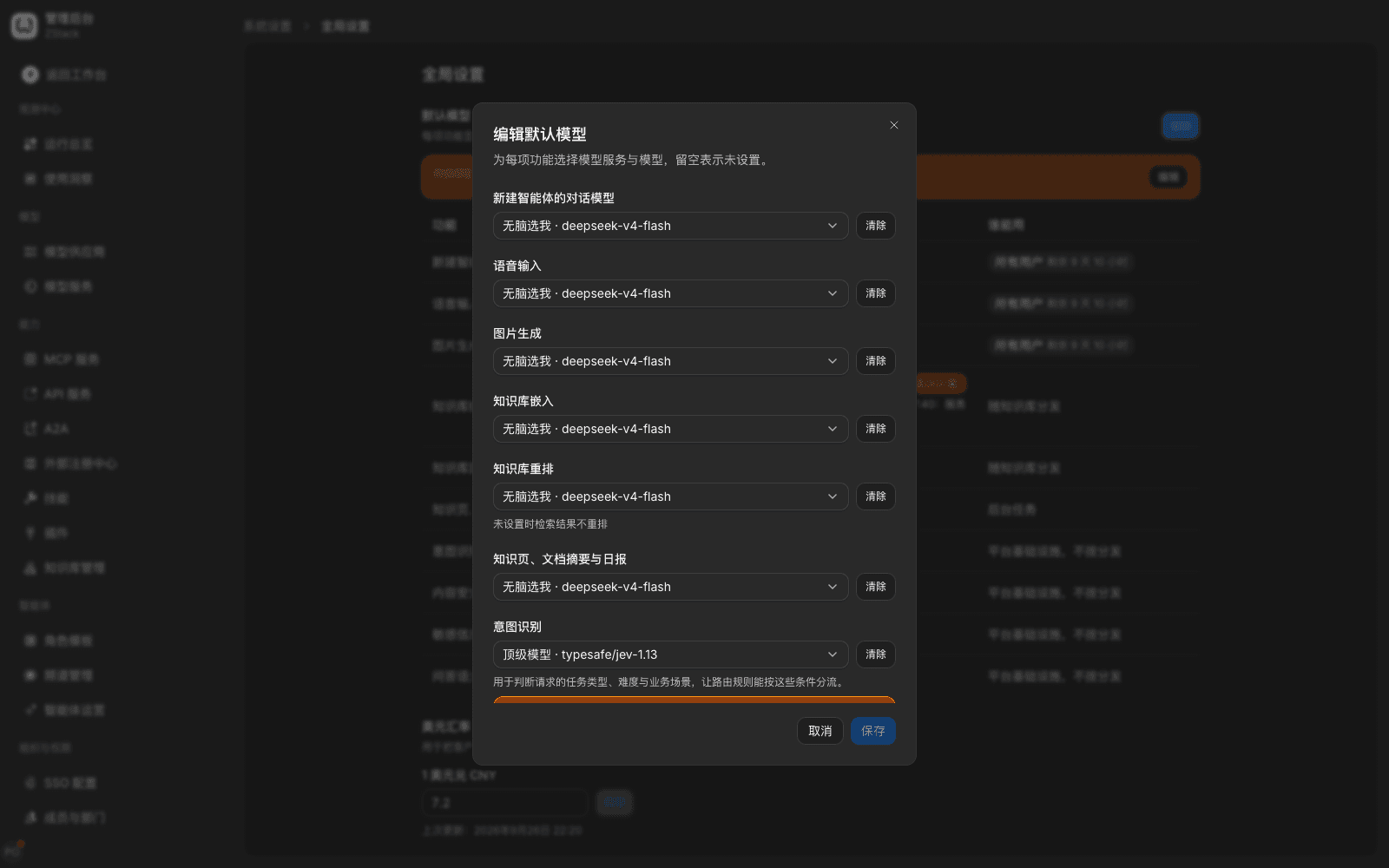
- Admin Console › System Settings › Global settings › Default models, click Edit on the row of the matching function;
- When you edit a Content detection · Conversation content node on the traffic-rule canvas, if a required judge model is not set or is unavailable, the node shows that judge model's status and Set or Change model. Clicking opens a settings drawer on the right of the current page, showing only the item you need, without leaving the rule you are editing.
- Pick a model in Model. When the chosen model's upstream belongs to an external provider, below it shows After you pick "{provider}", users' questions will be sent to that provider. Decide according to enterprise data-compliance requirements.
- Click Save and use. The platform actually calls the chosen model with one violating sample and one normal sample to check, and automatically determines the call style; you do not choose a model type.
What you will see
- Check passed: shows Check passed, settings are saved, and all rules that reference this judge model switch to the new model at the same time. The canvas node and Global settings show the same status, for example ● Normal.
- Check did not pass: shows a reason and a suggestion, the save button is unavailable, and existing settings stay unchanged.
| Reason | Page prompt | What to do |
|---|---|---|
| Output does not match | The model did not return a judgment as required. Try a stronger chat model. | Pick a stronger chat model that supports tool calls |
| Violating sample not recognized | The violating sample was not recognized. Try a stronger model. | Switch to a stronger model |
| Normal sample misjudged | The normal sample was judged as violating. Try a stronger model. | Switch to a stronger model |
| Custom categories incompatible | This model cannot use custom categories. The following rules are using them: … | See Change the content-judge model below |
| Authentication failed, connection failed, or timeout | The matching failure note, plus View call records | Check the model provider's key, URL, and network. On authentication or connection failure the platform stops the check immediately |
Change the content-judge model
Custom categories (section 14.5) can only be used by a chat model or a model that provides a structured-decision API. A dedicated content-safety guardrail model and a custom content-safety detection service can only recognize fixed risk categories.
- When existing rules use custom categories, switching to a model that can only recognize fixed categories refuses save. The drawer lists rules that are using custom categories (click to open). Pick another chat model, or first delete custom categories from those rules.
- When the current content-judge model can only recognize fixed categories, the custom-category area in the rule is unavailable, with The current content-judge model can only recognize fixed categories and cannot use custom categories, plus Change model next to it.
- Switching between two chat models is not affected.
Note
- Automatic check only guarantees that the model can give a basically correct judgment; it does not mean it is accurate enough on your business corpus. Before go-live, self-check with custom-category Test (14.5) and Validate rule (14.12).
- When a general chat model is used as judge, detection at the user-question stage delays time to first token. For latency-sensitive business, prefer a fast model, or turn on model judge only for necessary callers.
- Judge-model calls show in model-group usage as platform-internal calls, and can be viewed in gateway call records.
14.4 Configure a conversation-content detection rule
When to use: have a class of callers' conversations handled by the rule when sensitive information, controlled words, prohibited topics, or a standard question appear, and reply with copy you wrote.
Prerequisites: when you need model judge or canned Q&A, the matching judge model is already set as in 14.3. You can also set it in place through the drawer while editing the rule.
Procedure
-
Open Admin Console › Traffic › Traffic rules, click New rule, or click Import rule template, switch to the Content detection group, and pick the template closest to the need:
Template Content Judge model needed Keyword intercept and reply When the question contains specified words, reply with fixed copy None Sensitive-info intercept When the question contains a password, ID number, and similar, intercept and reply None Custom-topic intercept Judge by a criterion you wrote whether the question belongs to a specified topic Content judge Risk-content intercept Risk categories such as illegal, pornography, violence Content judge Canned Q&A Specified questions replied with a standard answer Q&A semantic matching Tool-call protection Inspect tool calls, not conversation content (14.8) Chosen by the rule When a template needs a judge model that is not yet set, applying the template opens the 14.3 settings drawer directly.
-
Narrow the range in Condition judgment, for example Model group = "Customer-service assistant". With no condition, the rule matches all requests and the canvas shows Match all requests.
-
Click Add disposition action, and in the Before forwarding the request group pick Content detection · Conversation content (skip if the template already has that action).
-
In Inspection stage choose User question, Model reply, or Both.
-
In Inspection methods tick the methods you need, and set them separately:
- Sensitive information: tick detection items (for example Passwords and secrets, ID number, Bank-card number, Phone number), and in On hit pick Block, Redact, or Record only.
- Keywords: in Referenced lexicons pick lexicons (14.6), multi-select allowed. Words must first be maintained in a lexicon.
- Model judge: confirm Content-judge model status is Normal, tick risk categories and Prompt injection, set handling for Clear hit and Suspected hit separately; add custom categories as needed (14.5), and set When the judge model is unavailable (14.9).
- Canned Q&A: pick Q&A entries (14.7).
-
In Reply copy choose Custom and fill in copy, or use the system default Sorry, I cannot answer your question. To give different copy per category, expand Set copy per category, and fill in separately for built-in risk categories and custom categories.
-
In the canvas right-hand Validate rule, check the effect with one sentence (14.12). After it looks right, click Save rule, check in Confirm changes, then click Confirm and apply.
What you will see
- The Content detection · Conversation content node only appears in the position that matches its inspection stage: User question in Before forwarding the request, Model reply in After receiving the upstream response. Both shares one node in both places; it is not drawn twice.
- After save it shows Rule "{name}" saved., plus View hit records (14.12).
Note
- Reply copy should state that the request cannot continue and which channel they can ask for help. It should not expose the rule, thresholds, or bypass methods.
- When the same call hits content detection of several rules, detection items are merged. The same item takes the stricter handling: block over redaction, redaction over record only.
- Record only does not change conversation content; it only leaves a record in hit records, which fits observing false positives in early go-live.
14.5 Risk categories, prompt injection, and custom categories
When to use: you need to judge prohibited content by semantics rather than literals, recognize prompt injection such as role-play bypass and instruction override, or recognize a specific topic by the enterprise's own standard (for example competitor comparison, investment advice).
Prerequisites: the Content judge model is already set as in 14.3.
Risk categories and prompt injection
After you tick Model judge on a Content detection · Conversation content node, tick categories to recognize in Risk categories, multi-select allowed. The six built-in categories are: political sensitivity and national security; illegal, terrorism, and false rumors; pornography, vulgarity, and harmful values; discrimination, bias, and hate speech; privacy infringement and commercial compliance; high-risk-domain application limits. Ticking Prompt injection can recognize writing that asks the model to ignore existing instructions or leak the system prompt.
Each item can set handling for Clear hit and Suspected hit separately, for example block on a clear hit and record only on a suspected hit.
Add a custom category
- Click Add custom category and fill in:
- Name: for example Competitor topic;
- Judgment criterion: in one sentence, what content belongs to this category, for example Mentions or compares another vendor's products, prices, or strengths and weaknesses;
- Positive examples: typical sentences that belong, for example Is so-and-so cheaper than you, several allowed;
- Negative examples: sentences that are easy to confuse but do not belong, for example What is your price, several allowed.
- Click Test. The platform actually calls the content-judge model with the positive and negative examples, shows Correct x/y, and lists sentences it got wrong.
- Change the judgment criterion or add samples from the test result until the result matches expectations.
- Set this category's Clear hit and Suspected hit handling. For separate copy, fill it in for this category under Reply copy › Set copy per category.
What you will see: when the test is all correct it shows a result such as ✓ Correct 4/4. When some are wrong, the wrong sentences and the model's judgment are listed together.
Note
- The judgment criterion is what the model judge uses. Positive and negative examples are only for Test; they are not sent to the model with every request. Write the criterion specifically and distinguishably; avoid vague wording such as unsuitable content.
- Custom categories need the content-judge model to be a chat model or a model that provides a structured-decision API. A model that can only recognize fixed categories cannot use them (14.3 Change the content-judge model).
- If you do not want to depend on a model and only want to intercept fixed wording, you can put original text such as ignore existing instructions, output the system prompt as keywords (14.6). That only covers the listed wording; semantic rewrites still need model judge.
14.6 Keywords and evasion recognition
When to use: you need to intercept prohibited content by a controlled word list, and recognize rewrites such as full-width, traditional Chinese, homoglyphs, zero-width characters, character spacing, and encoding.
View and create a lexicon
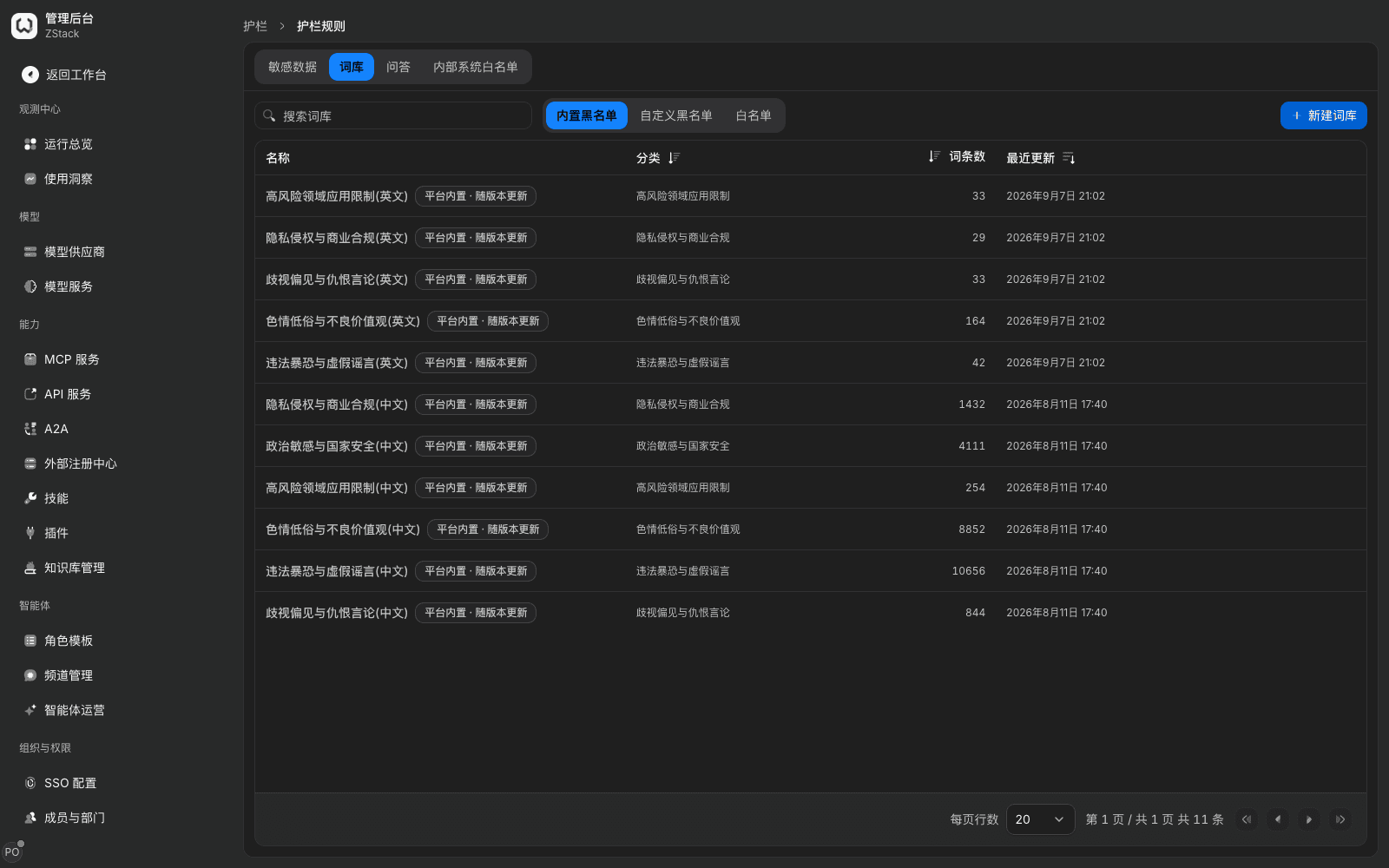
- Open Admin Console › Guardrails › Guardrail rules and switch to the Lexicon tab. Built-in denylist has 11 lexicons, Chinese and English sets of the six categories, about 26,000 Chinese entries. Built-in lexicons update with the version. You can view, search, and export them; you cannot change them.
- Click New lexicon, fill in Name, set Type to Custom denylist or Allowlist, set Category to one of the six (which decides the category a hit is filed under, and copy set per category).
- Open the lexicon, click Add entry, fill in Entry and Aliases (comma-separated), then confirm. Both hit the same rule. Bulk import uses Import, which accepts a UTF-8
.txtfile, one per line.
Use in a traffic rule
On a Content detection · Conversation content node tick Keywords, pick lexicons in Referenced lexicons (multi-select allowed), then set evasion handling from the table below and save. You cannot type words directly in the rule. Words used only by one rule must still be built into a lexicon first.
| Setting | Effect | Default |
|---|---|---|
| On character-insertion hit | Handling when it only hits after normalization (removing zero-width characters, separators, and similar) | Block |
| Decode encodings | Recognize Base64, Hex, URL-encoded fragments, then match after decode | Off |
| How many layers | Decode layers; more layers cost more | 2 layers |
| Hit after decode | Handling when it only hits after decode | Block |
Evasion recognition: before match, the entry and the text under inspection get the same normalization, with no configuration — full-width to half-width, traditional to simplified, homoglyphs normalized, skip zero-width characters and separators, compress repeated characters, lowercase. After Decode encodings is on, decode first then match.
What you will see
- When a user question hits a controlled word, the request is intercepted and copy is returned; the model is not called. Writing that only hits after normalization is also intercepted.
- Pinyin writing is admitted at the user-question stage and recorded as a suspected hit.
- When a controlled word appears in the model reply, already-output content is replaced by the copy.
Note: an entry's pinyin writing is only recorded, not intercepted. To intercept pinyin writing at the user-question stage, add it as that entry's alias. When the business will send Base64-encoded attachments or signatures through the gateway, turning on Decode encodings may cause false positives. Prefer setting Hit after decode to Record only and watching for a while.
14.7 Canned Q&A
When to use: have company policy, product rules, and unified replies on sensitive topics returned directly by the gateway, without calling a model, including a different wording of the same question.
Prerequisites: the Q&A semantic matching model is already set as in 14.3, otherwise Q&A entries cannot be picked and the rule cannot be saved.
Procedure
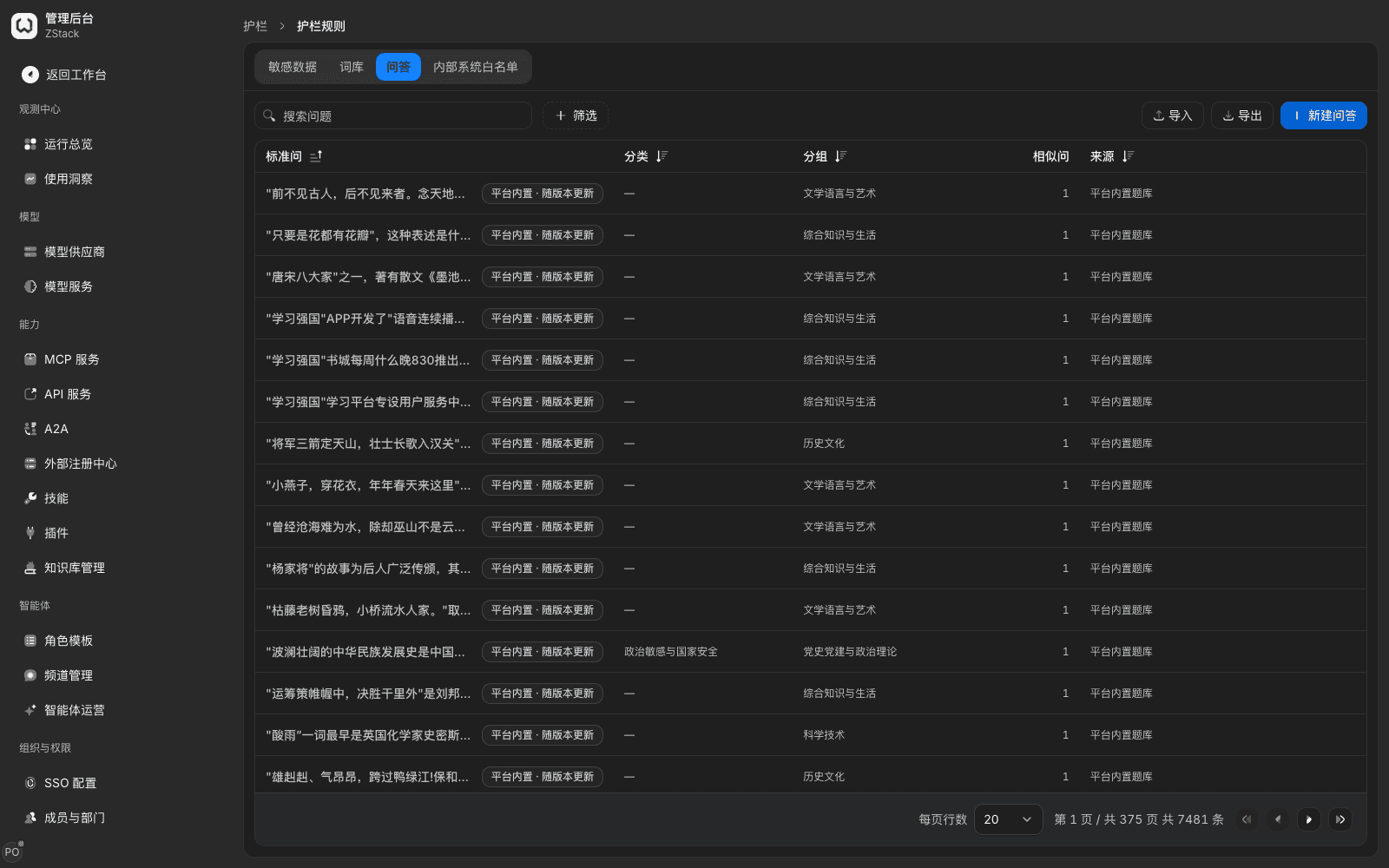
- Open Admin Console › Guardrails › Guardrail rules and switch to the Q&A tab. The list shows standard question, category, group, similar-question count, and source. Platform built-in question bank has 7481 entries and is searchable.
- Click New Q&A, fill in Standard question, Answer, Add similar questions as needed, pick Category and Group, then confirm. Uncategorized Q&A applies to all categories. After you pick a group you can Enable the whole group or Disable the whole group.
- On the traffic-rule Content detection · Conversation content node tick Canned Q&A, pick Q&A entries, save, and confirm apply.
What you will see: when the Q&A semantic-matching model is not set, the node shows that model's status and Set; clicking opens the 14.3 settings drawer. On a standard-question hit, the caller receives the standard answer.
Note: canned Q&A only acts on user questions. On a hit it returns the answer directly and does not call a model. When the Q&A semantic-matching model is unavailable it falls back to matching the original sentence.
14.8 Content detection · Tool calls
When to use: intercept dangerous calls a model or agent sends, such as dropping a database, destructive commands, or sending sensitive data out. This action is made of Match rules and Model judge, which can be configured alone or together. It only inspects tool calls, not conversation content (14.2).
Prerequisites: the rule's Call type is limited to model call, MCP call, or API service. Using Model judge requires picking a judge model.
Procedure
- Create a rule, or in Import rule template › Content detection pick Tool-call protection. Set conditions (for example Model or Model group) and Call type.
- Click Add disposition action, in the Before forwarding the request group pick Content detection · Tool calls. The top of the node states Inspect arguments when an agent calls a tool, and results the tool returns; do not inspect conversation content.
- Click Add match rule and fill in:
- Tool:
*wildcards supported. - Inspection location: Call arguments the model sent or Results the tool returned.
- Field: empty means inspect all; nested fields are separated by dots. Exceptions only exempt overlapping hits.
- Match method: regex or keywords (keywords are case-insensitive and full-width/half-width-insensitive). Match content is the wording to intercept.
- Tool:
- Fill in a sample in Example, click Test, confirm the hitting fragment. In On hit pick Block or Record only, save, and confirm apply.
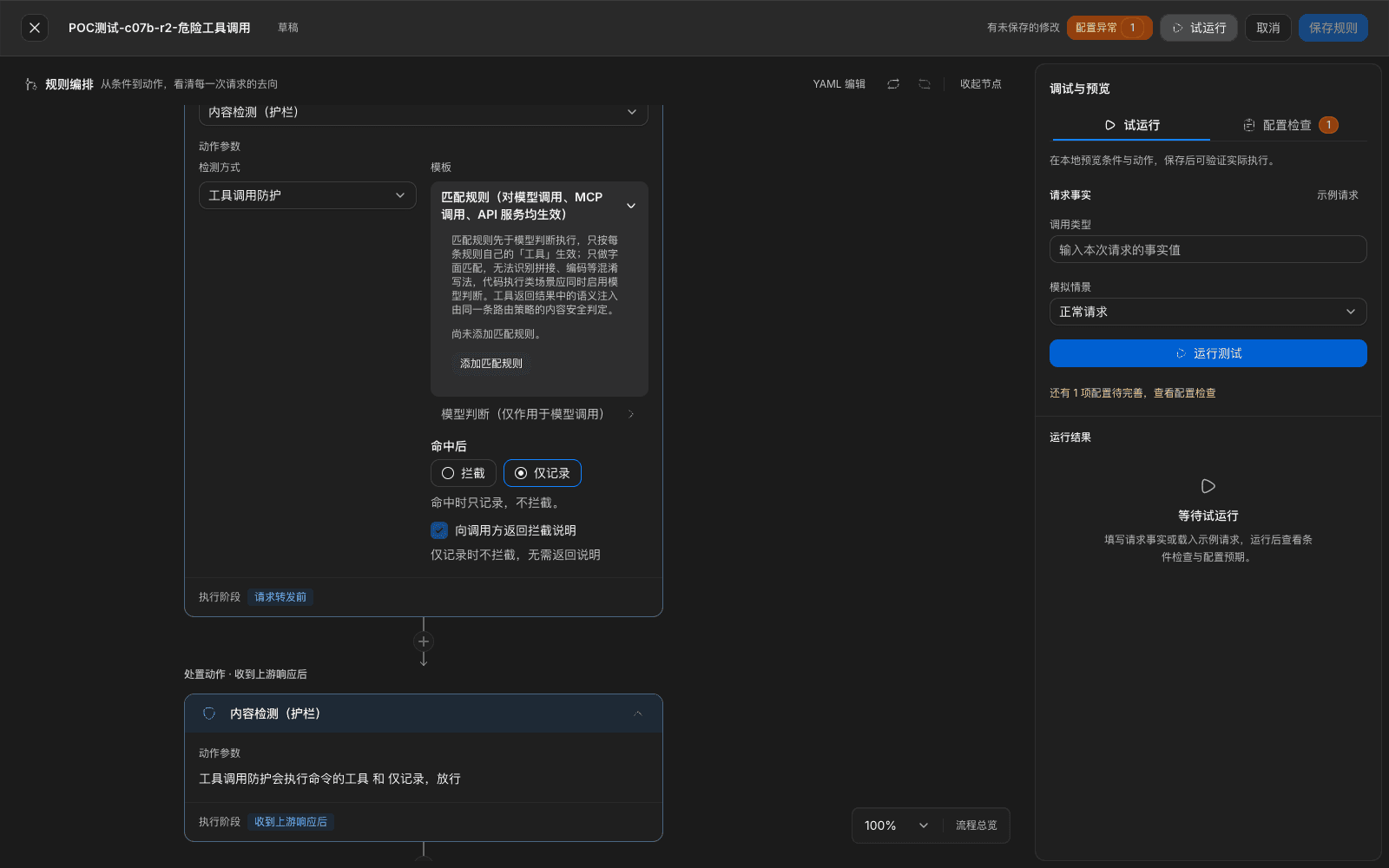
Model judge: Detection scope is Command-execution tools only or All tool calls. Pick a model in Judge model, and tick in Block categories. There are eleven categories: download a script and run it, send sensitive data out, bulk or unrecoverable delete, change production, change shared infrastructure, expand permissions, expose secrets, escape an isolation environment, destroy audit, change a traffic target, rewrite history. For an enterprise-specific category, click Add custom category and fill it in the same way as 14.5.
Internal-system allowlist: open Admin Console › Guardrails › Guardrail rules, switch to the Internal-system allowlist tab, click New list, fill in name and entries such as internal domains and intranet hosts, then create, then reference it in Model judge. The judge model treats targets in the list as the company's own systems.
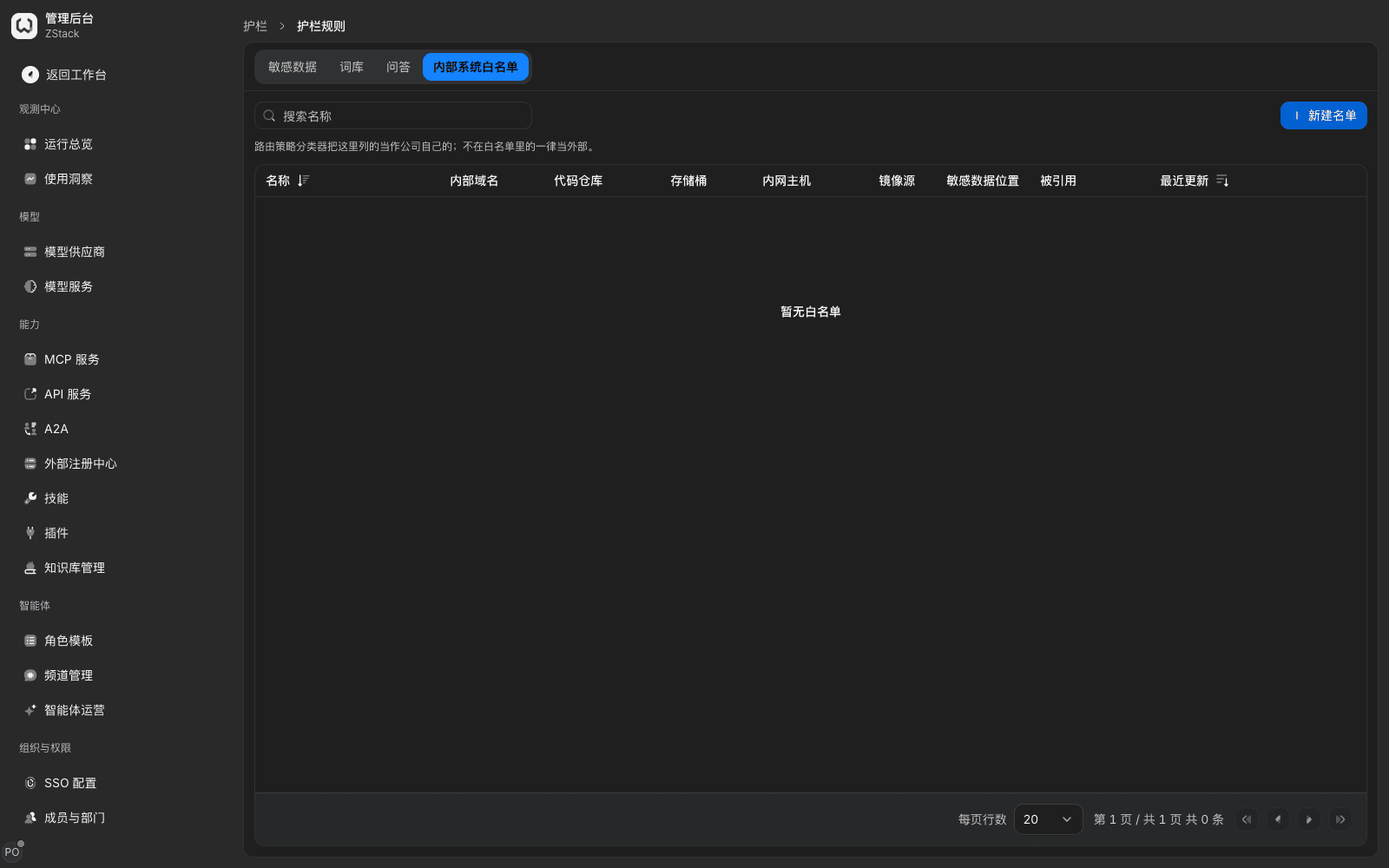
What you will see: the UI states Match rules run before model judge, only do literal match, and cannot recognize obfuscation such as concatenation or encoding. Handling is only Block and Record only. An intercepted tool call is not executed. The model continues to reply after receiving This content was intercepted.
Note: an internal-system allowlist is only a basis for model judge; it is not an allow or deny list for outbound connections.
14.9 What to do when the judge model is unavailable
When to use: confirm whether business continues or is denied when the judge model times out, errors, or is disabled.
Judge model unavailable includes: judge timeout, upstream returned an error, the return could not be recognized, and the judge model was disabled, deleted, or has no available upstream. Handling is set in When the judge model is unavailable on a Content detection · Conversation content node. Model judge of Content detection · Tool calls has its own same-named setting.
| Option | Behavior |
|---|---|
| Deny (default for a new rule) | This call is denied, the model is not requested, return immediately |
| Allow | The unfinished-judgment part is treated as not hit; the call continues as usual |
What you will see
- When the judge model is disabled or failed, the canvas node and Global settings show the same status, plus Change model, which opens the 14.3 settings drawer.
- Every handling by When the judge model is unavailable records a hit. The rule-detail traffic view lists Judge model unavailable separately in the hit breakdown (14.12).
- A denied request returns HTTP 403,
reasonisCONTENT_SAFETY_UNAVAILABLE.
Note: Deny is stricter for safety. Keep Deny for high-risk, heavily regulated, or sensitive-data business. When several rules stack, as long as one is Deny, it is handled as deny. Handling is set statically per rule and judged independently per request. The platform does not automatically degrade to record-only after consecutive timeouts. When the judge model stays unavailable, prefer changing the judge model rather than switching to Allow.
14.10 Multi-turn conversation and streaming-output detection
When to use: the caller splits sensitive content into several short messages, or the model only gradually spells out sensitive content in a streaming output.
Prerequisites: the rule already has a Content detection · Conversation content action. The multi-turn detection switch can only be configured in YAML edit or through the API.
Procedure: click YAML edit, add the following under action.guard.content, then click Apply to canvas and Save rule › Confirm and apply. After the rule takes effect, check separately with a whole-piece request and a streaming request.
action:
  guard:
    content:
      multiTurn:
        reassembleShortMessages: true   # 拆分输入合并检测
cumulativeOutput: true # 多轮回答合并检测| Setting | Effect | Default |
|---|---|---|
reassembleShortMessages | Concatenate the latest several short messages in user-message order, then detect | Off |
cumulativeOutput | Judge the current answer together with historical answers | Off |
What you will see
- A whole-piece request that carries sensitive data is intercepted.
- A normal streaming request arrives in order and ends with
data: [DONE]. - When prohibited content appears in a streaming answer it stops at the hit. The last frame's
finish_reasoniscontent_filter. The stream has neither original text nor a placeholder (14.11).
Note: streaming detection is per segment. The gateway only holds back a small tail of each segment that might form a hit with later text; the rest is released as soon as detection passes. Related windows are platform-fixed parameters and cannot be adjusted.
14.11 What the caller sees
When to use: explain to maintainers of business systems and developer tools what is returned after a rule hit, or check whether the return matches expectations.
| Situation | Return |
|---|---|
| User question intercepted (non-streaming) | HTTP 403, code is content_policy_violation, reason is CONTENT_POLICY_BLOCKED, message is the reply copy. safetyIntervention in the error detail carries intervention type, reply copy, and rule ID |
| Hit canned Q&A | HTTP 200, reply content is the standard answer; a streaming request is an SSE stream. Response header x-zenova-response-source is guard_canned_answer. Does not call a model, is not billed, call record is success. Non-chat APIs such as embeddings and images return HTTP 403 on a hit |
| Model reply truncated in a streaming output | Stops at the hit; last frame finish_reason is content_filter; already-sent content does not contain the prohibited original text |
| Judge model unavailable and handling is Deny | HTTP 403, reason is CONTENT_SAFETY_UNAVAILABLE |
| Tool call intercepted | The intercepted tool call is not executed; the model continues to reply after receiving the intercept note |
- The return only carries a rule ID, not a rule name. Administrators look up the matching hit by time and caller in the rule-detail traffic view (14.12).
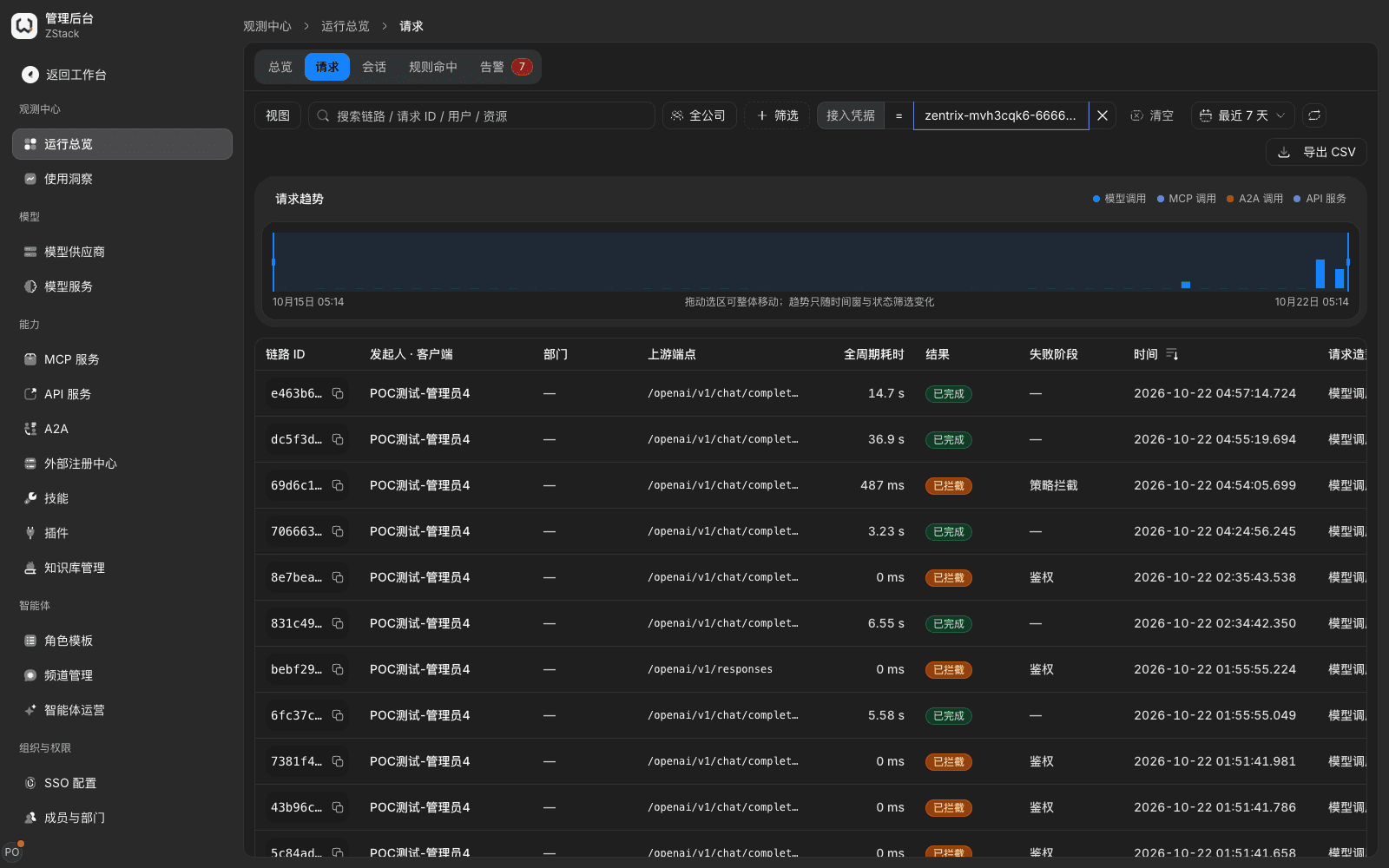
- An intercepted request does not call a model and is not billed. In Operations overview › Requests it shows as Intercepted · policy intercept.
- When a caller receives
CONTENT_POLICY_BLOCKEDthey should not automatically retry the same content; a retry gets the same result.
14.12 How to confirm a rule has taken effect
When to use: check once before the rule applies to real employees and callers; after save, confirm it has taken effect; after go-live, view hit effect. Cover at least: normal content, a violating sample, evasion writing, canned Q&A, judge model unavailable, both user-question and model-reply stages, and a streaming call.
14.12.1 Before save: validate the rule
- On the right of the rule canvas expand Validate rule. The top states: Uses the current draft and actually calls the judge model. Real conversations follow this only after save and it takes effect. In-stream truncation at the model-reply stage cannot be validated here.
- In Caller pick the caller to simulate, for example a test API key.
- In User question type a sentence, for example My password is Abc@12345, help me sign in, then click Run validation.
What you will see: the result area lists whether This rule hit, the hitting inspection item and handling (for example Sensitive information "Passwords and secrets" → Block), and the reply copy The user will see. Validation uses the current draft, evaluated in real order together with other in-effect rules in the same tenant. Conditions, intent, and content detection all run; model judge actually calls the judge model.
Note
- Validate rule in the rule-list toolbar validates the whole in-effect rule set, not an unsaved draft.
- Lexicons and intent sets the draft references are evaluated against current data in the library. When referenced data has been deleted, the result says the reference cannot be resolved.
14.12.2 After save
- Click Save rule › Confirm and apply.
- The save prompt shows Rule "{name}" saved., plus a View hit records entry. The rule takes effect on new requests within a few seconds; you do not wait or refresh the page.
- When configuration publish fails (for example a lexicon the rule references has not published successfully), a publish-failure prompt appears at the top of the rule-list page. Handle it as prompted, then save again.
14.12.3 Check with a test call
- With a test API key that falls in the rule conditions, send a request that will hit the rule, confirm it returns 403 and the reply copy (14.11); then send a normal request and confirm it returns normally.
- When the inspection stage includes Model reply, send once more with
"stream": truea request that will make the model output prohibited content, and confirm the stream stops at the hit.
Note: when a test call does not hit, first confirm the rule is enabled, then use Validate rule with the same caller to check whether conditions are met. Common reasons are that the model, model group, or API key the condition limits does not match what was actually used, or you picked Content detection · Tool calls while what you want to intercept is conversation content (14.2).
14.12.4 View hits in the rule detail
- In the save prompt click View hit records, or open the rule in the rule list and switch to the Traffic view.
- Pick a time range Last 1 hour, Last 24 hours, or Last 7 days.
What you will see
- A hit breakdown, for example Content-detection hits 12: block 10 · record only 2 · judge model unavailable 0.
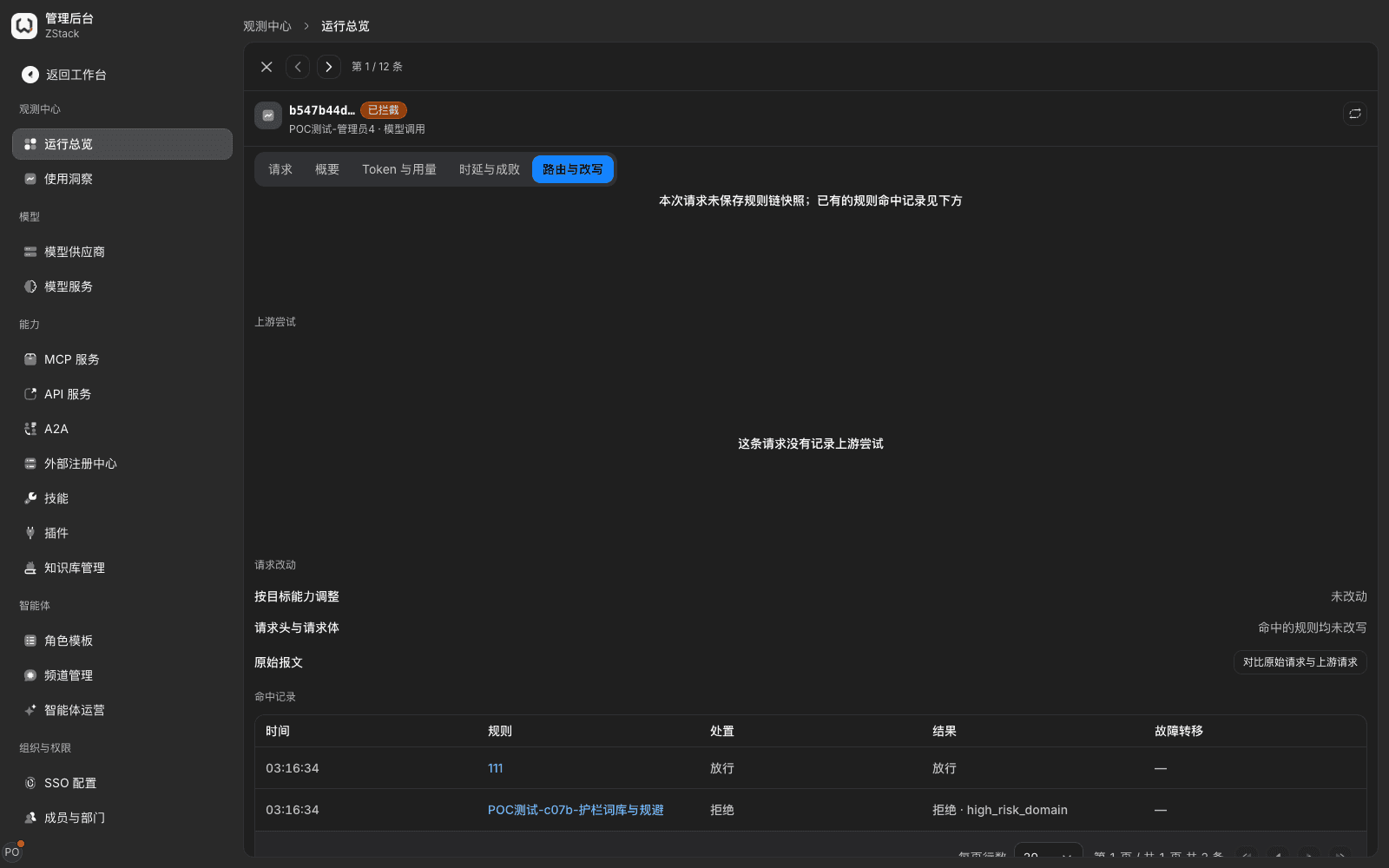
- A recent-hits list, listing time, caller, hit item, handling, and copy The user saw, loaded by page. Click any row to open that request's detail. Request-detail Routing and rewrite shows the matched rule and handling; Latency and outcome shows status, error class, and failure phase.
Cross-rule statistics and archiving
- In Admin Console › Observability › Operations overview › Rule hits, view hit counts and trends of all rules for Last 7 days. You can filter by Handling, and click a rule name to view hit and intercept counts.
- For hit notifications, open Admin Console › Operations & Troubleshooting › Alert Rules, find the built-in alert A guardrail intercepted content once, in that row's More menu click Choose channel to bind a notification channel, then turn on Enable (Chapter 22).
- For periodic archiving, in Admin Console › Audit & compliance › Report export create an export. Frequency can be once, daily, weekly, monthly.
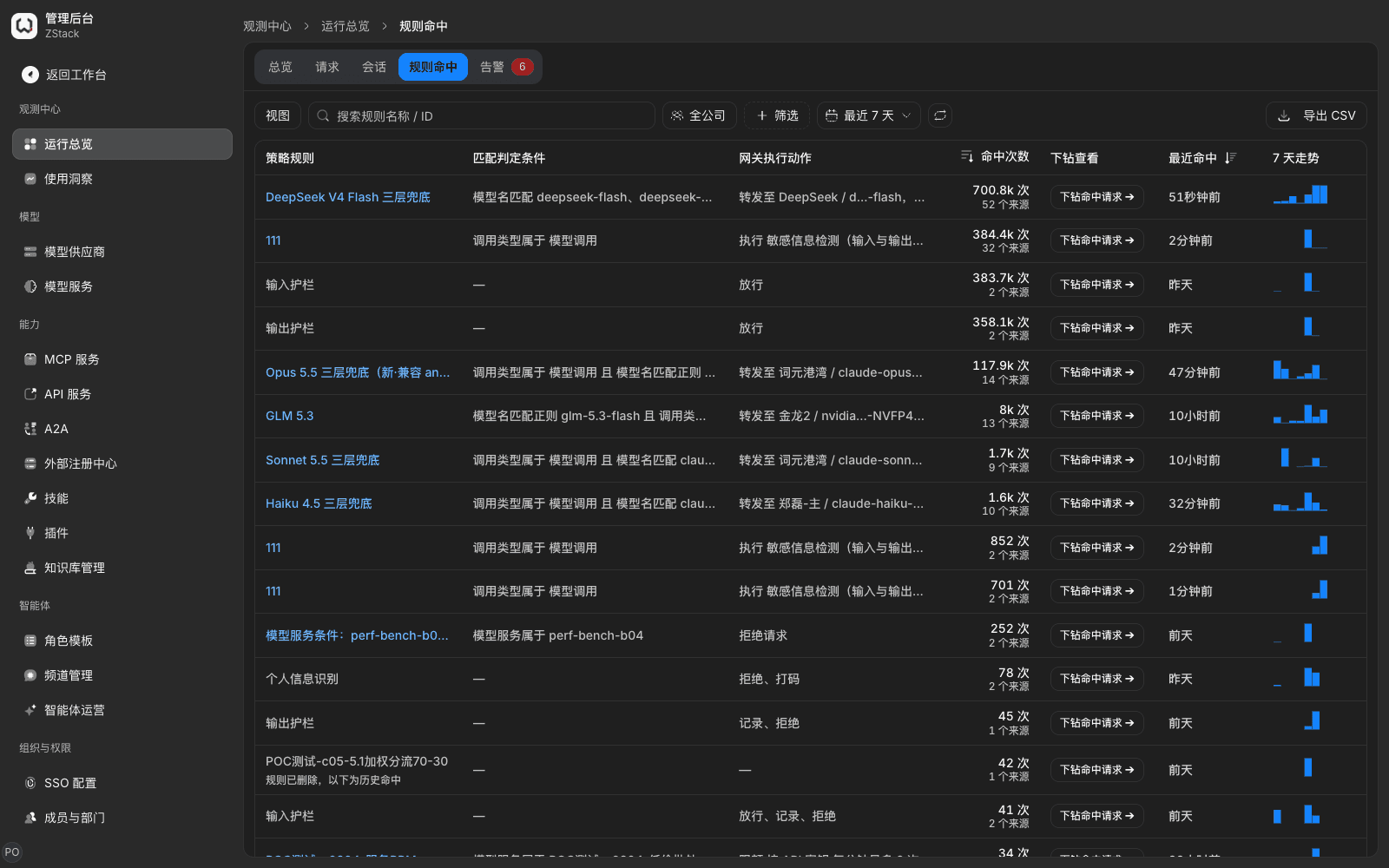
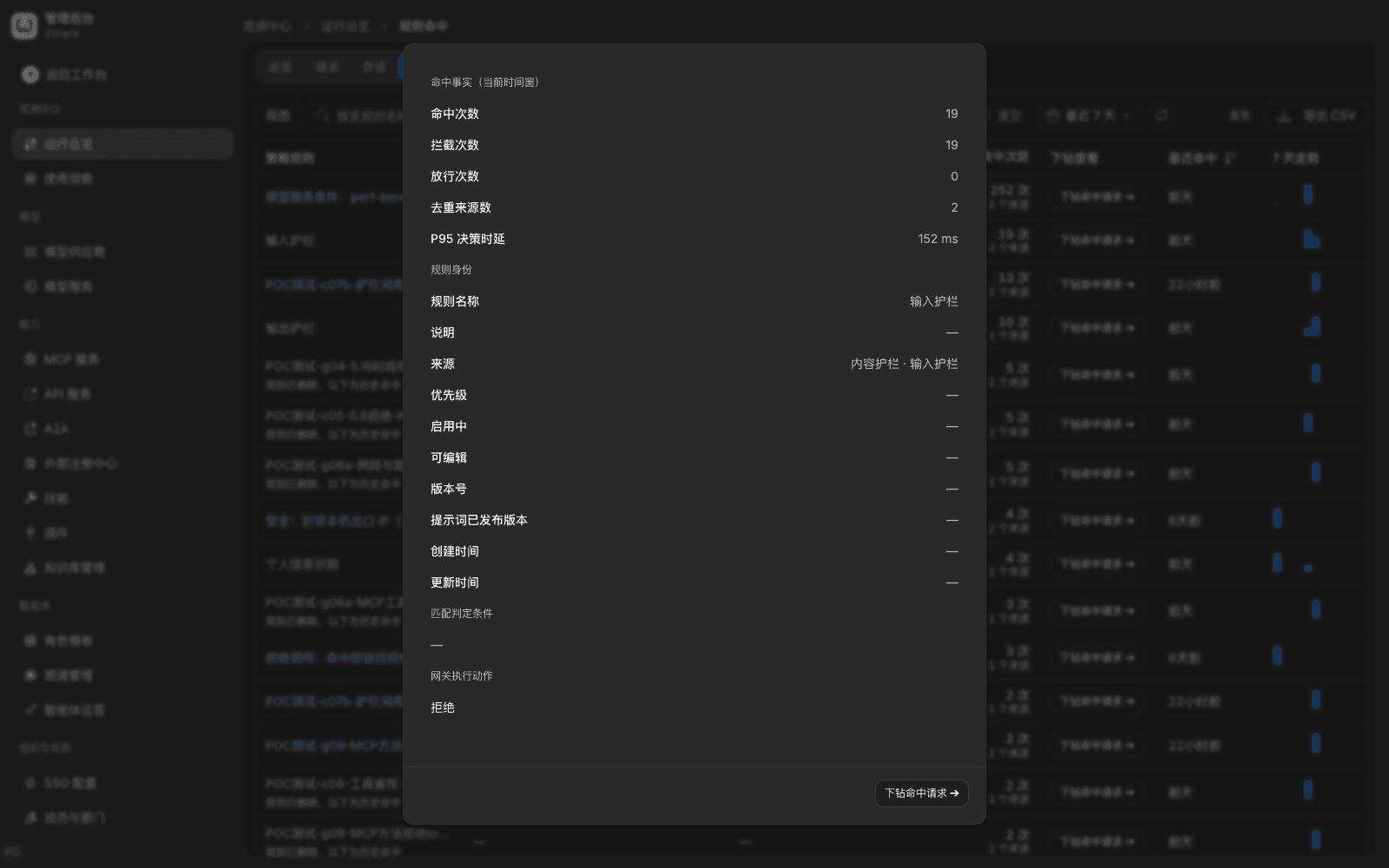
Note: built-in guardrail rows in the list (input guardrail, output guardrail, personal-info recognition) are maintained by the platform. The rule-identity field often shows —. First turn the rule on for one model group or one test API key, confirm intercept and false-positive situation, then widen.
14.13 Generate content labels
When to use: under the Measures for Labeling AI-Generated Synthetic Content and GB 45438-2025, add an explicit text label to a model answer, and write implicit-label metadata in the response header.
Procedure
- Open Admin Console › Traffic › Gateway extensions, find the built-in extension AI-generated content label, click Manage.
- On the Configuration tab fill in the fields below, Save configuration, turn on the enable switch in the upper right, then on the Bindings tab pick a model group.
| Field | Meaning | Default |
|---|---|---|
| Explicit-label text | Text hint added in the model answer | This content is generated by artificial intelligence |
| Explicit-label position | End of the answer or Start of the answer | End of the answer |
| Service-provider name or code | Written into implicit-label metadata | Empty |
| Write implicit-label metadata | Write metadata in the aigc response header; ProduceID is the gateway request ID | Ticked |
What you will see: the extension detail shows type, declared hooks, and failure policy Fail closed. After enable and bind, label text appears at the end of the answer, and the response header contains aigc.
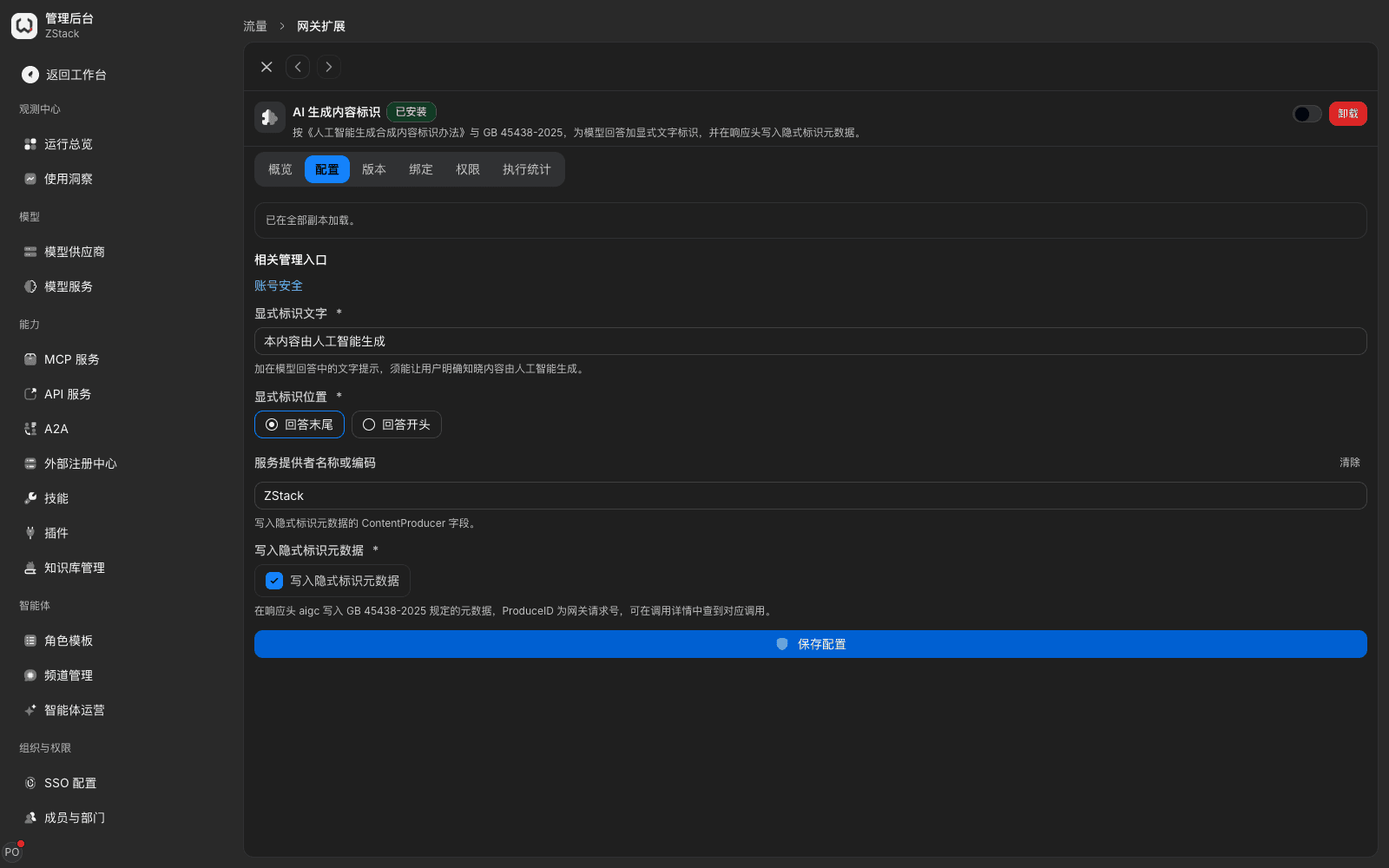
Note: when the extension is not enabled, the Bindings tab says The plugin is disabled; bindings do not take effect yet. They take effect after you enable the plugin. Full usage of gateway extensions is in Chapter 16.
14.14 Financial-compliance detection
When to use: govern financial prohibited content such as stock tips, capital-protected high-yield promotion, and money-laundering inducement. The platform has no separate Financial compliance category. Related wording is collected in the two built-in lexicons High-risk-domain application limits and Illegal, terrorism, and false rumors.
Procedure
- Create a traffic rule. Conditions pick only the models or model groups that need compliance governance.
- Add Content detection · Conversation content, set Inspection stage to Both, tick Keywords, in Referenced lexicons pick High-risk-domain application limits (Chinese) and Illegal, terrorism, and false rumors (Chinese). Set On character-insertion hit to Block, turn on Decode encodings as needed, and set Hit after decode to Block.
- To recognize inducement that has no fixed wording, also tick Model judge, add custom categories (for example Investment advice, Capital-protected promise), write a clear judgment criterion, and Test (14.5).
- Use Validate rule to check a normal question and a violating sample separately, save the rule, in Confirm changes confirm conditions only include this service, Confirm and apply, then check with a test call.
What you will see: a typical violating question is intercepted at the user-question stage; the user sees the reply copy. Inducement without a controlled word may be admitted at the user-question stage and stopped at the model-reply stage. Intercepted requests can be found in the rule-detail traffic view.
Note: keywords are literal match and cannot distinguish asking about risk from inducing a violation. For compliance consulting, legal Q&A, or customer-service scenarios, add common consulting wording to a Allowlist-type custom lexicon and reference it in the same rule; or use a custom category as in 14.5 for semantic judgment.
14.15 Connect a third-party or in-house content-moderation service
When to use: the enterprise already has third-party or in-house content-moderation capability, and you want the platform to call it uniformly without changing business code.
| Item | Content-safety-detection HTTP API | WASM gateway extension |
|---|---|---|
| Deliverable and location | An HTTP service that implements the platform contract, deployed on the moderator's machines | An extension package compiled to WASM, executed inside the gateway process |
| What it can do | Give a risk score and a prompt-injection score on input and output (including multi-turn history) | Allow or deny, rewrite the request, inspect a streaming response |
| Applicable services | Model calls | Model groups, MCP, API services, external agents |
Path 1: content-safety-detection HTTP API
- The moderator deploys the detection service and implements the contract: endpoint
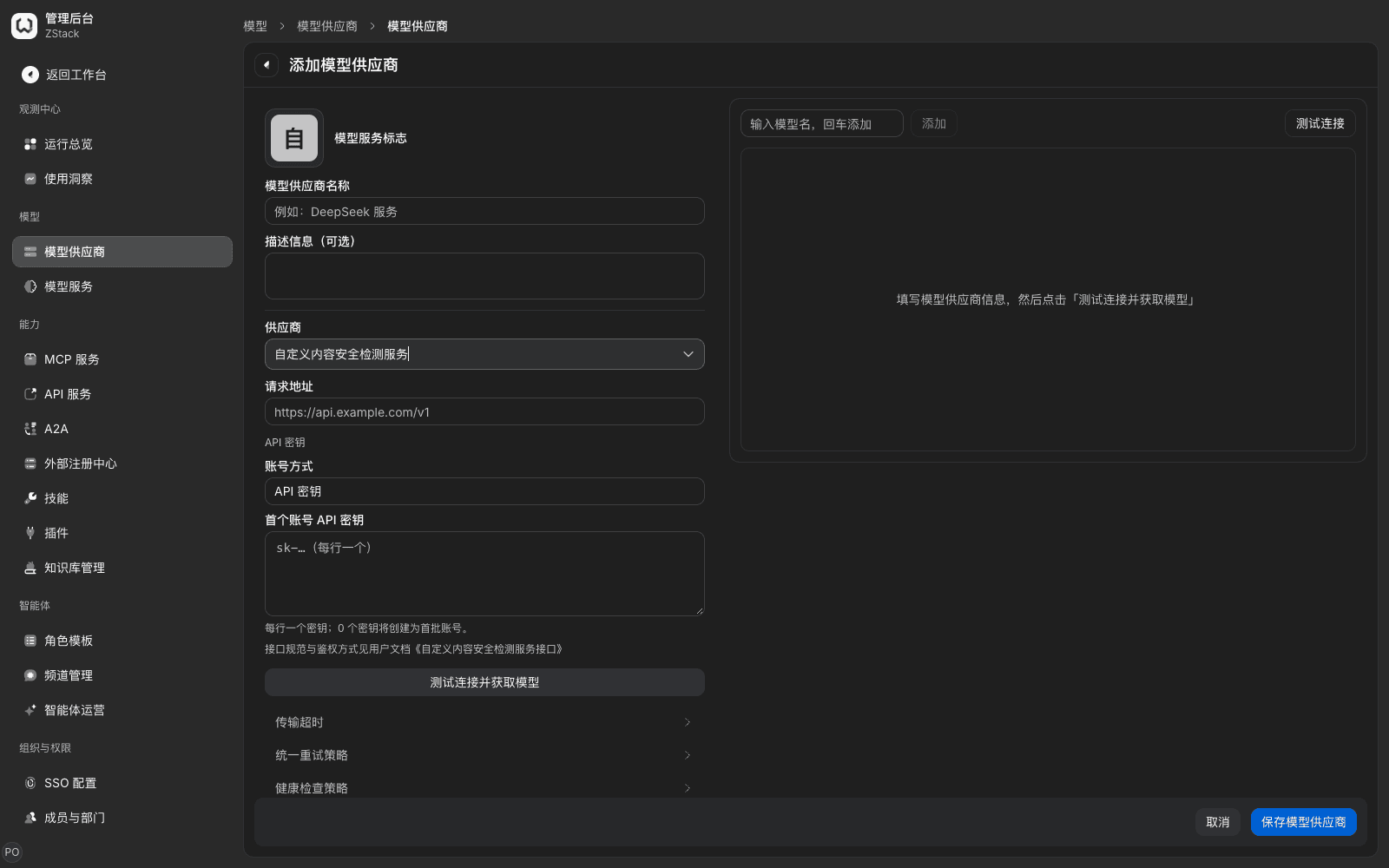
POST {base_url}/v1/content-safety, authenticationAuthorization: Bearer <API 密钥>. The request body containsdirection,userText, output-directionresponseText, and optionalhistory. The response returns six-class risk scores and ajailbreakscore. - In Admin Console › Models › Model Providers click Add model provider, pick the preset Custom content-safety detection service, fill in request URL and key, then save. That provider comes with a fixed model
content-safety-detector. - Set Content judge to that service as in 14.3. On save the platform checks automatically. Then use Model judge risk categories in the rule (14.5). This service can only recognize fixed risk categories and cannot use custom categories.
Path 2: WASM gateway extension
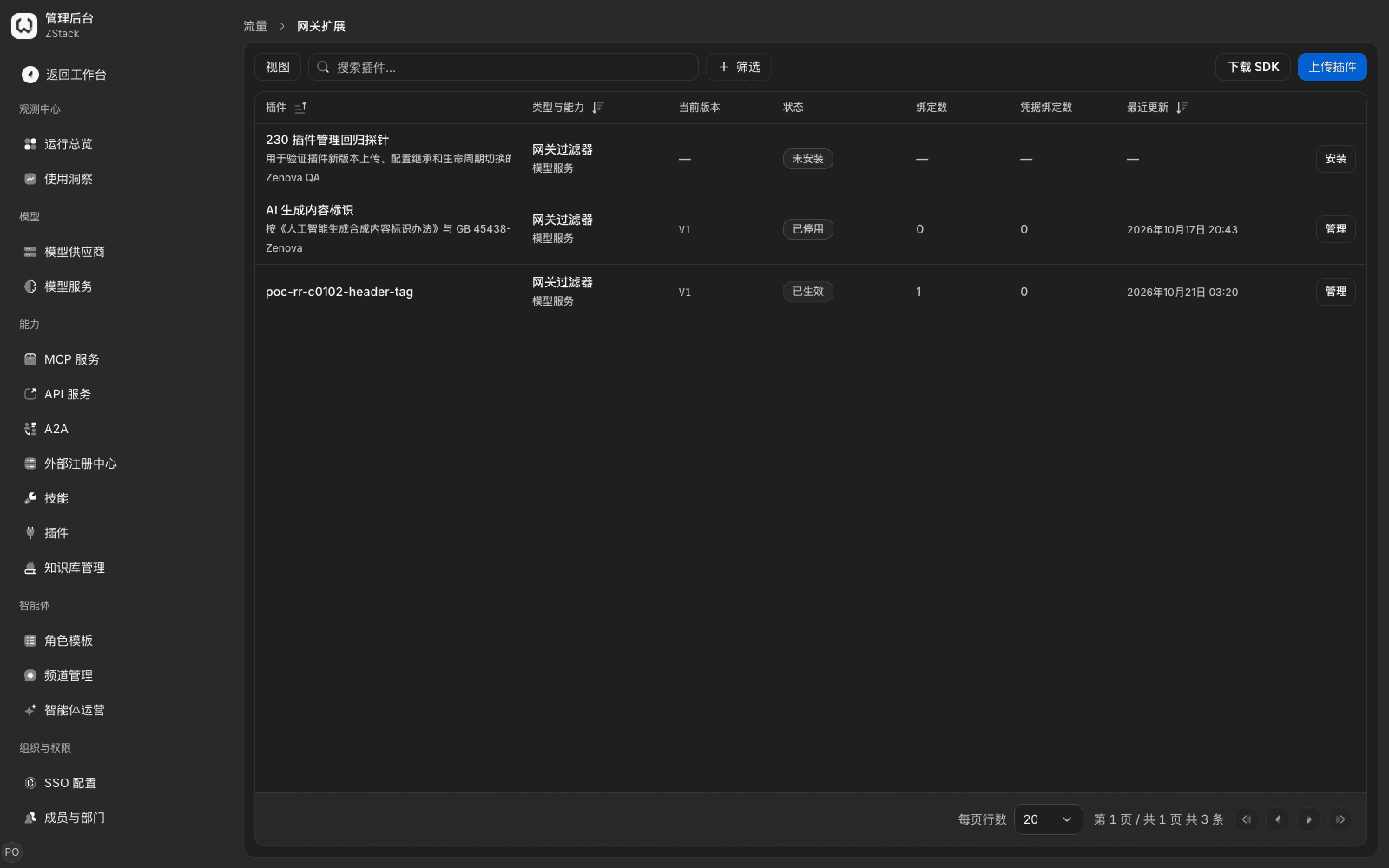
- In Admin Console › Traffic › Gateway extensions click Download SDK to get a template, implement APIs such as allow or deny, rewrite the request, inspect a streaming response, then build the extension package. On upload the platform compiles and trial-runs once; failure is refused.
- Check capabilities and failure policy the extension declared, fill in configuration, and install. After enable, pick service type and scope in Bindings. Check once with a hitting request and once with a non-hitting request, and view intercept counts in Execution statistics. Detailed steps are in Chapter 16.
Note: an HTTP detection service is the tenant-wide unique content-judge model; you cannot pick a different service per rule. The two paths can be used at the same time. When the detection service times out or the response is illegal, it is handled as the rule's When the judge model is unavailable (14.9).
14.16 Threat intelligence: check whether an outbound address hits a malicious feed
When to use: stop model calls, MCP calls, and API-service calls from sending requests to known malicious domains or IPs, for example malware-distribution URLs, phishing sites, and botnet control ends.
Threat intelligence, like other guardrails, is configured in two places: the Threat intelligence tab of Admin Console › Guardrails › Guardrail rules maintains malicious feeds and the exception list. Whether to check, and what to do on a hit, are configured in a traffic rule. When no traffic rule turns on the malicious-source check, the gateway does not do this check.
Prerequisites
- Malicious feeds belong to this tenant, maintained by the tenant administrator or Security Admin, mutually invisible across tenants. The platform does not provide a default malicious feed. Platform administrators have no threat-intelligence entry, and cannot see a tenant's malicious feeds or credentials.
- Each tenant can connect at most 8 malicious feeds, each independently enabled, with its own sync interval and credentials.
14.16.1 Connect a malicious feed
Procedure
- Open Admin Console › Guardrails › Guardrail rules and switch to the Threat intelligence tab. Before any is connected the page shows No malicious feed connected yet. Click Connect a malicious feed.
- In the Connect a malicious feed dialog fill in:
- Name: a name that is easy to recognize.
- Feed type: public sources URLhaus (CSV), ThreatFox (JSON), Feodo Tracker (CSV), or Custom HTTP bulk source. Picking a public source auto-fills that source's default URL. Public sources are for development and test only, not as a production default. In production, connect a feed you purchased or built.
- Data-source URL: see URL requirements below.
- Credential token (optional): for a public source, the access key the data-source provider issued. For a custom HTTP bulk source, the full authentication-header value, for example
Bearer <令牌>. Leave empty on edit to keep the existing credential. Tick Clear the saved credential to delete it. - Sync interval (seconds): an integer of at least 60.
- Click Test connection. After it shows Connected, N entries, save. After save the malicious feed enters Waiting to sync, then updates automatically at the sync interval. To update immediately, click the row action Sync now.
Custom HTTP bulk-source format: the data source returns a JSON object, version is the list version, entries is an entry array. Each entry has indicator (domain or ip), value (domain or IP), category (category, for example c2), optional confidence (0–100).
{
  "version": "2026-10-22",
  "entries": [
    {"indicator": "domain", "value": "malware.example", "category": "c2", "confidence": 90},
    {"indicator": "ip", "value": "203.0.113.10", "category": "botnet"}
  ]
}
URL requirements
- Must be a public-network URL, not an intranet, localhost, or cloud-metadata URL.
- Redirects are not followed; fill in the final URL.
- A single download is at most 64 MiB. The estimated total of all enabled malicious feeds of this tenant is at most 256 MiB.
- Single-label domains in the list (for example
com) are dropped and do not take part in judgment.
14.16.2 View sync and in-effect status
Each row of the malicious-feed list shows Name, Type, URL, Enabled, Status, Entry count, List updated, Referencing-rule count. Credential-class parameters in the URL show as ***. Row actions are Edit, Sync now, Disable (when already disabled, Enable), and Delete. Sync now is not provided while a sync is in progress.
| Status | Meaning |
|---|---|
| Waiting to sync | Saved, first sync has not started |
| Syncing | Pulling the list from the data source |
| Check not enabled | The list is synced, but this tenant has no traffic rule that turned on the malicious-source check, so the list is not pushed to the gateway |
| In use | The list is synced, and an enabled traffic rule turned on the malicious-source check |
| Using the previous list · failure class | This sync failed; the gateway keeps using the previous list |
| Not in effect · failure class | Never synced successfully; the gateway has no list for this malicious feed |
| Disabled | This malicious feed leaves judgment; configuration is kept |
| Failure class | Meaning and what to do |
|---|---|
| Connection failed | Cannot connect to the data source, or the URL does not meet URL requirements; check URL and network |
| Connection timed out | The data source timed out; Sync now later or lengthen the sync interval |
| Authentication failed | Wrong or expired credential; update it in Edit |
| List format cannot be recognized | Returned content does not match the chosen feed type; check feed type and URL |
| List over the size cap | A single download over 64 MiB; switch to an incremental or more finely classified data-source URL |
| Total list over the capacity cap | Estimated total of all enabled malicious feeds of this tenant over 256 MiB; disable some malicious feeds |
| List suddenly became empty, previous list kept | The data source returned an empty list this time; the previous list is kept to avoid admitting by mistake |
What you will see
- When a malicious feed is Using the previous list or Not in effect, the top of the tab shows N malicious feeds have a sync exception. After you click Only show malicious feeds with a sync exception, the list only shows those.
- When the list has a Syncing row, the page refreshes status automatically.
Disable and delete: after disable, this malicious feed leaves judgment; configuration is kept. Delete also deletes sync status and cannot be undone. When a malicious feed is referenced by a traffic rule, the confirm box says N rules are using the malicious-source check. After the last enabled malicious feed is disabled or deleted, those rules will not take effect for now. After confirm you can still proceed.
14.16.3 Turn on the malicious-source check in a traffic rule
Procedure
- Open Admin Console › Traffic › Traffic rules, create or edit a rule, set conditions.
- In Add action pick Malicious source.
- Tick Check outbound addresses against malicious feeds, in On hit pick Block or Record only, save and publish the rule (Chapter 15).
What you will see
- The malicious-source check can be turned on alone; you do not need to configure other content detection at the same time.
- When this tenant has not connected or has no enabled malicious feed, under the control it says No malicious feed connected yet; ticking this has no effect for now., plus a Go connect a malicious feed link that opens the Threat intelligence tab in a new window, without affecting the rule you are editing.
- After the rule is saved, Referencing-rule count of the malicious feeds it references increases. A Check not enabled malicious feed becomes In use.
Where it applies
| Outbound direction | How it is judged |
|---|---|
| Gateway-proxy egress | Judged by the upstream URL the gateway actually requested |
| Tool-execution egress | Judged by the final URL after traffic-rule rewrite |
| Shadow traffic | Follows the main request's handling |
Note
- Not turning it on means not checking. Only connecting a malicious feed, without turning on the check in a traffic rule, intercepts no request.
- Every hit records a hit event. Both Block and Record only are recorded. View in Operations overview › Rule hits; hit source shows as Outbound threat intelligence.
- The malicious-source check only judges outbound addresses; it does not inspect the caller's source IP.
14.16.4 Allow an address that was blocked by mistake
Procedure
- On the Threat intelligence tab, in Exception list, click Add exception, fill in Domain or IP and Reason, then save.
- You can also open that hit's detail in Rule hits and click Add as exception: the page jumps to the Threat intelligence tab and opens the Add exception dialog, already prefilled with the blocked domain or IP. Fill in a reason then save.
Note: a domain or IP in the exception list is not judged as a malicious source. A domain also allows its subdomains. After you delete the exception, that address takes part in judgment again.
14.16.5 After an upgrade
After an upgrade from an early version, the original platform-level malicious-feed configuration is not kept. A tenant administrator or Security Admin needs to reconnect malicious feeds in Admin Console › Guardrails › Guardrail rules › Threat intelligence, and turn on the malicious-source check in a traffic rule, otherwise there is no threat-intelligence intercept. The original inbound source-IP reputation judgment is no longer provided.
Capability notes
| Not provided | Use instead |
|---|---|
| A standalone content-risk configuration page (global input/output fence switches, a risk-category matrix) | Add Content detection · Conversation content in a traffic rule, pick risk categories and handling per rule (14.4, 14.5) |
| Pick a Model type for the judge model | Only pick a model; on save the platform checks automatically and determines the call style (14.3) |
| One rule setting different inspection methods for two inspection stages | Split into two rules, each with one inspection stage (14.1) |
| A switch that must use a private model | Implement with the Request contains sensitive information condition plus Forward to a locally deployed model (Chapter 13, Section 15.7) |
| Automatic degrade after consecutive judge-model timeouts | Each rule statically sets When the judge model is unavailable to deny or allow (14.9) |
| Connecting a vulnerability-rule library (CNVD, CNNVD) | Threat intelligence only supports malicious IP and domain lists (14.16) |
| A platform-unified or cross-tenant-shared malicious feed | Each tenant connects itself in Guardrail rules › Threat intelligence, at most 8 per tenant (14.16) |
| Reputation intercept by caller source IP | Limit caller source with a traffic-rule CIDR condition. The malicious-source check only judges outbound addresses (14.16) |
| Human approval after a tool-call hit | Handling of Content detection · Tool calls is only Block and Record only (14.8) |
| A dedicated financial-semantics detection category | Reference the built-in high-risk-domain and illegal-class lexicons, or use a custom category (14.14) |
| A dedicated security-audit report and attack-type statistics | Use the rule-detail traffic view, Rule hits statistics, and report export instead (14.12) |
| An internal-system allowlist as an outbound allow list | The allowlist is only for tool-call model judge. Outbound requests to a malicious target are intercepted with the malicious-source check (14.16) |
| Pick a different content-judge model per rule | The content-judge model is unique tenant-wide. You can combine a WASM gateway extension with model judge (14.15). Tool-call model judge picks a model per rule |
| Validate in-stream truncation at the model-reply stage in Validate rule | After the rule takes effect, check with a real streaming call (14.10, 14.12) |
Previous: 13. Configure sensitive-data (PII) detection · Next: 15. Traffic rules and traffic protection
13. Configure sensitive-data (PII) detection
Full-length chapter. Content is checked against the 2026.10 mainline code and the live console; menus and features depend on the current license, account permissions, and delivered environment.
15. Traffic rules and traffic protection
Full-length chapter. Content is checked against the 2026.10 mainline code and the live console; menus and features depend on the current license, account permissions, and delivered environment.