27. Information needed when contacting support
Full-length chapter. Content is checked against the 2026.10 mainline code and the live console; menus and features depend on the current license, account permissions, and delivered environment.
Back to overview · Full table of contents · Download full PDF
This chapter: gather the information in this chapter before you submit an issue. That shortens the time to locate the cause. It covers the usual evidence entries, which fields to record, what must be redacted, and how to organize the material for support.
27.1 Confirm three things yourself first
Before you contact support, confirm these three points. They rule out most cases that only look like a fault:
- Is it a permission or scope issue: when the call returns
403, first confirm the caller is in the available scope of a model group that contains that model, and that the key status is usable. - Is it a quota issue: when the call returns
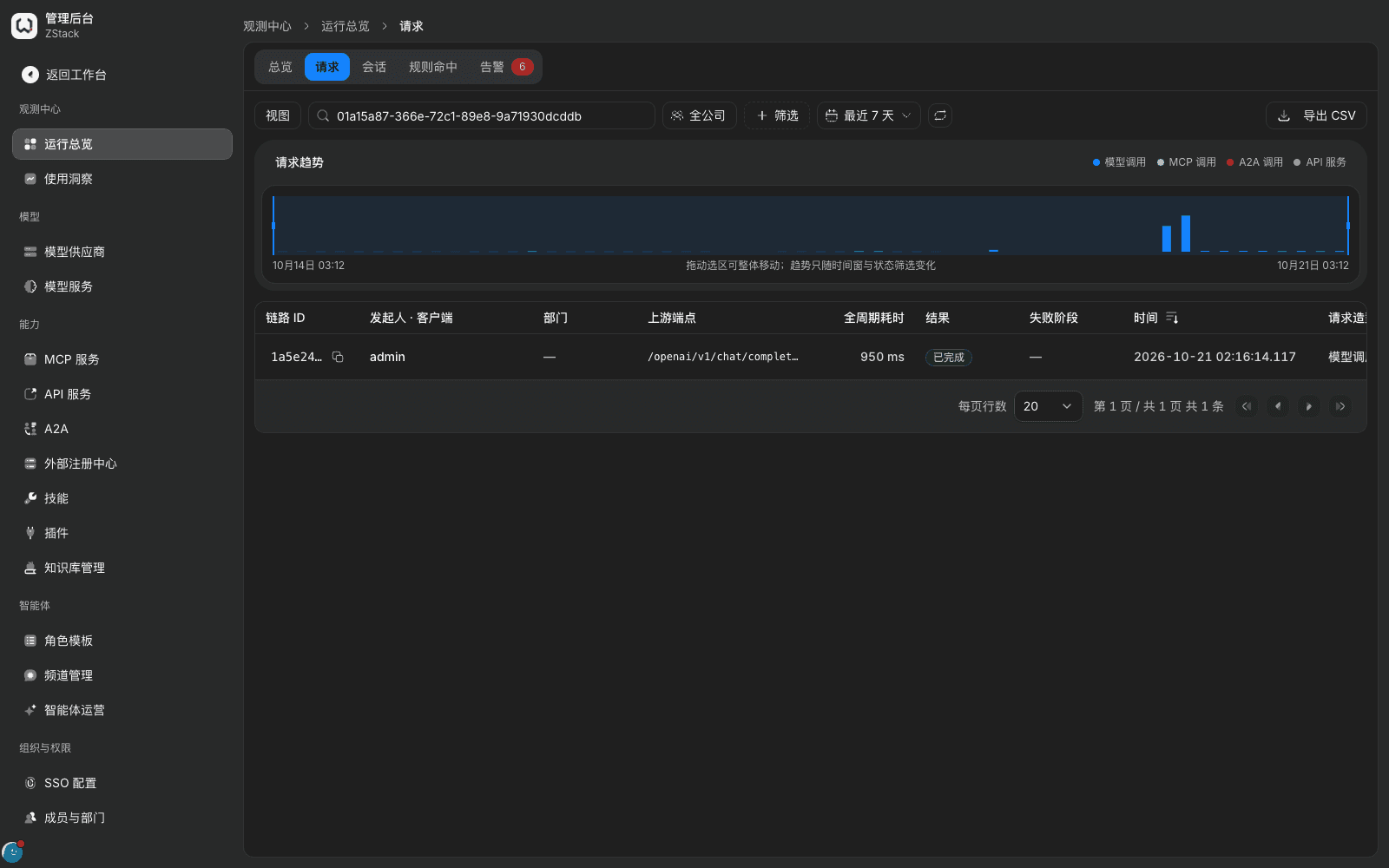
429and the reason code isPOOL_EXHAUSTED, the quota is exhausted; it is not a service fault. Adjust the quota or wait for the period to reset. - Is it a rule block: when the request status in 「Operations overview › Requests」 is 「Blocked」, open 「Routing & changes › Hit records」 in the detail. You can see which rule matched and on which conditions.
All three have a conclusion on the console; engineering does not need to be involved.
27.2 Information to record
| Item | Where to get it | Notes |
|---|---|---|
| Time of occurrence | 「Occurred at」 on the request-detail 「Summary」 | To the minute, and note the time zone |
| Trace ID / request ID | Request-detail 「Summary」 | These two IDs are the primary keys for locating the call; copy them in full |
| Gateway event ID | Same | Provide it as well when several requests fail in the same batch |
| Actor and access credential | Same | Write only the credential prefix (for example lp_73d693c) |
| Client IP | Same | — |
| Declared model and actual routed model | Same | If they differ, a routing rewrite occurred |
| HTTP status code and error code | Response body and request detail | For example 429 / rate_limit_exceeded / TRAFFIC_RATE_LIMITED |
| Reproduction steps | — | The click sequence from sign-in; the more specific, the better |
| Screenshots | — | The error page, the request detail, and the related configuration page |
Note: the request ID and trace ID are also in the response headers (for example x-trace-id, x-lp-data-plane-request-id). When the caller is a business system, have developers log these two response headers; later troubleshooting is much faster.
27.3 Content that must be redacted
Before you submit screenshots and logs, check the items below one by one. Do not send them as-is:
- API keys, upstream vendor keys, access-key pairs (AK/SK), database passwords, master keys;
- Two-factor seeds, passkeys, recovery codes;
- Real customer data in request and response bodies (names, mobile numbers, ID numbers, bank-card numbers, addresses, ticket numbers, and similar);
- Internal domains, intranet IPs, and topology (if they are unrelated to the issue).
The product already handles most of this on the console: the authorization header in the request detail is shown as 「Redacted · length N」, and key plaintext does not appear in call records. Still confirm before you take a screenshot that the page has no plaintext-key dialog.
27.4 Organize the material into one write-up
Write in this order; support can pick it up most easily:
- One-sentence conclusion: which function, what happened, how many people are affected.
- Blast radius: which callers, which models or model groups, and whether all traffic is affected.
- Time and frequency: first occurrence; continuous failure or intermittent.
- What you already did: which rule you disabled, which configuration you changed, and the result.
- Locating fields: Trace ID, request ID, error code (see the table in 27.2).
- Attachments: redacted screenshots and log fragments.
Capability notes
| Capability not provided | What to do instead |
|---|---|
| Search failed sign-in records by account | 「Authentication」 records in Operation audit show the time and reason of a failed sign-in, but 「Actor」 is shown as the system and does not include the attempted account; to investigate by account, combine that account's successful sign-ins with the source IP (Chapter 22) |
| One-click diagnostic-pack export for gateway calls | Collect evidence item by item from the table in 27.2, or use 「Report export」 to export call and usage data (Chapter 22) |
| Original gateway-side input and output in Trace detail | Call Spans produced by the gateway itself do not capture input or output; when you need the original request and response, take them from the 「Request」 and 「Response to client」 tabs of 「Operations overview › Requests › request detail」 (Chapter 20) |
Previous: 26. Go-live checks, stable operation, and management handover · Next: Appendix A. Role and entry quick reference
26. Go-live checks, stable operation, and management handover
Full-length chapter. Content is checked against the 2026.10 mainline code and the live console; menus and features depend on the current license, account permissions, and delivered environment.
Appendix A. Role and entry quick reference
Full-length chapter. Content is checked against the 2026.10 mainline code and the live console; menus and features depend on the current license, account permissions, and delivered environment.