Zentrix Gateway Deployment and Service Selection Guide
Choose hosted or private deployment, decide where models and tools run, then agree data and operations responsibilities.
2026.10 · This guide is for solution design and handover. Installer commands, component versions, and resource settings follow the installer, offline package, and implementation notes delivered for that engagement.
For the step-by-step procedure from downloading the installer through environment preparation, installation, initialization, and acceptance, see the Zentrix Gateway POC Deployment Manual (Read online).
1. Decide the operating model
Zentrix Gateway provides unified model and tool access and governance for business systems, developer tools, and external agents.
Product scope and deployment mode are decided separately. The same access-and-governance need can be met as a hosted SaaS service or deployed in an environment the enterprise operates. Where external models and tools run is a further, independent decision.
As a neutral third-party access and governance layer, the product supports combining different vendors and enterprise private models. Whether a given modality, protocol, or tool parameter is supported must be checked with real samples. A single entry point does not mean every upstream is equivalent.
2. Three common combinations
| Combination | Where the software runs | Models and tools | Decide first |
|---|---|---|---|
| Hosted SaaS | Environment agreed with the service provider | External or specially opened services connected per the plan | Hosting region, access method, data retention, backup, service responsibility |
| Private deployment with external services | Enterprise-owned or designated environment | Public-network models and SaaS tools the enterprise allows | Egress inventory, input scope, third-party authorization and fees |
| Private deployment with intranet dependencies | Intranet environment the enterprise allows | Intranet models, tools, storage, and required dependencies | Offline artifacts, intranet certificates, dependency completeness, update and recovery methods |
“Supports SaaS services” covers both offering the product as SaaS and connecting external SaaS models and tools. The two can stand independently: a private deployment can still call cloud tools, and a SaaS service still needs a defined connection scope.
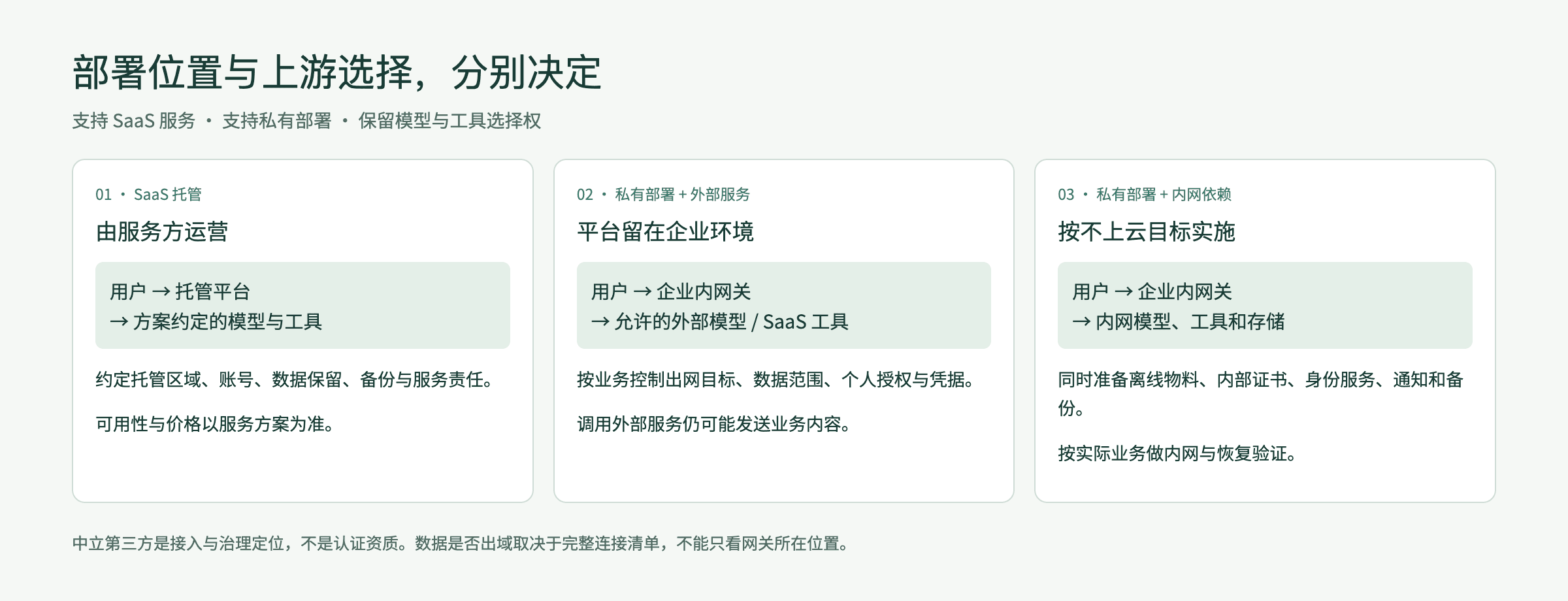
Schematic. Whether data leaves the enterprise boundary depends on the whole combination, not only on where the gateway is installed.
3. Turning “no public cloud” into an acceptable plan
Staying off the public cloud can be a private-deployment goal, but every dependency must be pinned to an allowed network and resource location.
| Object | Record |
|---|---|
| Web and API ingress | Business and admin access URLs, ingress ports and bind addresses, TLS certificates, access scope, and ingress protection |
| Model inference | Upstream addresses, model-weight locations, inference resources, and content allowed to be sent |
| Tools and business systems | API / MCP / external-agent addresses, accounts, permissions, and whether the public network is required |
| Data storage | How and where the platform database, analytics database, and object storage are deployed; where call records and audit data are kept |
| Knowledge and cache | When a knowledge base is used, where its embedding and matching models run; when semantic cache is enabled, the provider of the semantic-cache vector model and rerank model that the tenant selects in Default models |
| Identity and notifications | Connection targets for SSO, directory sync, SMTP, and operations notification channels |
| Install and update | How the installer, .zpkg offline package, gateway-node package, and upgrade packages are obtained; how the license file is delivered |
| Certificates and base services | DNS, time sync, internal CA; when automatic certificate issuance is used, the DNS-provider API and certificate authority |
| Backup and recovery | Where backup files are copied off-host, how the master key is stored, off-site replication, and the recovery-rehearsal environment |
Boundaries of an offline environment:
- Installation does not need the public network. Everything required to install is in the installer and the offline package. The offline package and the answers file do not contain credentials. Credentials are entered on site from a secrets file or the terminal. After installation, the tenant administrator imports the license, which is verified locally.
- Upgrade packages, component packages, and extension packages are always downloaded by the delivery staff from the download site on a computer with internet access, then uploaded on site to the System Updates page or applied from the command line. The platform does not fetch them online.
- Automatic issuance of ingress certificates requires the control plane to reach the certificate authority and the DNS-provider API. When egress is not allowed, upload a wildcard certificate that covers the ingress domain.
At acceptance, check configuration against live connections and record allowed targets and business samples. When a disconnected-network test is required, run the named functions in an approved test environment. After public-network access is cut, public models, tools, and identity that depend on the internet becoming unavailable is a plan difference and must be written into the acceptance record.
When external SaaS is used, prompts, file fragments, tool arguments, and receipts sent upstream may contain business information. Agree authorization scope, data classification, and redaction requirements before making the calls.
4. SaaS onboarding and responsibilities
In the SaaS model the service provider operates the platform infrastructure, including installation, upgrades, backup and restore, ingress and certificates, gateway nodes, and tenant provisioning. The enterprise, as a tenant, manages its own members, permissions, model or tool authorization, and business-use policy. Concrete responsibility follows the service agreement.
- Decide product scope, hosting region, how the tenant and the default administrator account are provisioned, and the billing currency of the tenant (it cannot be changed after creation).
- Decide who purchases and maintains models, tools, and external subscriptions, and tenant quotas such as the monthly token cap.
- The tenant administrator imports the license and configures administrative roles, members, SSO, and available capabilities.
- For one business case, verify a successful call, a permission denial, billing attribution, and problem records.
- Agree upgrade notices, incident response, backup and restore, data export, and handling after service stop. The service operator can export all data for that tenant asynchronously from tenant management.
| Topic | Provider and customer must agree |
|---|---|
| Availability and support | Service hours, incident response, maintenance windows, and upgrade notices. Gateway calls are not affected by a fast-switch upgrade. A downtime upgrade makes gateway calls on the console and the central node unavailable while it runs (remote gateway nodes keep serving), so agree the maintenance window and the notice method |
| Data | Hosting location, retention of call records and content, and export and deletion procedures |
| Fees | How software service, inference, tool subscriptions, and extra resources are billed separately |
| Security | Administrative duties, permission approval, credential rotation, and incident notification |
| Exit | Export contents, handover format, access cutoff, and data-cleanup deadline |
Multi-tenant, tenant-management, and registration capabilities in the code show that the software can take that form. They do not replace commercial confirmation of the current SaaS plan, service region, or service level.
5. Private deployment and implementation preparation
5.1 Delivery form
The private-deployment form is chosen at install time. Only the three values below are valid. An unknown value makes startup and database migration fail immediately:
| Form | Value | Install method | Notes |
|---|---|---|---|
| Single-host or multi-host bare metal (Linux) | bare-metal-systemd | zenova install | Services are managed by systemd and install to /opt/zenova by default; --install-dir selects another directory. Multi-host installs are driven from the control host over SSH in waves |
| Single-host bare metal (macOS) | bare-metal-launchd | zenova install | Services are managed by launchd |
| Kubernetes multi-replica | helm | Helm chart | Deploy per the implementation notes. Data-layer backup is handled by the cluster. Capability on/off is managed by chart configuration |
Install, upgrade, and backup/restore are performed only by the zenova program. The console pages System Updates and Backup & Restore call the same executor as the command line. The earlier Docker Compose offline package is no longer provided.
The delivery scope of the Kubernetes form, including tenant traffic ingress, follows the current implementation notes. Confirm with the implementation team before selecting it.
5.2 Deliverables
| Deliverable | Notes |
|---|---|
| Installer | The zenova program itself, published as a static binary. Version and platform must match the offline package |
Offline package (.zpkg) | Assembled for the chosen platform, deployment form, and capabilities, including components and configuration prefilled by the customizer site. Download it from the customizer site, or assemble it locally with zenova package compose from local ingredients. The two are equivalent |
Gateway-node package (zenova-node.zpkg) | Used when installing a remote gateway node |
License (.lic) | After installation, the tenant administrator imports it on System Settings → Global settings → License |
After it starts, the installer checks the sha256 and size of each component against the release manifest to confirm the media are complete.
Optional capabilities for the Zentrix Gateway edition (install answer edition = "zentrix_gateway") are listed below. Hosted agents and document parsing are not provided in the Zentrix Gateway edition.
| Capability | ID | Notes |
|---|---|---|
| Core | core | Required |
| Knowledge base | knowledge_base | Optional; the license must also include this module |
| High-availability data layer | ha_data | Used on multi-host installs with self-hosted databases |
Semantic cache is not a separately installed capability. It ships with core. After the tenant selects a semantic-cache vector model and a rerank model in Default models, it is turned on per rule in routing rules. No model is deployed on the host. Deployments that use OceanBase as the platform database do not support semantic cache.
Capabilities not enabled this time stay on the host and can be turned on later from System Updates.
5.3 Host requirements and pre-install checks
The installer checks the host before writing any files and reports each item. Failed items include the reason and the remedy. After the remedy, press Enter to recheck.
| Check | Requirement |
|---|---|
| CPU architecture | Matches the package platform (x86_64 or arm64) |
| Memory | At least 8 GB |
| Disk space | Volume that holds the install directory (default /opt/zenova): 20 GB base; plus 30 GB for a self-hosted platform database, plus 50 GB for a self-hosted analytics database, plus 10 GB for bundled object storage; plus 5 GB for knowledge base. Insufficient space blocks installation (diagnostic code HOST_DISK_LOW). The installer suggests --install-dir on a larger volume and, on Linux, lists the three mounts with the most free space |
| Service manager | Linux requires systemd; macOS uses launchd |
| System time | Time service is synchronized; offset no more than 30 seconds. Linux is judged with chronyc tracking |
| Host network address | The host needs a usable non-loopback address |
| Instruction set | A self-hosted analytics database on x86_64 requires the x86-64-v3 instruction set (including AVX2). If a VM CPU is too old, pass through the host CPU or use Haswell or later, or switch the analytics database to an existing service |
| Ports | If the local listen port for the business ingress is in use, the occupying process is reported and installation is blocked (HOST_ENTRY_PORT_BUSY). The installer does not pick another port automatically. A separately specified admin ingress port and platform internal-service ports advance to the next free port, and the terminal states the port actually used |
Install and operations commands require root. Run them with sudo. The Zentrix Gateway edition has no container-run capability and does not require a container runtime at install time.
To preflight only, append --check-only. The installer reads the package, checks versions, selects capabilities, and checks the host, then exits without writing anything.
5.4 Data dependencies
Choose a deployment mode for the platform database (PostgreSQL), the analytics database (ClickHouse), and object storage, one by one. After installation, Deployment configuration → Data dependencies shows whether each item is Deployed by the platform or Existing service, and who operates it.
| Dependency | Deployed with the install | Requirements when using an existing service |
|---|---|---|
| Platform database | Deployed on this host (on the data-layer host in a multi-host install) | Provide a superuser account. The server must provide extensions vector (0.7.0 or later), pg_trgm, uuid-ossp, pgcrypto, and btree_gist. max_connections must be at least 400. The installer uses this account to create the roles and databases the platform needs. The administrator password is used only during installation |
| Analytics database | Deployed on this host | Version 26.7 or later, with cluster, shard, and replica macros defined. The login account must be able to create databases |
| Object storage | Choose one: Bundled object storage (recommended, production) or Local directory (single-host trial) | Existing S3-compatible storage: provide endpoint, region, bucket, addressing (path-style or virtual-hosted), and an access key with read, write, and delete permission |
Notes:
- The analytics database is required in every deployment form. Call details, usage statistics, and policy hits are stored there. A single-host bare-metal install can deploy it with the platform or use an existing service. Pre-upgrade checks add an “analytics database (ClickHouse)” item. An install without an analytics database is blocked from upgrading. Follow the prompt and run
zenova install --reconfigureto deploy one or to fill in an existing ClickHouse, then recheck. - Bundled object storage applies only to single-host bare-metal installs. The installer creates separate buckets for platform data, gateway payload archives, and audit archives.
- When using an existing database, the connection may be plaintext, encrypted (verification delegated to the system trust store), or encrypted and verified with a specified CA certificate. The last two both verify the certificate and hostname; they differ only in CA source. Encryption is recommended in production. Existing S3-compatible storage has no separate encryption option; an address that starts with
https://is an encrypted connection. - After credentials are entered and before the real install, the installer probes existing services: database login, account privileges, extensions and version, connection limit, macros and create-database rights, and object-storage read, write, and delete. The probe writes and then deletes a temporary object. It does not write business data.
- The object-storage mode cannot be changed online after install. Back up, reinstall with the new choice, then restore.
- Local backups do not include a platform database or S3-compatible storage that is an existing service. Those parts are protected by the database administrator and the storage administrator using their own backup mechanisms. The secret-service key directory
/etc/zenova/secret-service/keysis included in host-level backup and is stored separately from the backup archive. Restoring onto a different host requires that directory.
5.5 Single-host installation
sudo ./zenova install ./<offline-package>.zpkgInteractive installation proceeds in this order: verify the package, check the host, select capabilities, confirm prefilled configuration, complete configuration that was not prefilled (access URLs, deployment mode of each dependency, object storage, operations notification channels), enter credentials and probe dependencies, send a test operations notification, and confirm what will be installed. No files are written before confirmation. Typing q at any step leaves nothing on the host. After confirmation, the installer installs the data layer, the control plane (the local central gateway node starts with the control plane), and the selected capabilities, then runs post-install acceptance.
On completion it prints the console URL, username root, the initial password, and the acceptance result. Before the first login password change, run sudo zenova root-password show on the install host to view the initial password again. To reset root, run sudo zenova root-password set.
Non-interactive installation uses an answers file and a secrets file:
sudo ./zenova install ./<offline-package>.zpkg --answers answers.toml --secret-file secrets.toml --with core| Flag | Notes |
|---|---|
--install-dir <directory> | Install root, default /opt/zenova. Programs, data, versions, and unpack staging follow this directory. Later local operations commands detect it automatically; it can also be passed explicitly |
--log-dir <directory> | Separate canonical-log root. It must sit outside the install root and be empty on first use. Archives and the cursor ledger are stored together. If omitted, the first install follows the install root; a later install reuses the saved configuration |
--answers <file> | Answers file. When given, the installer does not ask interactive questions |
--secret-file <file> | Secrets file (mode 0600). Credentials enter only through this file or standard input. They are not written to the answers file |
--with <capabilities> | Capabilities to enable this time, comma-separated. Core is always included. If omitted, the Zentrix Gateway edition enables core only |
--reconfigure | Keep existing data, return to capability selection, and reconfirm with the previous answers |
--check-only | Stop after host checks. Write nothing |
--business-entry-port, --admin-entry-port | Local listen ports for business ingress and admin ingress. Business ingress defaults to the port in the access URL (80 if none is written). When a proxy or NAT sits in front of the access URL, use this flag for the local port that traffic is forwarded to. Admin ingress defaults to the same as business ingress; when they match, they are merged into one ingress |
--business-entry-bind, --admin-entry-bind | Local addresses the business and admin ingress bind to. Default is all interfaces |
On first Linux (systemd) install, the installer writes only the business-ingress HTTP port and 443 into the host firewall (firewalld or iptables). A split-out admin ingress port, ingress ports changed after install, and the firewall on macOS are opened by operations. Ports other than the ingress ports do not need to be reachable from outside the host. Operations should allow only the ingress ports through the host firewall or the network boundary.
Choose a persistent filesystem for the install and log directories. On Linux, /tmp, /var/tmp, /home, /root, /run/user, /usr, /etc, and /boot are not supported. The install volume must allow executing programs. The install root may contain only letters, digits, dots, underscores, hyphens, and slashes. Path configuration has no automatic move. A host still allows only one central install. Canonical logs reuse the native daily / 500 MiB rotation and 30-day retention. The system journal and the bounded capture buffer on macOS keep their native layout.
If installation is interrupted or a step fails, fix the cause and rerun the same install command. Completed steps are skipped. After installation, day-to-day configuration changes are made on the console Deployment configuration page or with zenova config set.
5.6 Multi-host installation
When the answers file contains a host inventory ([[hosts]], each row with address, role, and site), running zenova install on the control host starts a multi-host install. Host roles include control plane, gateway node, platform database, analytics database, and arbiter. The install directory on each host follows --install-dir on the control host for this run. A gateway-node host sets its install directory in the answers file with gateway_install_dir = "/data/zenova-node" (the node default if omitted). It must not fall inside the central install directory.
- The installer lists the host plan and any gaps, such as too few hosts or sites for a role. When there is a gap, the only options are to go back and edit or to exit.
- Confirm address, role, and site host by host, and enter the SSH login method (private-key file, local ssh-agent, or one-time password). Several hosts may share one set of login credentials.
- Enter the control-plane virtual address. It must be a single private IP.
- Before writing, the installer logs into each host for a read-only preflight (the remote side runs
--check-only). Writing starts only when every host passes. - Hosts are installed in waves, with live progress. If a host fails, the prompt is Wave N · host · reason. After the fix, rerun
zenova install. Completed waves are skipped.
SSH credentials stay in memory. The install report records only addresses and results.
--install-dir and --log-dir specified on the control host are passed to preflight and the real install on every role host. Changing the path changes the resume identity, so hosts completed on the old path cannot be skipped silently. Gateway-node hosts do not use the central install root: if --install-dir on the control host is not the default /opt/zenova, gateway nodes also install there; otherwise they install to the node default /opt/zenova-node. The SSH staging cache remains at /var/lib/zenova/install-stage. That filesystem still needs space for the installer and the offline package.
5.7 Wipe-and-reinstall and resume after failure
| Purpose | Command | Existing data |
|---|---|---|
| Upgrade the current version | zenova upgrade <upgrade-package>.zpkg | Data kept |
| Refill install configuration | zenova install <offline-package>.zpkg --reconfigure | Data kept |
| Delete the old deployment and install from scratch | zenova install <offline-package>.zpkg --fresh | Old data, configuration, and identity are wiped, then the new package is installed |
Upgrade:
- Node-package prefetch and site order: when the upgrade includes a gateway-node package, online nodes keep serving while they download the new node package (at most 4 at a time, with resumable downloads). Only after the download is complete and verified are nodes drained and switched one by one, with a 15-second grace period after draining before the package is replaced. Nodes roll one at a time in alphabetical order of site label; nodes with no site come last. If any node fails to upgrade, the rollout stops and the remaining nodes stay on the old version. A node with no progress for 15 minutes is treated as failed.
- Service interruption and progress: the “Service interruption” shown by
zenova statusand the console is the real interruption (from writes stopping to service recovery); records from before this version show “—”. Both the command line and the console show gateway-node progress (n of N done) and the time spent in each stage. After the upgrade package is uploaded, the command line and the console use the same submission path, and the target version's upgrade executor takes over the local upgrade service and finishes the upgrade. Only when the upgrade-service protocol is too old do you first runsudo ./zenova upgrade <upgrade-package>.zpkgwith the program in the installer package. - On the first upgrade to this version, nodes still upgrade under the old procedure; prefetch and site order take full effect from the second upgrade.
Wipe-and-reinstall applies only to a single-host bare-metal install whose platform database, analytics database, and object storage are all self-hosted on the machine. If an existing external database or object storage is in use, the installer refuses to wipe and does not clean those resources. Gateway-node installs, multi-host, and Kubernetes deployments do not use this flow. An earlier Docker install (install root /opt/lobsterpool) can be cleaned by this flow and then replaced with the current bare-metal install.
- Use a standalone installer of the same version as the new offline package. Place the installer, offline package, answers file, and secrets file outside the old install root and business directories.
- Run a read-only preview first:
sudo ./zenova install ./<offline-package>.zpkg --fresh --dry-run. The preview lists the version, form, and cleanup scope of the old deployment. It does not stop services or delete data. - After checking the preview and scheduling a downtime window, run:
sudo ./zenova install ./<offline-package>.zpkg --fresh --confirm-data-loss DELETE_EXISTING_DATA. - Before deleting old data, the installer verifies the new package component digests and sizes, installer and package version and platform, install answers, and selected capabilities. If any check fails, deletion does not start.
- The installer stops the old services, cleans services, data paths, and exclusive resources that belong to that install, then installs the new package as a first-time install and runs post-install acceptance.
Wipe-and-reinstall does not back up automatically. The cleanup scope includes backups already on the host. To keep old data, back up first and move the archive outside the cleanup scope. Restore is possible only onto the same version, deployment form, and platform. A backup from an older version cannot be restored onto a newer install.
If interrupted: when the old deployment was cleaned successfully and the following install failed, fix the install error and run an ordinary install of the same package (without --fresh) to resume from the existing progress. When cleanup itself failed or was interrupted, inspect what remains and why it failed. Running --fresh again and confirming deletion means wiping local data once more.
5.8 Gateway nodes
The control-plane host is itself the central gateway node. To handle requests closer to other hosts, a platform administrator adds a node under Gateway → Nodes, generates a one-time install command, and runs it as root on the target host:
sudo ./zenova install node --package zenova-node.zpkg --control-plane <control-plane callback URL> --token <one-time token>The page requires the control-plane callback URL to start with https://. The node host must be able to reach that URL. When the control plane uses a self-signed or internal CA, the command includes that CA. The install command is valid for 24 hours. After it expires, reissue it from the node detail page. While a node is disconnected from the control plane, request records are spooled locally on the node and uploaded after recovery. While the control plane is unavailable, the gateway node continues to serve with the last configuration it received. During a system upgrade, remote gateway nodes are updated one host at a time in the Gateway node rolling update phase. When adding a node, Install directory may be filled in (leave it empty to install to /opt/zenova-node). The node program, data, and configuration all live under that directory, and the command then includes --install-dir <directory>. Upgrades reuse the directory from the first install and cannot change it. Nodes from earlier versions that used /var/lib/zenova-node and /etc/zenova-node are migrated into the install directory on upgrade. Failure rolls the node back automatically.
5.9 Implementation preparation and go-live sequence
Prepare before implementation:
- Organization and identity: platform administrator, tenant administrator, and other administrative roles; SSO or local-account plan.
- Resources and network: host sizing, network segments, business and admin access URLs, ingress ports, TLS, DNS, and time sync.
- Models and tools: model sources, inference resources, account authorization, and allowed connection addresses.
- Delivery artifacts: installer, offline package, node package, and license matching architecture, version, and deployment form.
- Operations: off-host backup location, custody of the master key and the secret-service key directory, recovery target, operations notification channels, and maintenance windows.
Size platform services and model-inference resources separately. Host checks in the installer do not include GPU requirements. Compute for local models, embeddings, or other inference components is estimated from the actual plan.
Suggested go-live sequence: base environment → install and post-install acceptance → first login and platform accounts → ingress URLs and certificates → gateway nodes → tenants and licenses → organization and duties → models and tools → usage authorization and policies → ordinary-account verification → alerting, backup, and recovery rehearsal → business handover.
Passing post-install acceptance only shows that the base platform services are available. Model and tool authorization, traffic-rule rollout, real business cases, and recovery rehearsal still need to be completed item by item.
6. Operations responsibilities
| Topic | Owner in a private deployment | Where to run it |
|---|---|---|
| Install, upgrade, optional-capability on/off | Platform administrator | zenova install, zenova upgrade; console System Updates |
| Backup, restore, and recovery rehearsal | Platform administrator | zenova backup, zenova restore; console Backup & Restore |
| Access URLs, ingress ports, ingress certificates | Platform administrator, with the network administrator | Console Deployment configuration, Gateway → Ingress & certificate; zenova config set |
| Gateway nodes | Platform administrator | Console Gateway → Nodes; zenova install node |
| Tenant provisioning and quotas | Platform administrator | Console Tenants |
| Self-hosted platform and analytics databases | Platform administrator | Included in platform backup; run zenova infra upgrade when the version is too old |
| Existing platform and analytics databases | Customer database administrator | Backup, upgrade, and credential rotation of the database itself |
| Existing S3-compatible storage | Customer storage administrator | Data protection and key rotation of the storage itself |
| DNS, firewall, load balancing, egress policy | Customer network administrator | Configure from ingress ports and egress targets |
| License, organization, models, tools, and policies | Tenant administrator | The admin console of each tenant |
When a host fails or the console is unavailable, the platform administrator runs sudo zenova status on the install host to see the status of each service, the current version, and the latest upgrade, then sudo zenova restart <service> as needed.
7. Handover and change
| Handover item | Evidence to keep |
|---|---|
| Product and version | Deployment form, version, enabled capabilities, license, and advanced modules |
| Deployment configuration | Access URLs, ingress ports and bind addresses, data-dependency modes and owners, latest acceptance result |
| External connections | Target, purpose, data type, authentication, owner |
| Business use | One successful sample, one denied sample, and the matching request IDs |
| Operations | Alert tests, backup IDs and off-host locations, records of an actual recovery rehearsal |
| Permissions | Verification of ordinary members, administrative roles, and platform accounts; custodians of the root password and the master key |
| Known limits | Items not connected, not enabled, not verified, or that depend on external conditions |
Before an upgrade or expansion, recheck version, capabilities, data and configuration changes, licenses, resources, and the maintenance window. Complete a backup and record the backup ID first, then follow the implementation steps for that engagement, and finally verify the critical business path and the denial path.
The neutral-third-party role preserves room to choose vendors and to govern them uniformly. Ongoing portability still requires maintained interface samples, a credential inventory, data export, and a replacement plan.
Manage the gateway through MCP
Connect platform MCP in an external agent and, as your real identity, manage tenants, organization, users, models, MCP, skills, external agents, distribution, callers, and quotas.
Zentrix Gateway POC Deployment Manual
From downloading the install artifacts to handing over a working environment: planning, obtaining packages, preparing the host, installing, initializing, accepting, and operating.